
Random disappearance of bookmarks in Firefox 145
kyozo Posted messages 109 Registration date Status Member Last intervention -
Hello,
I turned on my computer this morning and when I tried to access my "bookmarks," I noticed they have disappeared.
I haven't used them in a while, so I don't know when this disappearance happened.
How can I restore them?
After multiple searches, I found nothing in the history. I also checked my profiles via "about:config," but only the current profile appears.
Does anyone have any idea?
Thank you in advance
4 answers
-
Hello,
It is not about:config but about:profiles.
If hidden files are displayed, we can see the profile folders plainly.
https://www.pcastuces.com/pratique/astuces/4563.htm
If there are several, we can try to overwrite the relevant files.
https://support.mozilla.org/fr/kb/profils-la-ou-firefox-conserve-donnees-utilisateur
If there is only one, we can attempt to restore one or more of the bookmarks backup files via Bookmarks, Organize, Import, Restore.
A good practice for the future is to save bookmarks in HTML format.
about:config
browser.bookmarks.autoExportHTML to Trueand to schedule a daily backup of your profile to another partition or external storage.
-
Oops! It's indeed "about:profiles" that I used.
Another clarification that I didn't RE-mention in the message is that I'm on Ubuntu. So the first link (under Windows) cannot apply to my case.
I still went to check my hidden folders (which are not hidden), and found my "bookmarks" folder. I have done this several times a few years ago. Currently, you need to go to:
1- personal folder.
2- snap
3- firefox
4- common
5-.mozilla
6- firefox
This last firefox folder contains 1 folder named (for example) "1yfekhqi.default-14186547270-1565487589" (It always contains the word default and is surrounded by numbers and letters).
Other folders and files may be present: "crash reports", "profile.groups", "profiles.ini".
This is where I'm stuck. I believe that before, you had to go into the default folder and retrieve the bookmarkbackups folder that contains all the backups.
But I believe that now the process has changed????
Moreover, if it helps to understand where this issue comes from, I recall that I did an update two days ago, or I also accidentally clicked on the little house icon (Firefox's homepage) to the left of the input bar.
I only have a Linux Mint virtual machine to work with, I don't use snap, Firefox is included.
The profile is located there, where I have a bookmarks.html file because I created it as indicated and indeed a bookmarkbackups folder containing the compressed backups.
Also located at the root are the places.sqlite and favicons.sqlite files, of which the former contains the image and with which one can, if they are still incremented, overwrite those of the current profile when there are multiple.
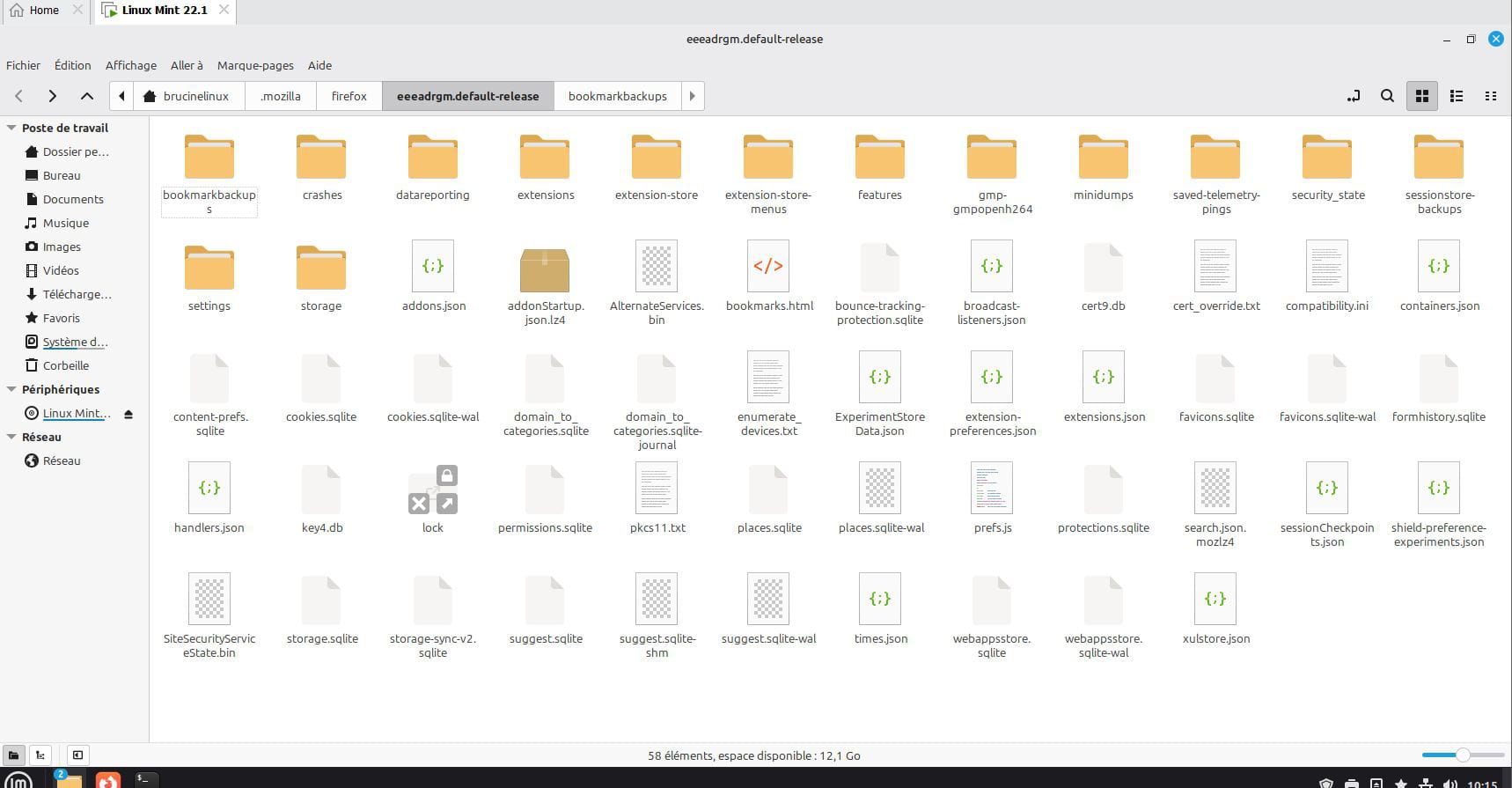
Thank you for your interest in the topic, but when I came home tonight and turned on the computer, I noticed, to my great delight, that all the bookmarks had reappeared. The most curious thing is that I didn't do anything for that. This seems very strange to me. Do you have any idea why this phenomenon occurred?
Hello,
Unbelievable! The bookmarks have disappeared again. What can I do to prevent this?
In fact, everything disappears; even the history. It's as if I'm using Firefox for the first time. Only my tabs from yesterday's session are still displayed.
I only have one profile that shows up in about:profiles.
Ok. I just found the files places.sqlite and favicons.sqlite in bookmarks with the bookmarkbackups folder. What should I do with them? Where should I import or copy/paste them? Thanks
In fact, just like last time, if I do a complete restart, the bookmarks and history reappear.
I would be curious to know why. Could I have checked or modified something that could be changed to return to my previous setup?
Good evening,
I'm still experiencing the same issue, losing my bookmarks and tabs. Curiously, upon restarting my computer as I had been doing for some time to temporarily resolve the problem, an old session appeared. Professionally, pressed for time, I've been working on this session for a week. I would now like to return to my old session, the one that has disappeared.
Is there a file in the hidden files that could be identifiable and allow me to revert to my old version? I've tried to do this through "history," "import and restore," but it doesn't work.
-