
Unable to delete my bookmarks on Firefox
kaneagle Posted messages 86295 Registration date Status Moderator Last intervention -
Hello
I'm using Firefox and I can't delete my bookmarks.
I tried going to my bookmarks and selecting - delete my bookmark, but it's impossible.
Then I tried clicking on the star and selecting at the bottom - delete the bookmark, but that's impossible too.
Do you have a solution? Thank you.
8 answers
-
Hello,
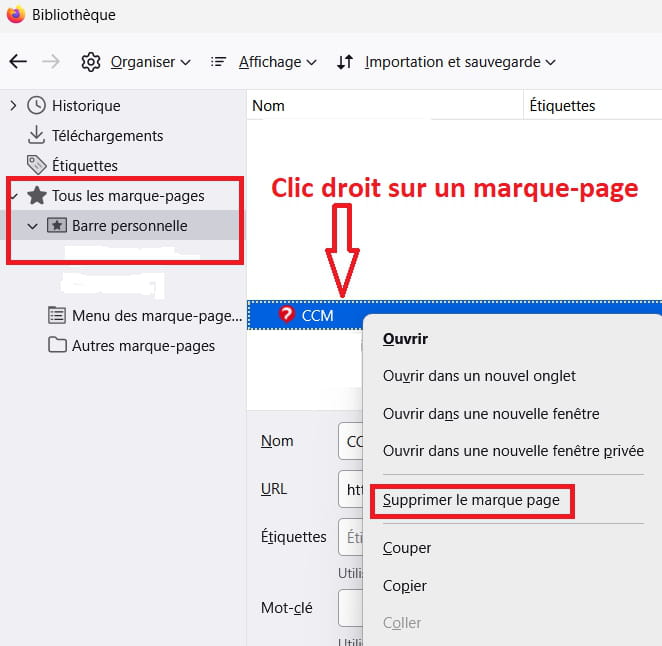
Press Ctrl + Shift + O
Can't you delete anything?Example image:
-----------------------------------------------------------------------------------------------------------
If not and you don't want to save anything as a bookmark, go delete the file(s) bookmarks-xxxxxx.json in your profile.
Press Windows + R
Type --> control panel and OK
File Explorer options
1- View tab
2- Check --> show hidden files, folders, and drives
3- Apply
4- OK.Press Windows + E
Go to --> C:\Users\your_username\AppData\Roaming\Mozilla\Firefox\Profiles\
xxxxxxx.default-releasebookmarkbackupsIn the bookmarkbackups folder
Delete the file(s) --> bookmarks-xxxxxx.json
-
I don't have a file to view
-
Hello,
Here it is:
https://www.pcastuces.com/pratique/astuces/4563.htm
Before recreating this file if it is corrupted, I will make a backup in a "neutral" format.
Enter about:config in the Firefox address bar, search for bookmarks, set autoExportHTML to True; we now have a bookmarks.html file in the profile, make an external copy that we can restore.
Additionally, there may be corruption in the places.sqlite and favicons.sqlite files that lead to the json backup, and those would need to be deleted or replaced with new ones from a second Firefox profile installation, which could then be deleted afterwards, or do the opposite: after an external backup of the initial profile, copy these files into the new profile along with other useful ones (credentials...) and delete the first one if it works, or uninstall Firefox, reinstall it, and replace these files with those from the backup.
https://support.mozilla.org/fr/kb/profils-la-ou-firefox-conserve-donnees-utilisateur
The situation described surprises me; are we talking about bookmarks in Bookmarks, right-click or in organize, or those that may be found in the menu bar or favorite sites on the homepage?
Firefox does not allow deleting the Personal Toolbar or Other bookmarks folders, I don't believe that has any impact on the ones contained within, but you never know.
-
-
Hello Brucine
I realize
that when I open a web page and want to click on the star to save it to my bookmarks, it's impossible
-
It's always the same when I go to my bookmarks on the right side of the screen; after selecting a link, it's impossible to delete.
-
I know well that politics cannot be ordered, but why always lean to the right?
Here, it's easier for a screenshot on a Windows 10 virtual machine where Firefox is not up to date because I don't use it often, but that doesn't change the question.
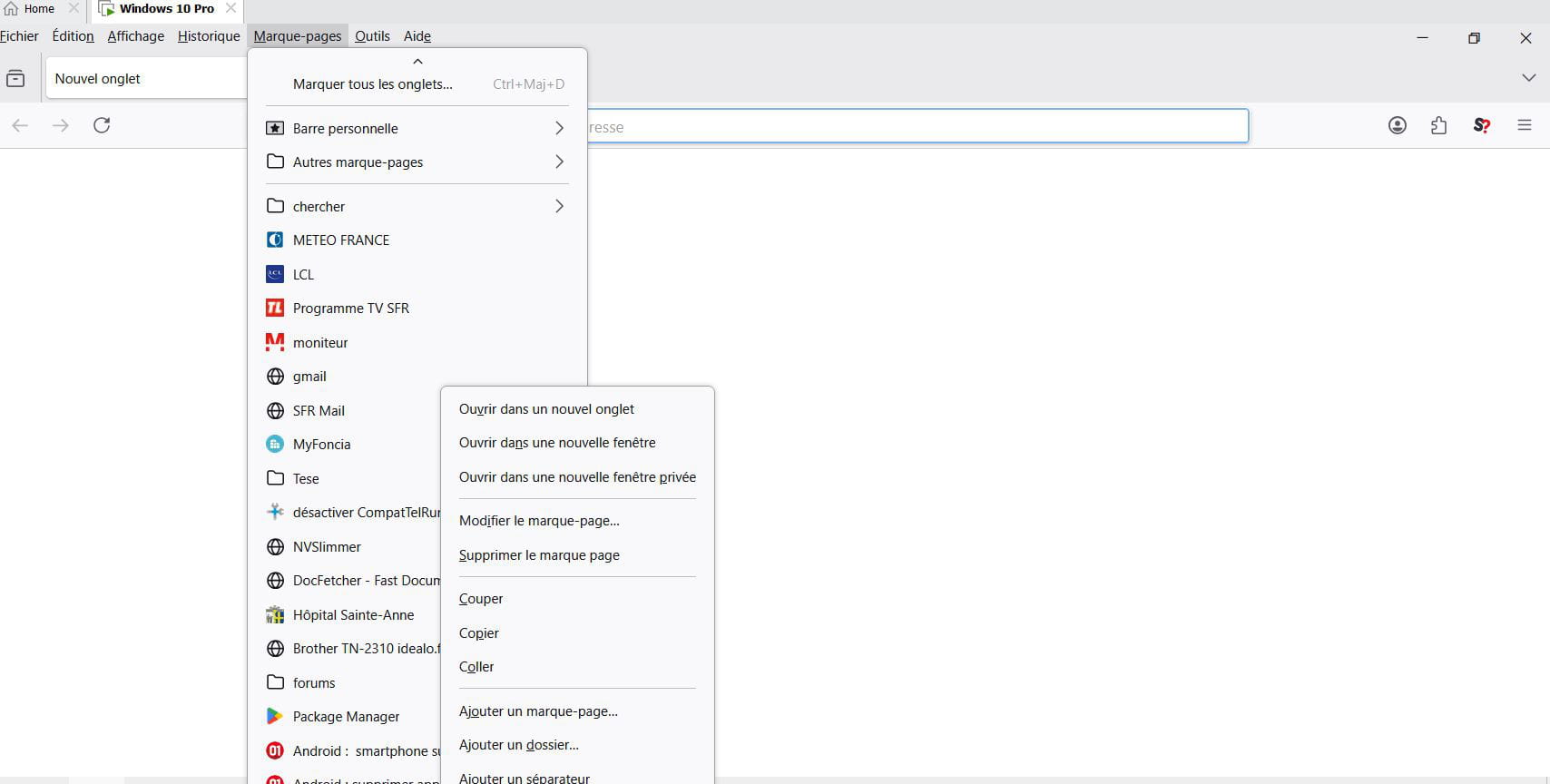
why on the right because when I got this computer they were on the right.
it doesn't matter on the right or elsewhere
the problem is that I can no longer delete them or save them
-
I'm not talking about the bookmarks star or anything else on the right, but about the bookmarks menu which, as shown in my screenshot, is not there.
Now, if it doesn't work from this location, make an external copy of the files mentioned in the last link in <3>, uninstall Firefox, reinstall it, and copy the saved files into the new profile, overwriting the ones that are there.
Reset Firefox with this -->> ResetBrowser <<--
Why should I uninstall Firefox because I can’t manage my bookmarks? I believe there must be a solution before I delete everything. Thank you for your help.
because I can't manage my bookmarksIs it possible that the program and/or the profile is corrupted?
Have you reset Firefox with ResetBrowser?
-
