Windows 11, avoid unnecessary features

fabul Posted messages 42198 Registration date Status Moderator Last intervention -
Hello,
CPM2 will be enabled on my PC, I'll be able to upgrade to W11, but I really don't want to have a Microsoft account, nor do I want to deal with AI everywhere. How can I practically avoid these issues?
Another thing: will the programs installed on W10 "migrate" to W11 or will I need to reinstall them?
Thank you for your answers
4 answers
-
Hello,
If you do it via update, the programs and everything will migrate (if no bugs)
If you need to reinstall from scratch, and it tries to force you to connect to a WiFi network to finish the installation (Ethernet disconnected), press the shift + F10 keys and enter the command oobe\bypassnro
Use O&O ShutUp10++ to disable as much telemetry as possible
https://www.oo-software.com/fr/shutup10
Disable almost everything, except App Notifications in the first tab, first series
The last one at the bottom in the second tab, the network connection status indicator.
Then the Windows Update tasks.
Then check the topic I opened here regarding WSAIFabricSvc
https://forums.commentcamarche.net/forum/affich-38181345-service-wsaifabricsvc-ajoute-ou-active-apres-mise-a-jour
You can disable unnecessary services like CDPSvc and OneSyncSvc and others via Regedit
Through this path HKEY_LOCAL_MACHINE\SYSTEM\CurrentControlSet\Services
Set the Start value data to 4 for the services to be disabled
Use Autoruns and services.msc to see the rest-
Hello,
press the shift + F10 keys and enter the command oobe\bypassnro
==► Microsoft has confirmed the blocking of oobe\bypassnro
Microsoft confirmed that it is disabling all known mechanisms for using Windows 11 with a local account during OOBE (out-of-the-box experience). "We are removing the known mechanisms for creating a local account in the Windows installation experience (OOBE)," Microsoft stated.==► Microsoft neutralizes bypass commands 25h2
Until now, it was possible to bypass the requirement to connect to the Internet and use a Microsoft account during the initial setup of Windows 11 (OOBE) through specific commands to be entered. The most well-known were OOBE\BYPASSNRO and start ms-cxh:localonly, which allowed access to the creation of a local account and to continue the setup of Windows 11 without any particular issues. But in the very latest builds of Windows 11, these commands no longer work at all. OOBE\\BYPASSNRO has no effect or causes the installation process to restart, while start ms-cxh:localonly simply restarts OOBE without offering the creation of a local account. Even lesser-known tricks like oobenetworkconnectionflow, or activating the BypassNRO registry setting, also fail. -
-
Hello Pistouri,
Microsoft = Evil!
I like my Windows without mandatory connection with my face, with or without a beard, in a Webcam, recognized or not by an artificial intelligence.
There are always ways to get around really unnecessary obligations.
I understand, I don't want a password that's too easy for my Hotmail/Outlook address, but I don't want a password for my Windows.
Otherwise with Bitlocker, but with a password, not with a PIN code (TPM required).
Difficult to please on their part.
@+ -
Hello Fabul,
I installed W11 (damned), I did what I could with O&O ShutUp10++
Yay and thanks for the tip.
As for what follows (copied below), I got to the services mentioned by Regedit, but:
1) What are CDPSvc and OneSyncSvc, what are they for? And how do I know if there are others to disable?
2) I didn't understand how to practically set the Start value
to 4 for the services to disable3) Where can I find Autorun and services.msc?
4) And finally (for the moment), how can I disable those horrible sounds that occur as soon as I do something (insert a USB stick, open an app, etc.)? I couldn’t find how to turn off notification sounds,
it’s just driving me crazy!Sorry, I'm not very tech-savvy, and on top of that, I need to get used to the W11 interface!
Thanks in advance for any help and advice, and have a good evening
Copy:
You can disable unnecessary services like CDPSvc and OneSyncSvc and similar ones via Regedit
Through this path HKEY_LOCAL_MACHINE\SYSTEM\CurrentControlSet\Services
Set the Start value to 4 for the services to disable
Use Autoruns and services.msc to see the rest -
For sounds, with the Sound icon next to the clock, open the Sound Mixer
And set "System sounds" to zero or even disable it
In Regedit, when on a key that has a name (CDPSvc, I mention it because they have duplicates or triplicates starting with the same name) in the left pane, you can see in the right frame the Values, which also have a name, the Start Value with Data 4 at the end = disabled, and you can right-click > Modify the data (The last digit on the right).
These are services added since Windows 10 that are unnecessary for certain uses.
Google would respond better than I could about what these services are, which I know are just useless for me, as I do not use OneDrive in any case, I do not know if it is related or dependent on OneDrive or Edge or the Microsoft account?
"3) Autorun and services.msc, where can I find that?"
2nd part here: https://forums.commentcamarche.net/forum/affich-38206831-alors-vous-voulez-supprimer-les-virus-vous-meme-comment
-
-
Thank you for this reply!
I didn't understand everything, but I'm not getting to the heart of the matter. I'll keep a copy for when the time comes.
I had heard about software to install for the upgrade, but I imagine that if the PC is compatible, it's not going to be much use to me?
Have a good evening
-
Hello,
I imagine that if the PC is compatible, it's not going to be of much use to me?
Exactly.
This can be verified with ==► PC Health Check or WhyNotWin11
I had heard about software to install to upgradeExactly.
There are all sorts of tutorials, more or less recent, on the Web if a PC is not compatible with W11.
CCM, for example, offers Flyoobe
Which is pronounced “fly-oh-bee”.
As an example, the installation procedure.
==► Bypass the blockages with Flyoobe
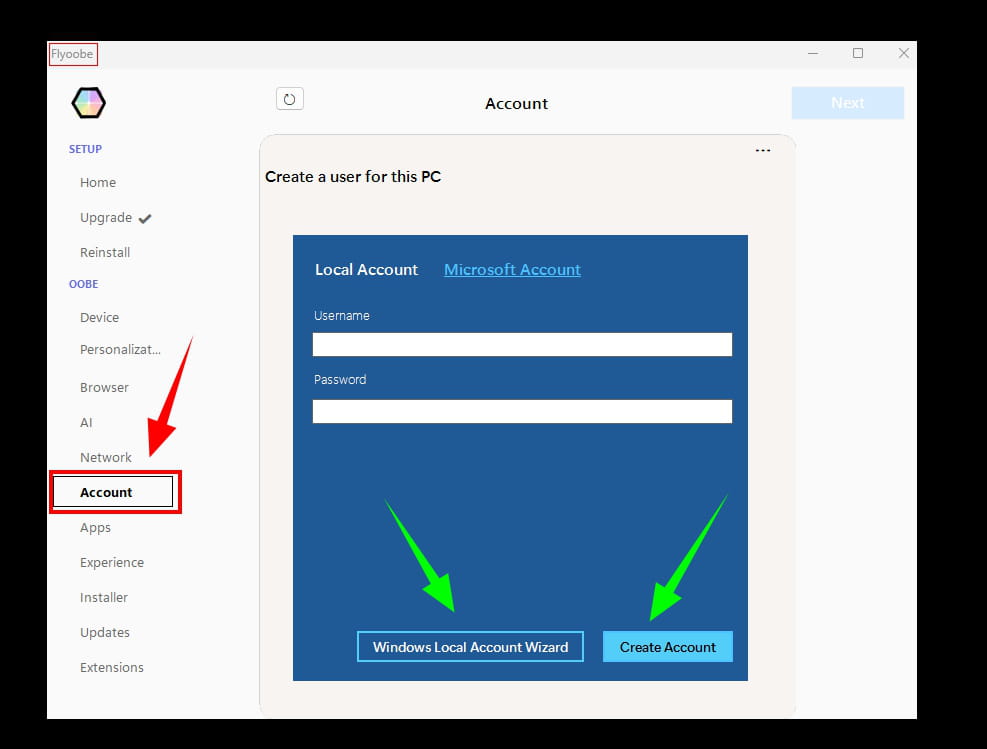
As a bonus, the option is offered to connect with a local account or create one.
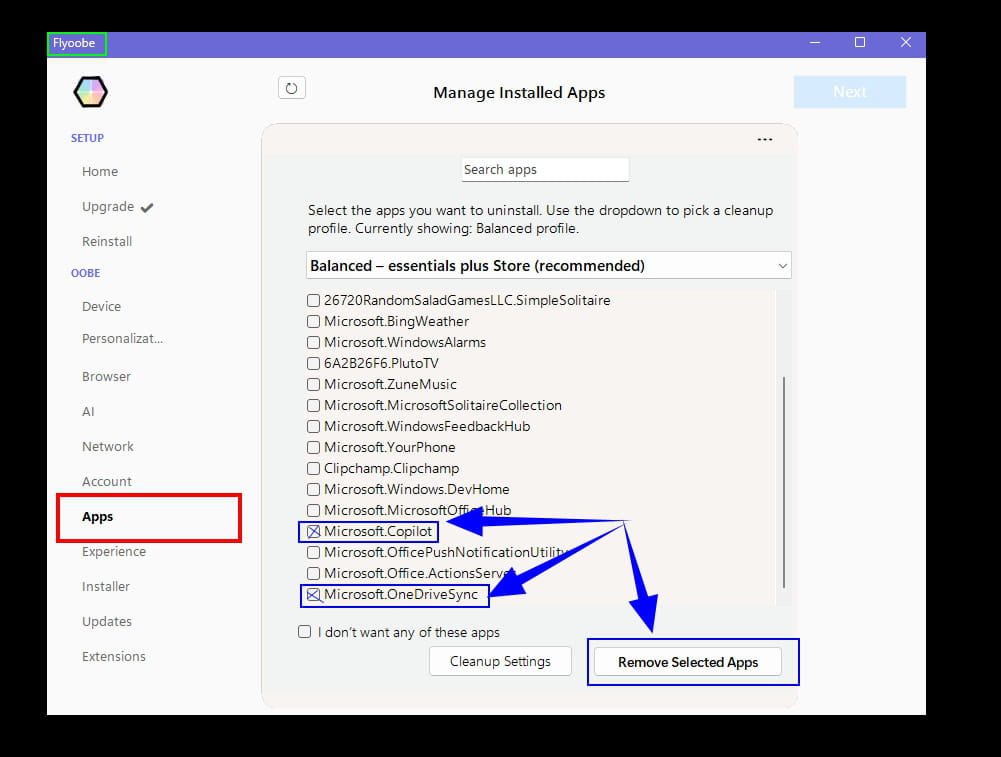
Uninstalling Microsoft applications.
Example:
And quite a few sections for customizing W11.
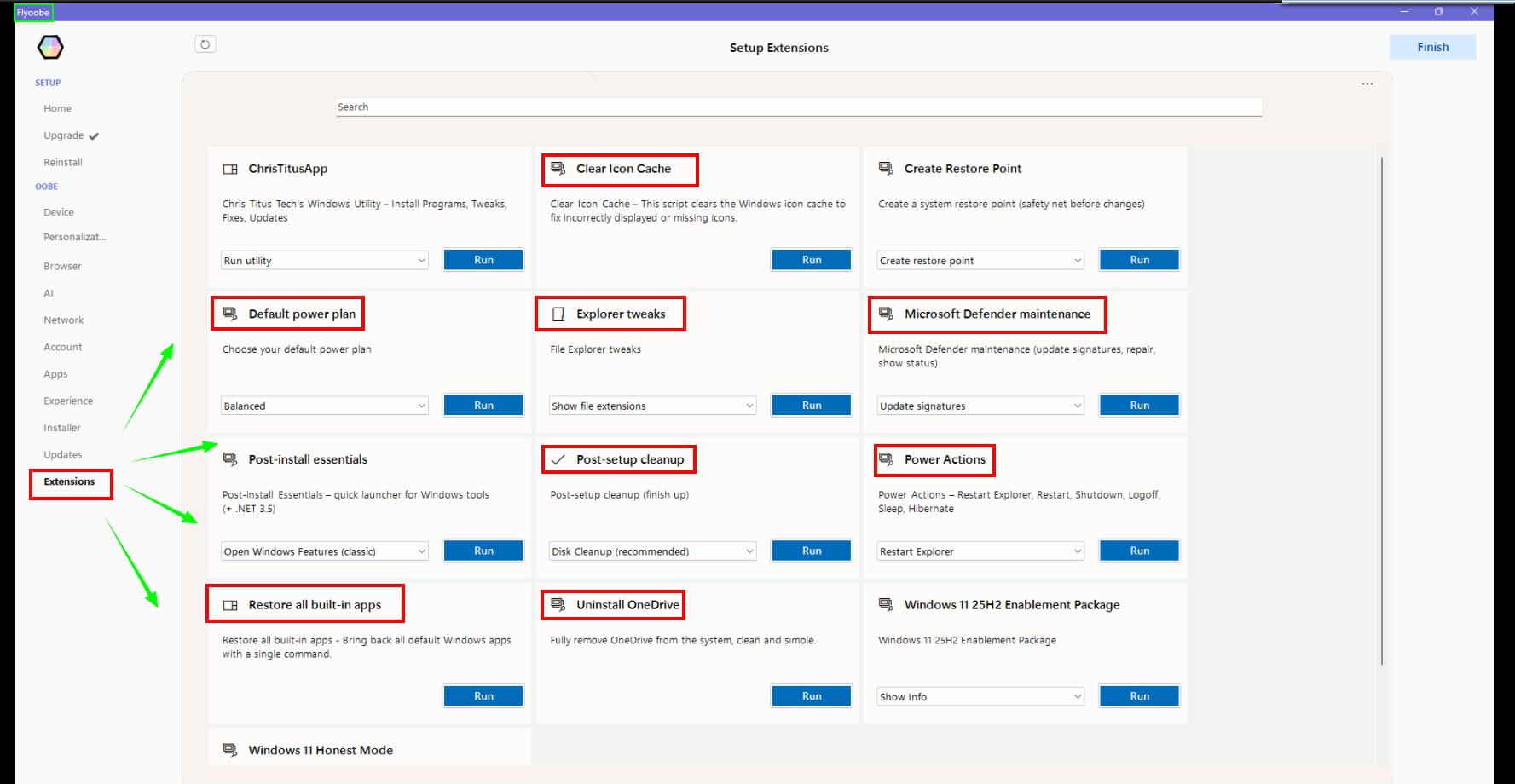
For example, the Extensions section, which is a good toolkit to use in moderation.
You're welcome,
If you have any additional questions...
I almost forgot, I uninstall Widget with the following PowerShell (Admin) command:
Get-AppxPackage *WebExperience* | Remove-AppxPackage
Have a great end of the day.
@+
-