
Recover data from external hard drive... now unallocated
nonodz -
Hello
I have a 2017 Acer PC equipped with 2 original drives:
Drive 0: 5400 rpm HDD 1 TB
Drive 1: 120 GB SSD for Windows 10
No problem with Drive 1 SSD, which works well.
However, Drive 0 no longer appears in Explorer. Worse, in the Disk Management, it shows as "unallocated".
It not being functional is not a big deal, but what bothers me is that it contains many photos that I don’t want to lose. I’ve tried some recovery software like Wondershare Recoverit and EaseUS EPM... without success.
What is your opinion on this problem? Do you have any advice before considering taking my PC to a computer repair shop? Thank you.
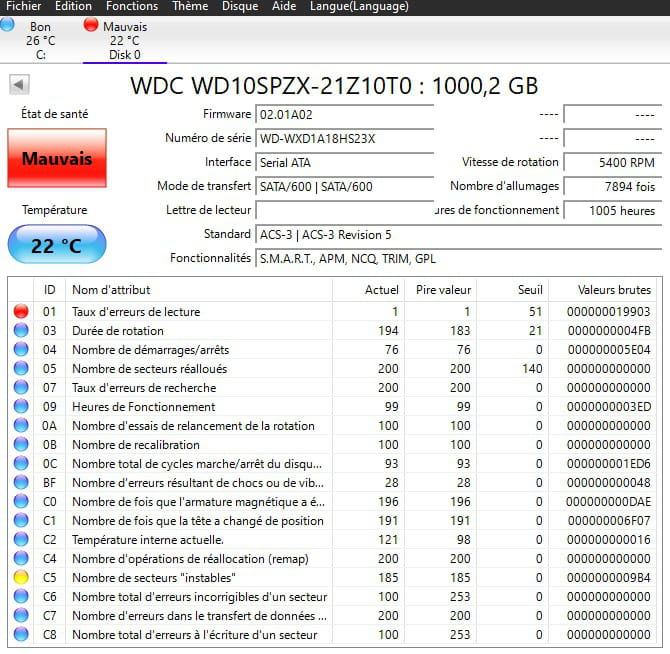
Below is CrystalDiskInfo...
5 answers
-
Hello,
We can try other recovery software than the ones you used, most of them are paid and the result will probably be the same.
I don't really see what a computer repair technician could do more, in the presence of a materially damaged disk, there is no solution except maybe commercial companies specialized in data recovery and at a stratospheric price.-
Desperate situation, if I understand correctly.
The drive appears as "unallocated," "unknown," and "uninitialized" in the disk manager.
Is it possible to attempt a quick format? If so, how... would it allow me to assign a letter to it?
Even in vain, I would like to try everything before resigning myself...
Thank you.
-
-
Hello,
I share brucine's opinion. However, I would like to add a comment (which will not solve the problem).
You said that the photos are on disk 1, so I deduce that the system is on disk 0. However, disk 1 is 1 TB and should be used for data backup, whereas the SSD, being faster, is better suited for the system and applications.
Moreover, I’m not sure, like brucine, that any disk, which shows the volume state as unallocated, can be recovered by any means other than in a clean room.
It could be the disk controller (an electronic component), which if integrated into the motherboard, might (perhaps) allow access to the data with a recovery kit.
I note an anomaly: the "unallocated volume" message concerns disk 0 while you say you can explore disk 1. To do this, disk 0, which contains the system, must be functioning; otherwise, you wouldn’t be able to access disk 1.
To go further, I think that a technician or a more equipped acquaintance should disassemble both disks and test them on a dock or a kit on another PC to check access to the content.
We endlessly reiterate the message about the necessity of regular or automatic double backup (namely on an external USB disk), but we only do it after suffering an irreparable failure, and this has happened to each of us.
@ brucine, of course, you are invited to complement or correct my suggestions.
-
Hello,
I understand that it is indeed SSD disk 1 that is the system, but the Crystal Disk Info header shows disk C: as good and disk 0 as bad. We still need to know why the system would be installed on disk 1, on what basis the software names the disks (why C:, it's not a disk number like in Diskpart, maybe a "Label"?), and/or if the author refers to them by a "fictitious" number by which he designates them.
No other comments, Your Honor.
-
-
Thank you for your participation
There is no error in my initial comment. I am merely reiterating what the disk manager displays.
Disk 1 is indeed an SSD that contains Windows 10.
Disk 0 is a WD spinning at 5400 RPM. It is indeed the one that serves as storage, particularly for photos. It is the one that has disappeared from the explorer, appearing as unallocated, unknown.
This is an Acer laptop, designed at the time when the first SSDs appeared. You remember, at that time, these laptops contained 2 disks... a SSD barely sufficient at 120 Go to contain the system partition... a traditional HDD of 1 To for storage.
At the top of Crystaldiskinfo, the "bad" one is indeed disk 0. And the photos are indeed on this disk 0.
-
Hello
I assume that the photos on disk 0 are lost and therefore I can try anything on this disk 0.
- In the CR Crystaldiskinfo, can you tell me what the first line means: Read error rate 1 - Threshold 51?
- Is it possible to try to reallocate it (I remind you that it appears unallocated, uninitialized)?
- Is it possible to assign it a letter so that it appears in the explorer?
Thank you.
-
Hello,
The snake is biting its tail.
Regardless of the data, the disk is physically damaged.
Various biases attempt to fix it (CHKDSK, prior conversion to RAW, creating a new volume, formatting...) see, for example, here, but one must be able to access it first.
https://www.stellarinfo.com/blog/fr/comment-recuperer-les-donnees-sur-un-disque-dur-non-alloue/
In cases where Windows opposes it, one can try formatting from a third-party tool, such as Gparted on a Linux Live USB like Puppy or equivalent.
But we are not going to resurrect a dead disk, and even a partial repair outside of defective sectors, if it were possible, is dangerous because it deprives it of its reliability.
-
-
If you want, I often go to China and I often take hard drives from people to extract data because they have physical damage. This is done in a clean room. The hard drive must never have been opened; otherwise, it could cost much more. I charge €250. If you are interested, email: ***@*** payment is made upon return when the data has been fully recovered.