
Issue downloading emails in Outlook
JPhL_01 Posted messages 22 Status Member -
Hello everyone,
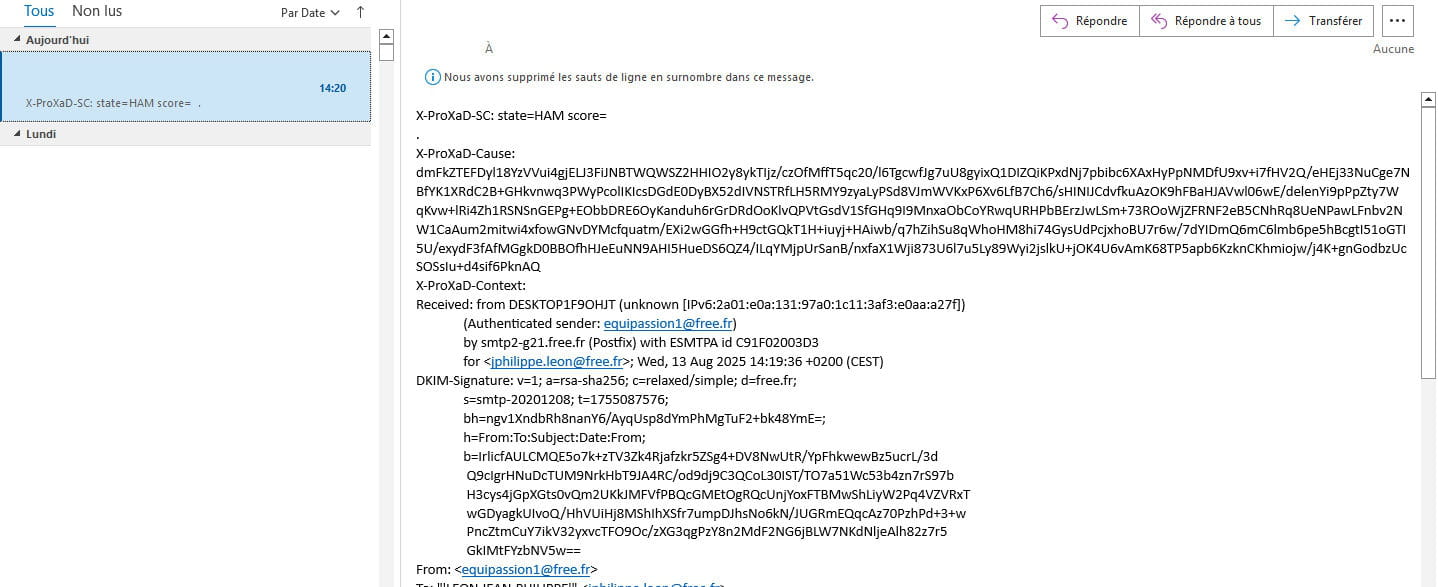
I have a "small" problem with downloading my emails in Outlook. I've included a screenshot to clarify my explanations.
I am using Outlook 2019. I go through MailWasher. On Free, the emails are normal, and they are also fine on MailWasher. The issue arises only when they are downloaded to Outlook. I am running Windows 11, protected by Bitdefender.
A friend has the same problem with Outlook 365, also using MailWasher. She is on Windows 10 with the same antivirus.
One small clarification: my three email addresses are with Free, while hers are with OVH, SFR, and Orange. So this isn't specific to one provider.
If you have any suggestions to help us sort out this problem.
Thank you in advance. Best regards.
6 answers
-
Hello,
I see the problem in your screenshot. The emails are displaying technical code (X-ProXaD headers) instead of the normal content, indicating an issue with message processing between MailWasher and Outlook.
Test by bypassing MailWasher
Set up one of the accounts directly in Outlook (using IMAP or POP) to see if the problem persists.If it works without MailWasher → the issue lies with MailWasher altering the message.
If it persists → it's not MailWasher, but possibly Bitdefender or Outlook.
The fact that this is common across several providers and versions of Outlook suggests a conflict between MailWasher and Outlook in processing message headers.
-
Thank you for your response. The problem persists when disabling Bitdefender and not using MailWasher.
-
Outlook-side solutions
Reset the POP/IMAP settings:Temporarily remove the email account in Outlook
Add it back with manual configuration (not automatic)
Use the basic POP3 settings without a proxyOutlook advanced settings:
Go to File > Options > Mail
In "Message formats", check that you are in "HTML" or "Rich text"
Temporarily disable "Download images automatically"
-
-
Thank you for your response. I'll take a look at that in a few days and keep you updated.
-
Hello,
Mailwasher doesn't alter anything; it simply filters the email on the server based on automatic filtering settings or those introduced by the user. The accepted email after its use is downloaded through the usual channel.
The situation has been regularly documented on the forum in recent days as being due to Bitdefender, either autonomously or because it is integrated, notably with Orange mail. -
I installed Mailbird for testing and the messages are coming in fine. So it seems to be coming from Outlook. It's strange, suddenly, especially since it seems to be a problem that a lot of people are experiencing. I'm going to try to reconfigure my email addresses on Outlook as Bruno83200_6929 explained to me.
I also tested with Thunderbird and it works without any problems.
-
Well, it works by itself again.
Thank you for the help you tried to give me. Best regards
