
ASUS EEE PC 1015PX won't start anymore.
billmaxime Posted messages 50534 Registration date Status Contributor Last intervention -
Hello,
It's a small laptop that I don't use often, but I'll need it very soon.
I tried to start it a few months ago but got a message indicating that the CMOS memory was corrupt. I still attempted to continue starting XP without entering the BIOS, but it didn’t boot. The startup is interrupted by a fleeting blue screen and it returns to the BIOS page. And it loops indefinitely.
I set it aside, and today I replaced the BIOS backup battery. A CR3032. The original battery, completely drained, was at 25 mV instead of 3V. After replacing the battery, Win XP still doesn’t boot. It's still the same.
I’ve tried all the boot modes, without any success.
I attempted to boot from an Ultimate Boot CD inserted into a USB optical drive, but it doesn't boot from USB.
The usual method is to go into the BIOS to set the boot order with USB first, but I don't have access to the BIOS.
At the beginning of the boot, I get the message "press F2 to enter BIOS," but it doesn't go into the BIOS when I press F2. Whether I press F2 once or multiple times doesn’t change anything.
Since I just replaced the battery, one might think that I reassembled something incorrectly. There are only two cables to disconnect (keyboard and touchpad), and I reconnected them properly. The keyboard works, as I can choose the boot mode with the arrows and the "Enter" key.
At the moment, I see no way to diagnose the problem or to solve it. That’s why I would need help.
17 answers
-
Hello,
Assuming that this antique still works, the choice of the boot device is usually obtained by pressing ESC, but it is not guaranteed that XP will accept to boot from a USB key instead of an external USB CD drive.-
By the way, unless I'm mistaken, this device was intended to launch Windows 7, which makes it all the more of a circus to install anything else since Asus uses a number of proprietary drivers and XP does not recognize SATA disks by default.
By an extraordinary phenomenon, there are still a number of these drivers available from Asus and the ready-to-use DVD at Internet Archive.
https://www.asus.com/fr/supportonly/eee%20pc%201015px/helpdesk_download/https://archive.org/details/eee-pc_202312
Regarding the SATA driver, it probably needs to be present on the installation media and invoked during the XP installation routine (if I remember correctly by pressing F6).
-
-
hi
do you want to reinstall XP on the PC?
also check this page for error codes ==> click here
see you+
-
Hello and thank you for this response.
The first thing I did yesterday was to download all the documents and drivers still available on the ASUS site, both for XP and for W7. I also just downloaded the disk image from the second link.
This PC was indeed sold with W7. It was my son who reinstalled it with XP when he gave it to me. Since it only has USB to communicate with mass storage, it would make sense for the BIOS to prioritize USB at startup. It also has an SD card reader, but I've never seen diagnostic or reinstallation tools on an SD card, and I'm not sure it can boot from an SD card.
I had already tried other keys to enter the BIOS, without success. I can keep trying ...
-
It is said that the recipes to access the Bios would be F2, but to be tapped starting from the computer turned off while doing it at the same time as the Power button.
Also, the USB key must be small in size and must be FAT32, and regarding XP, the disk controller in the Bios must be set not to AHCI but to SATA/IDE.
Aside from a possible reinstallation and changing the battery, there is no evidence that there is not otherwise a hardware failure, but we can also imagine that the resulting reset of the Bios has restored the default values for Windows 7 (notably AHCI and not SATA).
I don't know more, I haven't had this kind of machine (it wasn't even the same model) for a long time.
-
-
I tried other keys to access the BIOS. I only managed to access the XP boot menu using F5. I tested all the boot options, without success, then I checked "do not restart on error". Then the blue screen remained visible and here it is:
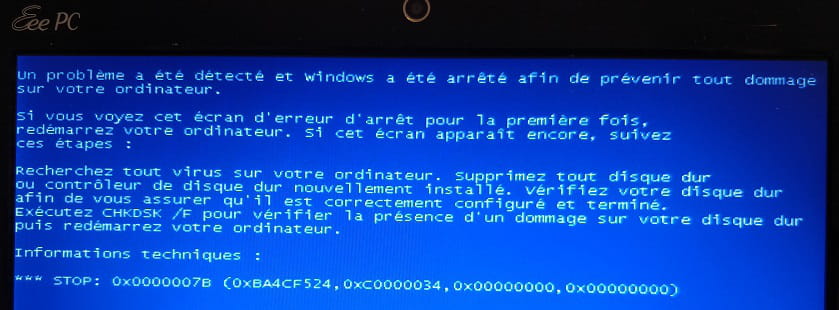
It seems there is a hard drive issue.
To run a chkdsk, one needs to boot from an external medium (USB). But, as it stands, we cannot boot via USB.
Were there any parameters in the CMOS memory so critical that their loss prevents booting?
-
We're facing the same issue; it's likely that it won't start because the BIOS has defaulted to AHCI, see for example here:
https://forums.commentcamarche.net/forum/affich-1968133-installation-windows-erreur-stop-0x0000007b
We absolutely need to find a way to access this BIOS; the "recipe" I mentioned earlier during startup is due to the fact that these damned machines have a "Fast Boot" feature that does exactly what it’s supposed to do—it shortens the POST sequence, which we need to find a way to bypass.
-
-
I prepared a bootable USB drive with the downloaded ISO image. When starting up, the PC does not boot from the USB drive.
Trying with a USB keyboard: the F2 key also has no effect.
If I don’t have any other ideas by then, I will dismantle it again to check the connection of the new battery, and if necessary, take out the hard drive for inspection.
-
hi,
you didn't say if you want to install XP or W7 on the PC
see you later
-
Hello
No need to look for the hard drive in an Eee PC
-
Hello,
And why is that?
While the very old eeePCs I gave away certainly had a Flash disk with very limited capacity, the more "recent" ones have a hard drive with variable capacity.
https://www.notebookcheck.biz/Asus-EEE-PC-1015PX.50509.0.html
Anyway, the question isn't about the nature of the storage but about being able to access the BIOS; otherwise, we're fighting for nothing.
-
-
I saw a real 3.5" hard drive while replacing the battery. However, there are several cables to unplug to access it.
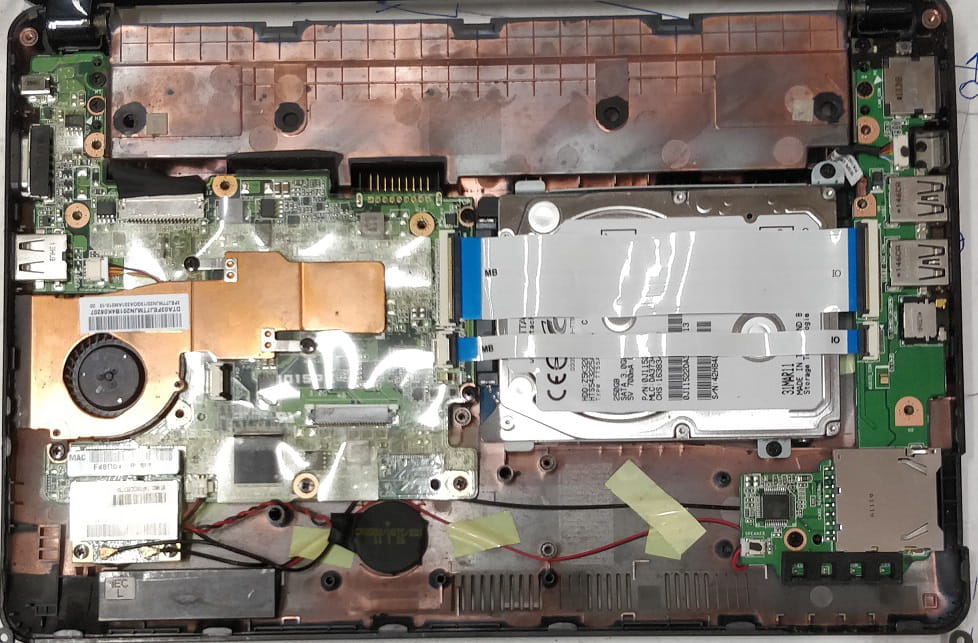
I would like to reinstall XP as it is now. Some applications I use are no longer compatible with W7 and later versions.
-
Now, the problem is finding out how to access the BIOS.
My son vaguely remembers that he also had difficulties accessing it, but he has forgotten how to do it.
-
I just took it apart again to access the battery.
After unplugging it, the BIOS menu appeared immediately upon powering on. I then reset the date, time, and the "IDE" option for the SATA drive, as well as the "display BIOS at startup" option and the USB boot priority.
XP then booted without any issues.
The only problem I encountered was that the battery connector broke, and I had to solder the wires directly onto the pins.
Thanks again to the participants for guiding me towards the correct diagnosis.
It is worth noting that it is unnecessary to remove the RAM for disassembly, as mentioned in the tutorials I have seen.
Also, it should be noted that there is a design flaw in the BIOS settings, since, in the event of memory loss, the default settings cause a blockage like the one I experienced.
-
Hello,
Although XP starts fine, there is still a problem accessing the BIOS, as well as booting from a USB drive.
I wanted to create an image of the hard drive with Clonezilla. So, I prepared a bootable USB drive. The PC did not boot from the USB, but from XP.
Then, I tried to enter the BIOS to check the boot priority order, without success!
For now, I'm looking for which key or key combination might work.
Here is the screen during the long startup:
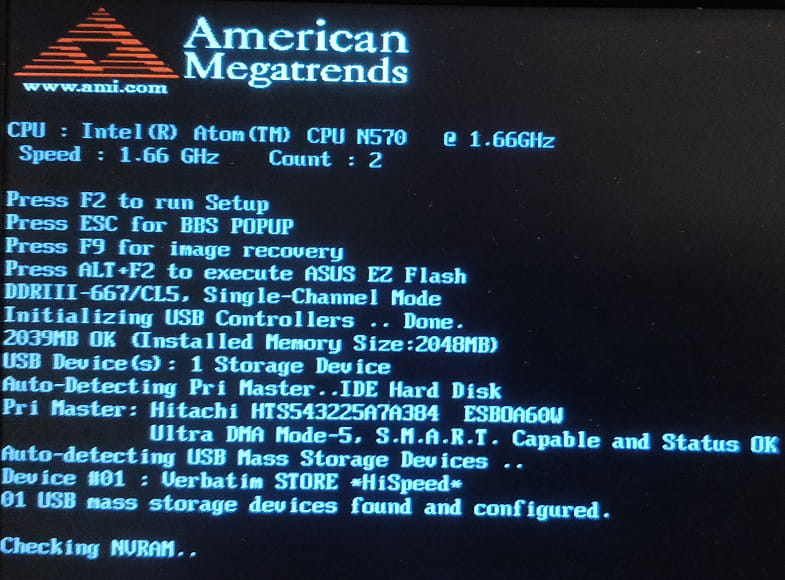
-
hi
watch this video to disable the options that will cause you problems for booting ==> click here (it's in Spanish, but you just need to watch the video)
in your screenshot, I see the BBS POPUP option
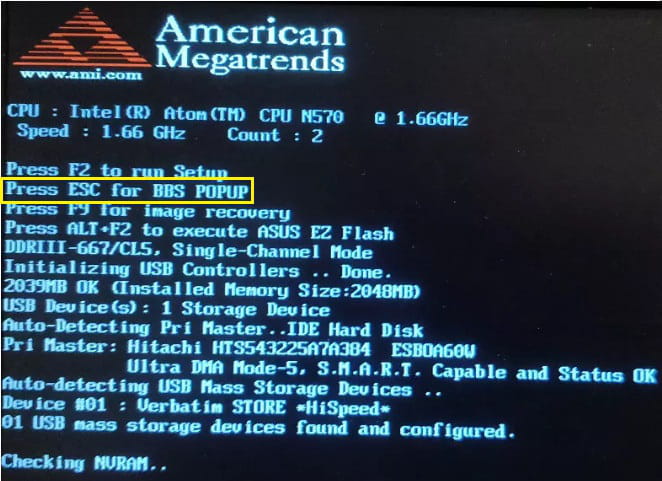
and I read this about the option in question
What is the BBS POPUP menu?
The BBS POPUP menu allows you to select a boot device
selection is done with the ESC key
@+
-
Hello,
I missed this response. I tried "esc" and "alt F2," but that didn't work either.
To clarify, XP is installed on the hard drive and is functioning properly.
To avoid issues in the future if the hard drive has problems, I wanted to create an image of the hard drive as a backup. Hence the use of Clonezilla.
Hello,
Indeed, billmaxime is right on this point, the same thing in French for Vista and a BIOS where the access key is not the same, but it doesn't matter.
https://docs.oracle.com/cd/E19127-01/ultra27.ws/821-0166/z400076f1018664/index.html
-
-
Is there a protection system in place that prevents access to the BIOS and also prevents booting from USB?
For your information, I tried to boot from CDROM (Clonezilla, Ultimate Boot) without success. The external optical drive activates for a moment, but that's it.
The BIOS version is 1101. This version does not appear in the list of downloadable versions.
-
re
the fast startup, which prevents you from accessing the BIOS
in this message ==> click here
you say that the PC boots into XP instead of the USB stick ==> The PC did not boot from the USB stick, but from XP.
Is XP not installed on the hard drive?
@+
-
Hello,
There seems to be a "Fast Booter" or something like that on these devices, as mentioned in <7>, whose role is to skip the POST sequence: it goes so fast that F2 is ineffective.
We might be able to disable it in the BIOS itself, but it's a catch-22 if we can't access it.
Hence the "trick" mentioned in <4>, I don't know how effective it is, to try to circumvent this phenomenon by attempting to access the BIOS not through F2 on Ctrl-Alt-Del but by pressing F2 at the same time or almost simultaneously as we press the Power button from a powered-off computer.
-
-
re
did you see brucine's message? ==> click here
The BIOS version is 1101. A version that does not appear in the list of downloadable versions.
indeed, I don't see it on the pc driver page ==> click here
For your information, I tried to boot from CDROM (clonezilla, ultimate boot) unsuccessfully. The external optical drive is activated for a few moments, nothing more.
there are different software to create a copy/clone of your HDD ==> click here
PS: you need to test brucine's solution to access the bios
@+
-
I tried different timings for F2 and even for ESC and some other keys. The indicated method doesn’t work on my EEEPC.
-
hi
have you tried this manipulation suggested by brucine?
That's where the "tip" mentioned in <4> comes from, I don't know how effective it is, to try to bypass this phenomenon by attempting to access the BIOS not from F2 on Ctrl-Alt-Del but from F2 almost at the same time as you press the Power button when the computer is off.
see you later


