
Drop in FPS in Counter Strike 2
Solved
Hello,
I have a problem with CS 2 that I don't understand, I have a display issue in the game. At the start of the game, I have normal operation with about 180-200 FPS, but after 5-10 minutes, the rendering drops to 50-80. I've done a lot of things to fix the game's performance, but I can't find a solution. I've cleared the cache, reinstalled Steam, CS 2, and Windows. I've prioritized the game in Windows, as well as reinstalled the NVIDIA drivers, and I've also set launch options. I have a GTX 1080 TI, 32 gigabytes of RAM, a Ryzen 7 2700x, 2 terabytes of storage, including two 512GB SSDs and an overcooling setup. Do you know how to solve this bug?
11 answers
-
I did some research on CS2 and apparently a lot of players are experiencing major performance issues in the game, and everyone is complaining about FPS drops since the last update.
Some players are playing at 300 FPS, and suddenly it drops to 30-60 FPS; simply put, the game is poorly optimized like many games, so we need to wait for an update that will fix the game's performance. Otherwise, you can try another multiplayer game, if there are no issues then it simply comes from CS2.
A player gives a temporary tip that might help play a bit better, let's see if it works.
2nd edit: I found a temporary solution based on some comments below
When it happens, press tab + escape. Then, press escape. Wait for the FPS to return to normal, then press tab and remove the scoreboard. For some reason, opening the scoreboard and entering and leaving the menu resets the FPS. It's not ideal, but it's playable.
-
Hello "I'm dropping to 90/100" could you see much better at 180/200 when it's considered in the industry that 90/100 is the limit to prove the difference even with a 144hz screen the best is the enemy of the good!!!!
"Donkeys change their minds not fools"
remember to mark your message as "resolved" if that's the case -
"Playing in competitions on CS2."
"300 fps"
"But after 5-10 minutes the performance drops."
"Ryzen 7 2700x"
The question is, can you do everything at once for more than 10 minutes and play for 4 or 10 hours at 300 fps with a 2700x, and what motherboard for competitions on CS2.
It's the competition players on CS2 who have the answer if they come here. What equipment do they use to play.
You can do benchmarks and break all records with a machine made for the duration of the benchmark, but which won't last all weekend for gaming.
(That's what we often see for the duration of a video)
Why so much RAM and so many SSDs, maybe in RAID: the fastest stuff, and all the tricks to keep everything in RAM, but only for the duration of a predefined and prepared sequence for this PC and this benchmark, or can you take the time to play the entire game in real time on the same machine?
And there is a graphics card and all the program parts are specific to the game, we don't use them elsewhere most of the time.
When it lasts for a fixed time, you can think about the temperature.
But if at the end of each game it's dead, we've seen players online at the end of the match where the site resets whatever to 0 and they have to set everything back up on their PC.
-
Hello,
I am on Windows 11, and overnight my PC froze on the desktop, YouTube got stuck, I had to reinstall Windows 11 and my problems disappeared.
I looked at comments from other people, it was coming from Windows with FPS drops once Windows was reinstalled, there were no more FPS drops. I see that you reinstalled Windows, did you format your hard drive beforehand or delete and recreate a clean partition to avoid installing an OS over another OS which would create problems?
-
Hello
Graphic designer work: so the data is important you need to back up "the comment I wouldn't want to lose" suggests that you don't have these backups, yellow or orange depends on the version it's the same, using an external drive does not allow to address this: either sectors will continue to become faulty the risk of losing everything at once without knowing when is not eliminated, the drive hasn't even had the time to use "replacement sectors: 0" it has already had "unstable sectors accompanied by the inability to launch the OS so data corrupted randomly anywhere on the disk" > new drive for backups. the repaired drive can only be used for temporary data, recorded game images of no interest that we allow ourselves to lose because we have backups!
-
Hello,
I managed to solve the problem! In fact, to play the game Valorant, you need to enable what is called SMT (SIMULTANEOUS MULTI-THREADING) in the BIOS. It turns out that CS 2 does not tolerate this option, so you need to disable SMT, and yes, because you have to revert to the processor's initial operation; the single-core makes the game run like before.
In the end, the graphics card delivers the same rendering and the processor fulfills its role...
Best regards,
EC
-
Hello,
Actually, the gameplay at 50 fps quickly becomes unplayable, the shots and movements stutter. Some pros need at least 300 fps minimum to compete in CS2. The game just fulfilled its contract during one match, but in the next match, it bugs again.
-
Good evening,
Thank you for all your responses. I reinstalled the Windows system by formatting the main SSD. I had reinstalled it in repair mode on the system itself, so I formatted and installed Windows 11 again. I noticed a malfunctioning of a SATA SSD hard drive, and as a result, the computer wouldn't start. I will test the game functionality tomorrow to see if anything has changed. Thank you for your responses, and I will keep you updated soon.
-
Well, if you have reinstalled and formatted your SSD and reinstalled Windows 11, that’s fine. Maybe your SSD is defective; you can install CrystalDiskInfo, which will give you the health of your SSD. If it's blue, that's okay; if it's yellow, you should think about replacing the SSD, and if it's red, it's dead.
But the colors don't necessarily indicate if your SSD is defective or not; you can have bad sectors. I had a Samsung 860 EVO SSD that was healthy and blue, but when I played games, they were slow and lacked performance. When I changed the SSD, no more problems; I found my games fast and smooth. So, a defective SSD can cause issues, and nothing indicated to me that it was defective, just for your information.
No problem, keep us updated.
-
-
Hello,
After the complete installation of Windows 11, the game seems to work like before. I play a lot of this game, I had never had this problem even though I already have 2000 hours in CS2. I think it should be fine in the future, but I have a small fear that the bug will come back before the next update. Since my screen is 60hz (boosted to 72hz), I thought the definition at 200ips was useless, but in a game like CS2, being a precision game, it ultimately needs such rendering.
For my SSD SATA hard drive, it was causing Windows to stop starting, so I bought an external case because I use it for photos and other graphic creations. On the other hand, for the hard drive, I have already used Crystal Disk, and it was orange, which seems sufficient for it to function.
Otherwise, I thank you for the support provided, best regards,
Edward CHARLES
-
Well, all the better that the complete reinstallation of Windows 11 solved the problem with CS2. Your issue could have come from Windows 11 or from the game being poorly optimized or from the game's updates causing problems. However, playing on a 60Hz screen for competitive games like CS2 or others is not recommended; at 60Hz, you're at a disadvantage compared to others who have a better refresh rate. You need a 144Hz screen with a DisplayPort cable, and then you'll feel the smoothness and can play at 200fps; that's just a piece of advice.
Be careful with CrystalDiskInfo; the orange color does not exist. There is blue, yellow, and red: if it's yellow, the hard drive needs to be changed because it could fail, and if it's red, it's critical, and it could fail quickly, and you could lose everything. I advise you to quickly buy a new hard drive and transfer everything if you don't want to lose it all.
-
@Kiilla
Hello,
I think I'm going to have to buy a screen one day to be able to play the game properly, that's for sure. As for the hard drive, I'm afraid of losing my data and I can't do anything for now. If I connect it to the computer, it freezes the operation, so I'm going to test it with the external enclosure.
Thank you for the advice and see you soon!
EC
-
@doudidounet
Hello,
Yes, it's best to play with a 144Hz monitor using a DisplayPort cable; it will greatly improve refresh rates, and you'll definitely notice the difference. However, make your decision based on your budget. If the hard drive is causing issues with Windows, it's clear that it's defective, and you should urgently buy a hard drive to avoid losing data and stick with the external drive for now. Avoid using the hard drive as it could fail at any moment.
You're welcome, it was my pleasure.
-
@Kiilla
Hello,
The problem is that I can't run the hard drive on the computer so I can't plug it in to make it work. In any case, I can't back up the data on it; the last resort is to connect it via USB and not through a SATA connector. PS: I hope I haven't lost the photographs and my graphic design work.
Have a great day!
-
-
Hello,
The problem has come back again on CS2... My external hard drive cannot find the hard drive that has an issue, I tried to format it by performing a Windows 11 installation process from just one hard drive. I started the computer again and once again I do not have access to the installation formatting.
What should I do for the rendering on CS2, there is no solution and my FPS are dropping again... Should I perhaps wait for the next update?
I have uploaded my results to the 3DMARK application, everything is okay, right?
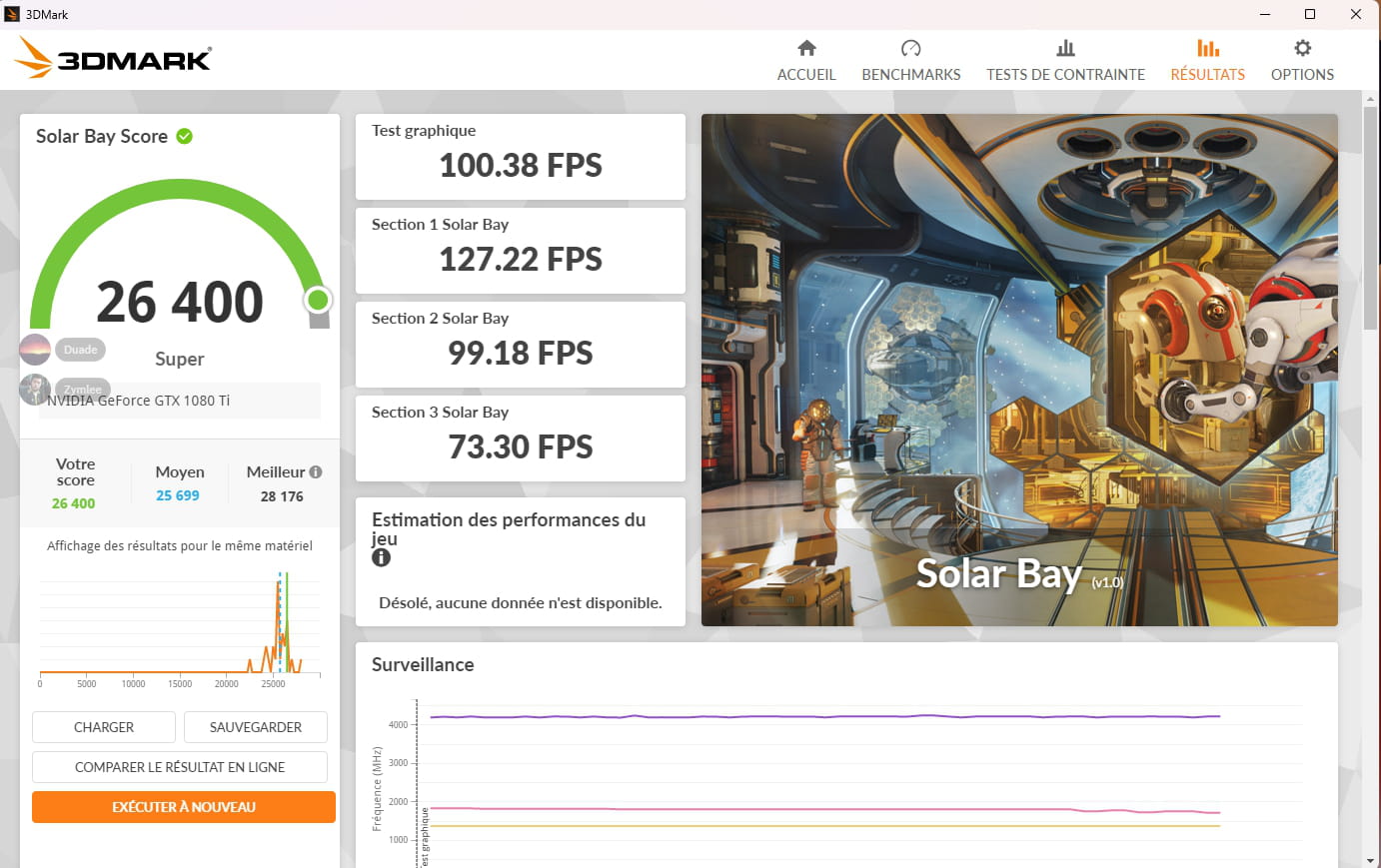
Thank you in advance, best regards,
EC
-
Hello,
Here are some screenshots to show the problem I'm experiencing:
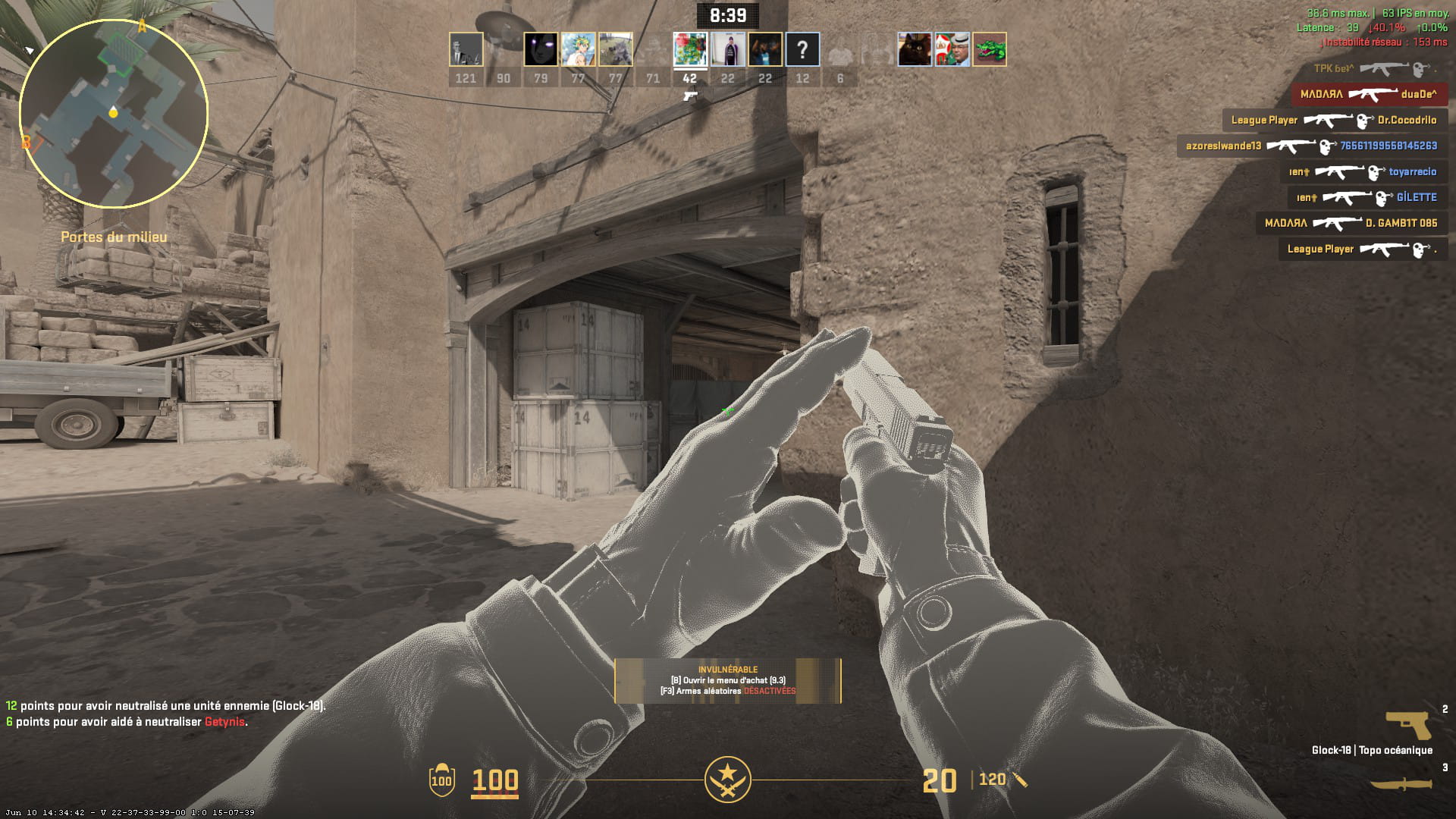
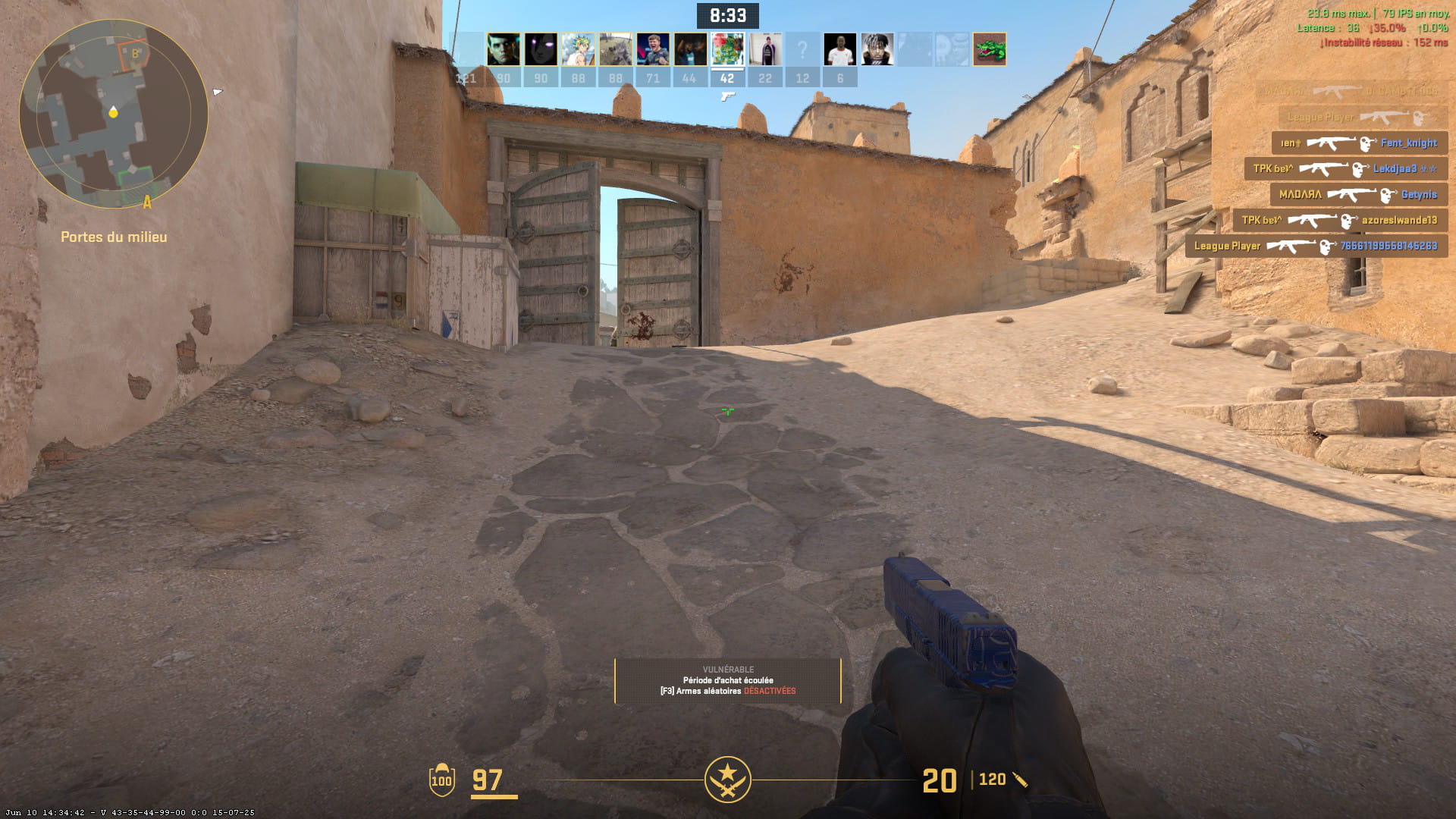
EC
-
Hello,
I managed to solve the problem! In fact, to play the game Valorant, you need to activate what is called SMT (SIMULTANEOUS MULTI-THREADING) in the BIOS. It turns out that CS 2 does not tolerate this option, so you have to disable SMT, as you need to revert to the processor's initial operation; the single-core setup runs the game as it did before.
In the end, the graphics card delivers the same performance, and the processor fulfills its role...
Best regards,
EC
-


