
Inaccessible sites with enforced IP
Solved
brupala Posted messages 111157 Registration date Status Member Last intervention -
Hello forum!
In order to keep control of my local network, I wanted to assign the IP 192.168.1.3 to my network card on a desktop PC (free address, nothing on ping).
When I do that, some websites (like Reddit) become inaccessible, and I don’t understand why. Others work normally.
I removed the DNS, tried with other DNS, same behavior.
When I switch back to DHCP on my network card, everything returns to normal.
Can I ask you for an explanation?
Thank you in advance.
7 answers
-
Hello,
Is the Box indeed 192.168.1.1 and specified as the gateway, with the DNS specified?-
-
Hello Brucine
Thank you for your answers.
I usually use DNS Jumper to optimize the DNS, but for my tests, I hadn't put anything in the DNS, nor in the gateway.
And the box is indeed 192.168.1.1.
I'm not really comfortable with the subject to be very frank.
What should I put in the gateway please?
Thanks
You can live without DNS to a certain extent, but not without a gateway. I even wonder how you can exit your local network in this situation. You're not telling us everything about your connections (I assume you have others; otherwise, it won't work without a default gateway).
It is of course assumed that the Box is not at 192.168.0.1 at another address; you must set 192.168.1.1 as the gateway:
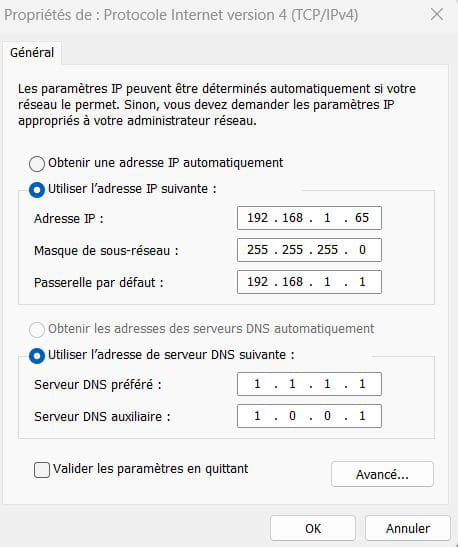
OK Brucine, thank you.
I'm going to try that.
I made a network plan. Am I allowed to send it to you in a private message?
-
Normally not, but there is nothing sensitive enough that we can't continue here, in any case local IPs are not routable and therefore not confidential.
The question generally poses no difficulty, computers in the same workgroup if we want to share them (with each also having a name for easy identification), it is enough that each has a different IP 192.168.1.n with a gateway of 192.168.1.1 and DNS of your choice.
For the reasons mentioned, I chose greater than 20 and to better memorize addresses in increments of 5, with machines "named" for example 192.168.1.30 or 35.
Get back to me if the test is inconclusive; be careful of some firewalls that may not selectively allow the local network 192.168.1.n when it remains internal, and then you'll have to start by testing with the firewall disabled and then configuring it.
Indeed, the gateway was the solution.
With your explanations, it's clearer, but fundamentally, I don't understand what a gateway is for.
Basically, you are telling your router to route the IPs, right?
Here is my network plan, I know it's a bit amateurish but I needed it to be clear in my head ...
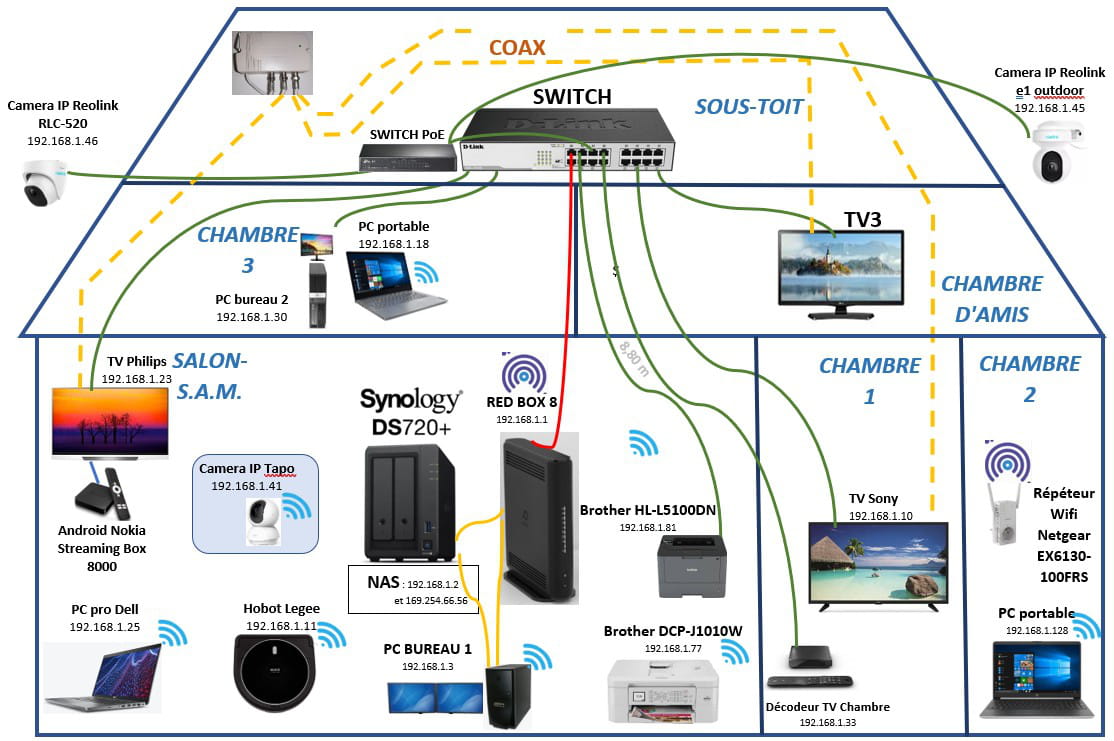
-
Amateur and aspiring wizard :-)
I hope I can explain your routing problem simply.
Let’s start with the IPv4 or IPv6 address: each machine knows or receives an IP address AND a subnet mask.
These two pieces of information determine the range of IP addresses that are part of its local network and to which it can directly address, but the IP protocol doesn't stop there, as there are all the other addresses outside, including the internet.
To communicate with the rest of the internet, it must go through a router that can learn the routes to the vast world. There may be several routers on its local network, but generally, there is only one, which becomes the default route; what is often mistakenly called the gateway is just its default route, so the address of the machine it must use to go "somewhere else".
In Windows, the routes are displayed using the command route print, just as IP settings are displayed using ipconfig or ipconfig/all
I assume your box 8 manages IPv6 and therefore provides you with RAs (router advertisements) that indicate what is needed to go through it (default route and parameters for the machine to configure automatically with a suitable address), this is called SLAAC.
So your IPv6 connection should have been working, since you hadn’t tampered with it, which allowed you to access quite a few IPv6 sites, Google, Facebook, and many others, but not a bunch of old, crappy sites like CCM or the government, which do not have an IPv6 address.
Your misconfiguration without a default route (0.0.0.0 mask 0.0.0.0 in route print) and ::/0 in IPv6 meant that you had no IPv4 internet.
I think that IPv6 also allows your dual link on the NAS to work a bit via the link-local addresses (fe80::/64) but with APIPA (169.254.../16) it’s also possible, it’s pretty much the same thing.
Also, rather than setting fixed IP addresses, it’s better to configure static DHCP (or permanent leases) on the DHCP server, so the box in your case; fixed IPs are really best reserved for network equipment (especially routers) and servers and printers, which are a variety of servers, although static DHCP is preferable for servers.
Hello Brupala
Thank you very much for your very thorough response. I admit I've learned a lot from this.
This is the first time someone has managed to explain this to me simply; the other articles on the subject are aimed at IT people or IT managers, not at laypersons.
You are right, IPV6 was indeed enabled. The network card on my PC is set to "Obtain an IPv6 address automatically," and I have DNS.
When I had an Orange box, I could assign IPs to my devices within the box's administration, but when I switched to a NB8 from RED, I could no longer do that. So, I fixed the IPs directly in each device, when they allowed me to. So, if I'm following your explanations correctly, I can't use the permanent lease system.
However, on the SMB3 line between the NAS and my desktop PC, I'm at 169.254.66.56 without IPV6 (unchecked): this address is the one Syno chose for me, I didn't touch it.
All of this may indeed explain the slowness of my internal network.
For example: a laptop is connected to my box via Ethernet, with no settings on its network card (everything automatic). When I run a CrystalDiskMark test to my NAS (which is also connected to the switch), I max out at 117 mBits/s, even though my cable is category 6A and I should be able to reach gigabit speeds. This is something that has always baffled me and that I still don't understand. Yet, the network card does indicate '1.0 Gbits/s'.
Another experience, if I connect this same PC to the switch, I reach the NAS, but at a lower speed (86 mBits/s).
If I have better understood the DHCP system, I would need further explanations (if I'm not imposing) on the configuration of my network (entirely wired, cables and sockets in category 6A or 7).
In any case, thank you very much, this is very constructive.
-
-
For the direct NAS PC connection, you should first check that the PC is indeed on APIPA as well, but you would manage better if you set a fixed IP (without gateway) on this port and on the PC as well, for example 10.0.0.1 and 10.0.0.2 with a mask of 255.255.255.252 (/30). You can also configure a DHCP range for this on the NAS, which will directly address the PC.
Hello Brucine
Alright.
I would actually prefer to do that.
I will dig into it to make it happen.
Do you think my NAS could serve as a DHCP server? That would be even better, that way the assignment of IPs would be independent of the ISP ...
-
As for the NAS, I'm dodging the issue; I don't understand much about this kind of device, brupala will answer better than I do.
That said, I use static IPs without them being imposed by the Box, which just recognizes them as connected if necessary, and thus independently of the ISP (at least as long as I don't switch to a Box that has a different address). -
Yes, the NAS can act as a DHCP server; it's a central element.
https://kb.synology.com/fr-fr/DSM/help/DSM/AdminCenter/connection_network_dhcp_server?version=6
Moreover, it has the ability to configure tons of DHCP options, unlike a box.
Alright Brucine, so you set your IPs directly in the device itself, right?
-
Absolutely (except for my smartphone), which is a bit of a workout concerning the virtual machines that use 2 virtual network adapters in different segments and more generally if we use both (which is not my case) a different address for each Wifi or ethernet adapter if we alternately use both on the same computer.
It's true, but we have a better handle on our network.
I have to go.
Thanks again.
-

