
Windows update blocking
flo88 Posted messages 28532 Registration date Status Contributor Last intervention -
Hello, since February it's been impossible to update. I've gone through the command prompt to stop the process but it says the service is starting or stopping and to try again later. I don't know what to do anymore, the computer keeps freezing. Do you know how to remove the freezes? I've also tried Windows Update fixer which gets stuck during the repair.
5 answers
-
Hello,
This might require more details, what version of Windows are you using, what updates?
If it's all updates including security updates, then you need to repair Windows Update or reinstall Windows.
https://www.malekal.com/reparer-windows-update/
However, sometimes a single failed update can block others in a domino effect, a workaround is to bypass Windows Update using the Windows Catalog where you can find the offending KB for the relevant version of Windows:https://www.catalog.update.microsoft.com/home.aspx
Finally, of course, a particular update may fail because it is or has become impossible (a number of updates from Windows 7 to Windows 10, Windows 10 to Windows 11...) -
Hello and thank you.
I'm on Windows 11 and the only update that appears is Hewlett Packard USB, and I don't know why since I don't have that program. In fact, no other updates appear. When I search, it takes hours to look and always gives me the HP update (apparently no updates since February, which surprises me). I'm going to check your links, I hope to find the solution.
-
Hello,
Just for your information:
Hewlett Packard is either the brand of your PC or that of your printer, which is connected via USB.
-
These are not programs but drivers, in principle.
From time to time, Windows Update offers updates for "generic" hardware (Intel...) but not those from a specific manufacturer.
On an OEM PC (Windows pre-installed by the manufacturer), updates are handled not by Microsoft but by that manufacturer.
If you don't remove the HP "utilities," updates will also search for HP driver updates.
The error in question is documented and could originate from a HP-Microsoft bug; we can't find a solution anywhere except to cancel this update (wushowhide, WUMT...) but that probably doesn't explain why normal Windows Update updates are not being offered.
-
-
So no problem detected via Malekal's tutorial and catalog update, I don't know how to use it...
-
There are 2 distinct problems.
The HP story is documented for obscure reasons to occur on PCs from other brands; as I mentioned, there is no solution until it disappears other than to hide it.
https://answers.microsoft.com/fr-fr/windows/forum/all/hewlett-packard-usb-12122014-120000-am-3505652825/a89eb8a1-08fc-4fec-a4c0-50d2352f3a18
On the Microsoft catalog, its purpose is to download a particular update; therefore, it cannot be used if it does not appear as a failure in Windows Update or if we do not know which version update (which one, 24H2?) or cumulative monthly; Windows versions have a limited support duration, and if, exceptionally, the PC has remained on a very old version of Windows 11, there may no longer be any updates available, in which case it would need to be done via Media Creation Tool and the corresponding ISO.
If that is not the case and Windows Update has not offered anything for months, it is either (strangely...) that a "security" software is blocking the connection, or that Windows Update is faulty (repair as indicated previously), or that Windows itself is faulty; we then try to repair Windows without data loss as also indicated previously, or if we fail, we reinstall Windows on itself from a 24H2 installation USB stick.
-
-
Hello
No, my PC is not HP and I have an HP printer but on WIFI I have uninstalled HP SMART
However, it is likely that the update comes from there or from an HP screen; regardless of whether the printer is on Wi-Fi, the basic setup must have been done via USB, Windows detects the hardware as it sees it.
But in any case, this update does not block the others; in Windows Update, there is a history, when was the last successful update?
-
If this is the last update, which dates back to February, that's fine, but it’s the history that needs to be looked at:
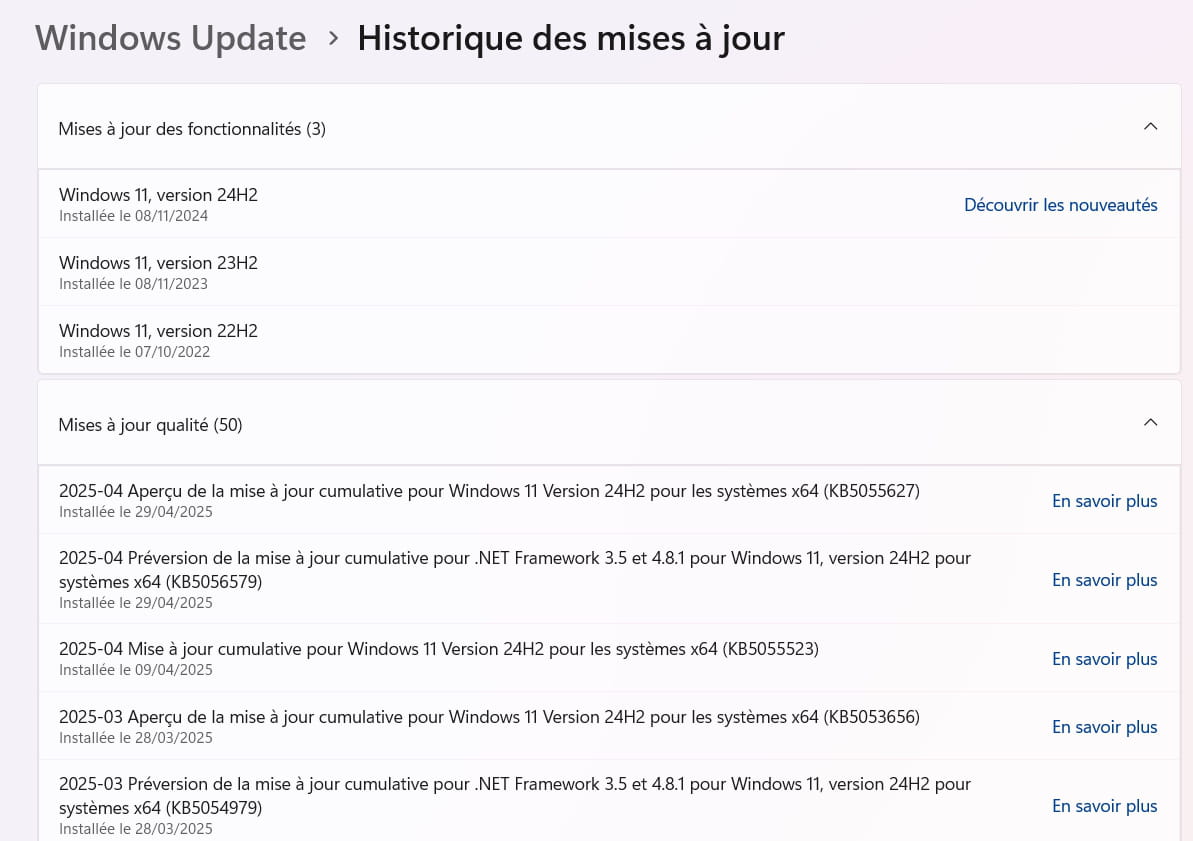
If there’s nothing recent (end of April), a system restore or a Windows repair is needed.

