
Freebox plan selection based on Gbps
vegansound Posted messages 134 Registration date Status Member Last intervention -
Hello everyone,
I currently have a Freebox Mini 4K since 2013. It's starting to show its age, and technically, I believe it's a bit outdated. I saw that it offers:
-
1 Gb/s upload speed with fiber optic
-
600 Mb/s download speed with fiber optic
While looking into getting a new Freebox, I'm only offered these two options:
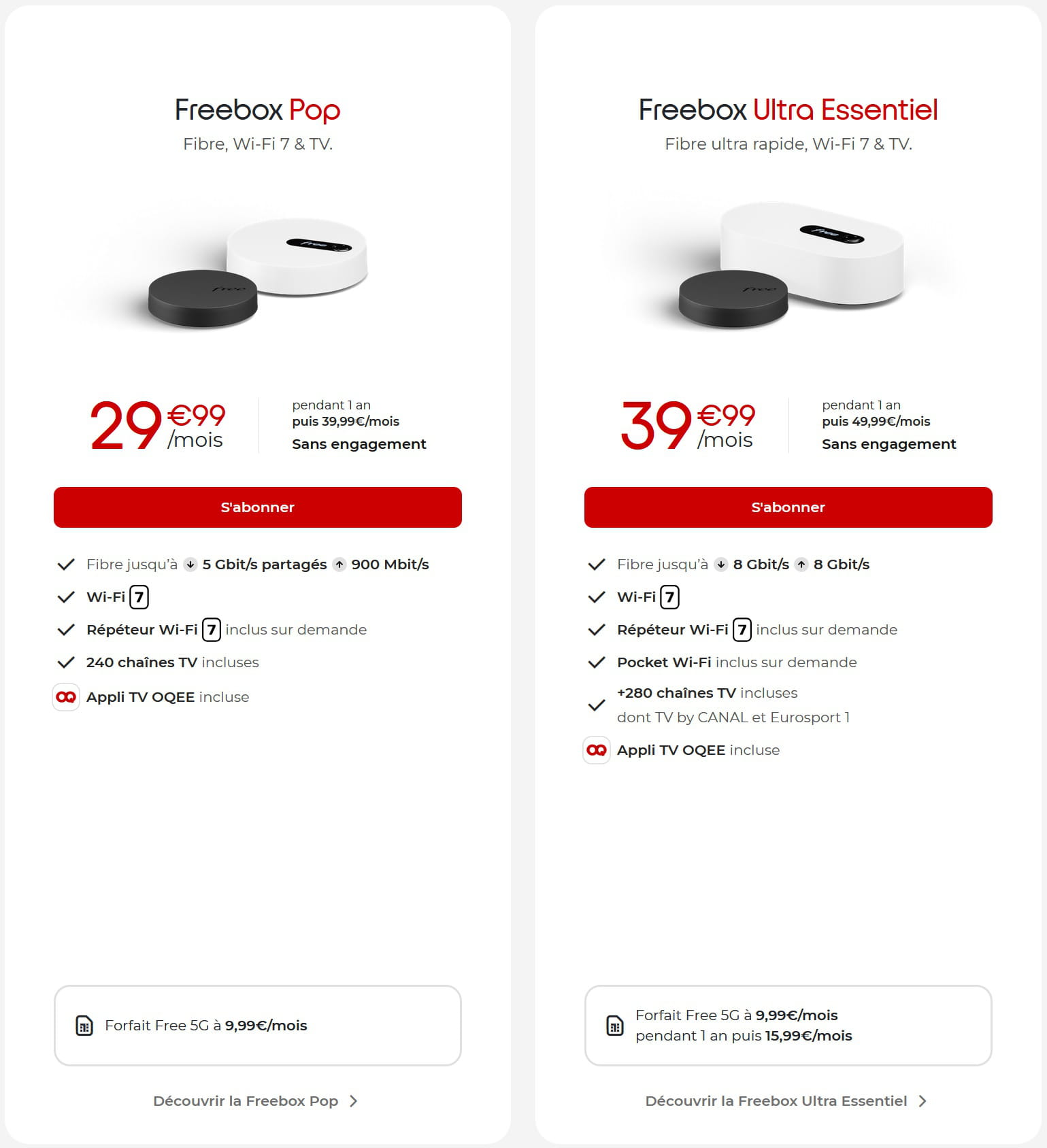
The (up to) 5 or 8 Gbit/s they promise, how can I know if I'll have access to that at my new place? Is it due to the geographical area? Is there a way to find out how much the future city can handle?
I would be tempted to go for the maximum Gbit/s, but if I end up getting an 8 Gbit/s plan when in reality I only have 3 or 4 max, I might as well choose the lower plan directly. But to order the right box, it's better to know beforehand, hence my presence here to seek your insights.
As for the "TV box" part, I don't care, I watch TV online. There is a "net only" plan, but the speeds are "Fiber up to ↓ 5 Gbit/s shared, ↑ 900 Mbit/s". I don't understand what this "shared" means, and it's clearly not the 8 Gbit/s offered by the other box. I'd prefer to have a TV box that I won't connect and have 8 Gbit/s than no TV box and "only" 5 Gbit/s.
Thank you for your help on this choice and the understanding of "up to x Gbit/s".
Bonus question: at the bottom of my capture, it says "5G plan at x€/month". Is this the price of our Free mobile plan if we link it to our Freebox plan? This could also interest me as I currently pay more than the indicated prices.
2 answers
-
Hello.
A choice of bandwidth is made based on the need.
What are your needs?
One question:
What's the point of having 5 Gbps if you're using a computer whose network card is limited to 1 Gbps and the combined applications you'll use don't exceed 100 Mbps?
Do you understand what I mean?
Even a subscription at 500 Mbps would be more than enough for you.
Here is a link that would allow you to know a "bandwidth at the address":
https://maconnexioninternet.arcep.fr/?lat=47.697084413084184&lng=2.0266675716102327&zoom=18&mode=debit&techno=terrestre
Or at least nearby.
-
Hello,
The Arcep map is good, but it is limited to 1 Gbit/s, so it doesn't really answer the question.
As a general rule, the first test when looking at a provider is eligibility (and therefore the actual fiber speed) at the specified address.
-
Thank you for your response.
In terms of needs, I send and receive a lot of large files, I play a lot of online console games (+ downloading digital games, often 40-50GB), I consume a lot of streaming videos, and various other tasks.
As for your question about my network card, I don't even know if I have one. But I imagine it's essential for browsing, so I must have one, right? How/where can I find out about that and its characteristics?
And yes, I understand what you're saying; I'm here to find the most optimal solution, not to get too much or too little compared to my hardware or my geographical area if that's taken into account in the equation.
I followed your link, and for my address, it says "Free Fiber = 1 Gbit/s and more (in both directions)." It still seems a bit vague to me. Considering that the boxes can go up to 8 Gbit/s, they're telling me that over 1 is good, but it doesn't indicate whether it can reach 5 or 8 from the plans. That's what brupala says, by the way.
-
-
Hello,
There aren't 50 answers:
Everywhere it is available in fiber, Free offers 10G-EPON which provides 8 Gbit/s up and down regardless of location, although there is an asymmetrical version with 8 down, but commercially limited to 5 and 1 up on the pop.
When we talk about shared bandwidth, like on the pop, it's because it indeed has 8 (limited to 5) of down bandwidth, but no 5 or 10 Gbit/s port to exploit it alone, so you need to use 3 Ethernet ports (there's a 2.5 port) to utilize it, not to mention the Wi-Fi, but that’s more random depending on the environment.
Then, there are still the old offers on the simple PON, your mini one and the V6 with separate ONTs from the box, but where Free's PON is, 10G-EPON is possible.
In fiber, the bandwidth does not depend on distance; the advertised bandwidth is the bandwidth provided over the fiber, but not necessarily beyond that, so the "up to..." is generally true, unlike DSL where it depended on the location.
But if Free offers an ultra box at your address, it's because it's equipped for 8 Gbit/s in both directions at the OLT level at their place, otherwise, they wouldn't be offering it.
And there you go, there you have it ....
But my goodness, how annoying are the line breaks!!-
Hello,
Thank you for your response. But I find it way too technical for my low level of knowledge in the field.
I understand that wherever Free offers fiber, it goes up to 8 Gbits/s guaranteed, but in that case, why do they say "up to"? It means that sometimes, perhaps depending on the geographic area, it might not reach that high, right?
I just (re)did the test on their site, and it clearly states "Good news! Your home is eligible for Free Fiber.", and as an option, I do have the Ultra, with or without TV packages.
So for you, is it better to go for an Ultra rather than a Pop, based on my needs mentioned in the comment of the other reply? -
It all depends on the equipment you have at home:
if you don’t have Wi-Fi 7 equipment or a 10 Gbit/s switch, and even a 10 Gbit/s network card, an 8 Gbit/s connection will never be fully utilized.
If you don’t have any of that, a pop or even a pop S is sufficient.
I repeat, if Free indicates up to 8 Gbit/s, it’s precisely because above 1, it depends on the equipment you connect to the box, not on what Free provides, which is always at 8 regardless of the location.
After all, if a download takes 10 minutes instead of 5, it’s not a big deal, especially since it’s more limited by the server than by your fiber connection.
-
Are Wi-Fi 7, the switch, or the network card components that can already be integrated into my motherboard or something else, or are they really separate, independent parts? I know my computer's configuration, but I don't know about that kind of thing.
If I need to buy an external component, I will. -
-
It should be balanced in the sense that I need to choose the network card based on the other components of my tower (I have the list, I can send it to you if needed), or in the sense that once installed, I need to tinker with the settings to adjust it in the most optimal way?
I'm not a tinkerer or someone always looking for optimal performance. I'm more of the type who prefers everything to be ready when I install (that's why I'm more of a console player than a PC one).
To return to the point --still interesting-- that Clarckos raised earlier (and to which you responded), based on my response to him, do my stated needs require 8Gbits/s? If not, what needs require so many Gbits/s? Aside from NASA, I don't see any. ^^
-

