
Low WiFi Speed
Kiilla Posted messages 768 Status Member -
Hello,
I just bought a new PC and everything works well, but the WIFI speed is low. Download speed measures 90Mb/s and upload speed 1Mb/s. The same test on my mobile phone gives me 900Mb/s.
My equipment:
-Fiber with Freebox Ultra
-Windows 11
-Gigabyte B650 Eagle AX motherboard
-Intel Wi-Fi 6E AX210 160MHz network card with updated driver.
-Processor AMD Ryzen 7 9700X 8-Core Processor 3.80 GHz
-Installed RAM 32.0 GB (31.1 GB usable)
-PC in the same room as the box, 3m away.
I tried tightening the antennas.
I tried different advanced settings for the drivers that I found on various forums
I tried with an older version of the driver
I tried safe mode with networking with an admin account but couldn’t connect, the password is not correct. I don’t know which one to enter.
Does anyone have any idea where this problem might come from?
Thank you in advance.
14 answers
-
Hello,
probably a useless utility installed with your motherboard that slows down the network flow, you absolutely need to test in safe mode with networking, what do you mean you don’t know which WPA key to enter, it’s the one displayed by the box, that’s all.
the same as in normal mode.
And there you go ....
But misery, how annoying the line spacing is !! -
Oh yes, it's true that I did that too. I uninstalled all the Gigabyte Control Center software without any results, but there are probably others hidden.
In safe mode, it's the connection to the Windows account that I can't manage. The PIN code is disabled, and my Outlook or Microsoft password associated with my email address doesn't work either. I don't see which one it could be.
-
Yes, with network support, you need to log in to your Windows account. The PIN code is enabled but not available. I am offered to configure it, but when I try, I am told that I need to be an administrator, which I am. I have checked in the account settings. I have an ethernet port, but I am trying to resolve the issue with my Wi-Fi card, so I don't see what that will add.

-
I don't want to waste my time studying the nonsense of Windows 11; I experienced one myself today, but enough is enough, Windows can stay in its corner.
If I were you, I would test it with a live Linux USB (I would have already done it, in fact), if it's within your skills.
-
-
Yes, good idea, I will test that. It was planned that I would install it at some point or another. Windows is for gaming even though I know it is becoming more compatible with Linux.
-
Well, by uninstalling some Gigabyte applications, I have improved. I'm now at 300Mb/s and I get the same result on Linux.
But still, it's not as much as on my mobile phone, which is 900Mb/s.
-
Hello @CameleonCourageaux90 StatusMember.
To check if it comes from a blocking software, please do the following:
Download FRST.
Once downloaded, save FRST to the desktop and then right-click on FRST and choose Run as administrator, which should look like this:


Wait until the message the tool is ready to use appears, then click Scan.
Warning, wait for the messages saying the scan is complete to appear.


At the end of the scan, the two reports FRST and Addition will be on the desktop.


Send the FRST and ADDITION reports to cjoint.com or pixeldrain.com.
Then attach the two links generated by cjoint.com or pixeldrain.com in your message.
bazfile
Moderator/Security Contributor.
A hello, a response, a thank you are always appreciated. -
https://www.cjoint.com/c/OBpreg6ks5S
https://www.cjoint.com/c/OBprfuEGY3S
And there you go, thank you.
-
@CameleonCourageaux90 StatusMember .
cFosSpeed was installed on your PC, and it was apparently blocking your connection. You have uninstalled it, and it is thanks to its removal that your speed has returned to normal. There are still some traces of cFosSpeed, but no active processes.
Go to Device Manager, right-click on your network card Intel(R) Wi-Fi 6E AX210 160MHz, choose uninstall device, then restart your PC. The card will automatically reinstall, check if the speed is better.
bazfile
Moderator/Security Contributor.
A greeting, a response, a thank you are always appreciated. -
Thank you for your analysis.
No, it's not better, but 300Mb/s is still not too bad. I have the same result on Linux, so maybe that's normal, right? It's the big difference with the 900Mb/s of my cell phone that was bothering me.
-
It's a Google Pixel 7 with Wi-Fi 6, it seems to me.
-
All the answers in images :-)
https://www.cjoint.com/c/OBqlcwnF7LS
https://www.cjoint.com/c/OBqleJDiDXS
https://www.cjoint.com/c/OBqlfiLV1LS
https://www.cjoint.com/c/OBqlh7ocl0S
Thank you
-
OK, thank you very much, that's informative.
The wifi card is indeed wifi 6, even 6E as it operates on 6 GHz.
However, I have doubts about what the fbx indicates, as it shows its wifi7 parameters while no one is connected in wifi7, just wifi 6.
The 320 MHz band only exists in wifi7, not in wifi 6 or 6E.
To see, you could try forcing your fbx to wifi6 (ax) just to see if it improves for the PC (for mobile, I doubt it).
-
-
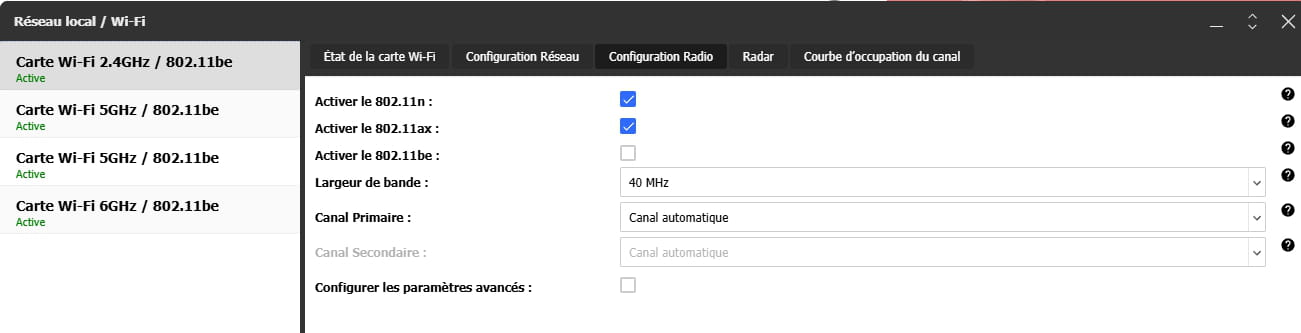
I did a lot of tests by enabling and disabling 802.11be on the different Wi-Fi cards of the router, but it doesn't change anything. In fact, the photo is misleading. 802.11be was just enabled, but 802.11ax was also on. Look below.
-
Yes, no doubt about it, my concern was that proposing Wi-Fi 7 by default could disrupt certain Wi-Fi cards that don't support it, as seen with Wi-Fi 4 (802.11n) cards. With Wi-Fi 6E cards like the Intel AX210, I wasn't aware; it's a sector we're still exploring and the combinations are becoming increasingly numerous, especially considering that Wi-Fi 7 occupies almost everything that can exist in terms of Wi-Fi bands, leaving little room for the rest.
In short, as long as everything is not close to the latest standards, it can be difficult.
-
-
Yes, I realize that it's not simple at all. Maybe one day it will get better with an update. In the meantime, 300Mb/s isn't so bad.
Thank you for trying.
-
Hello,
I saw on the gigabytes website that for your Gigabyte B650 Eagle AX motherboard, there are 2 drivers for the Wi-Fi. Have you installed them? > Realtek 8852 WIFI Driver > Intel WIFI driver.
If you haven't done it yet, try installing both drivers that are meant for your Wi-Fi card; usually, drivers improve connectivity, at least to see if there is an improvement.
Best regards.

