Smartview is not connecting to my PC.

Hello
My problem is simple but I don’t know how to do it. I want to be able to display my smartphone screen on my PC but I’m not able to. I have "smartview" on my phone and "Mobile connected" on my PC, but when I launch smartview from my smartphone, it searches but nothing happens, no device is detected.
I've been struggling for 2 days, I've watched the tutorials, I’m doing exactly as instructed but when I launch smart view, nothing happens.
Is there a kind soul to help me (it's super important for me)? Thank you.
13 answers
-
Good evening,
Have you enabled wireless display on your PC?
-
Good evening thev
Yes, it is activated
-
Moderator
Good evening
I'm not sure Smartview is suitable. On my smartphone, I use Link with Windows.
https://play.google.com/store/apps/details?id=com.microsoft.appmanager
On my computer, I do use Connected Mobile.
And it works!
What is well conceived is clearly stated,
And the words to say it come easily.
(Boileau) -
Then the wireless display (small blue window) is activated, what should I do next if I'm not using SmartView?
-
Good evening,
It depends on your smartphone. With mine, I use screencast via connection and sharing, after launching the wireless display.
It specifies that Bluetooth and WIFI must be enabled.
Are your two devices on the same WIFI network?
If you have Smartscreen standard on your device, it should work with the wireless display (make sure that in the settings for this feature, you have the option: available on all secured networks).
-
You see this screen when you launch the application
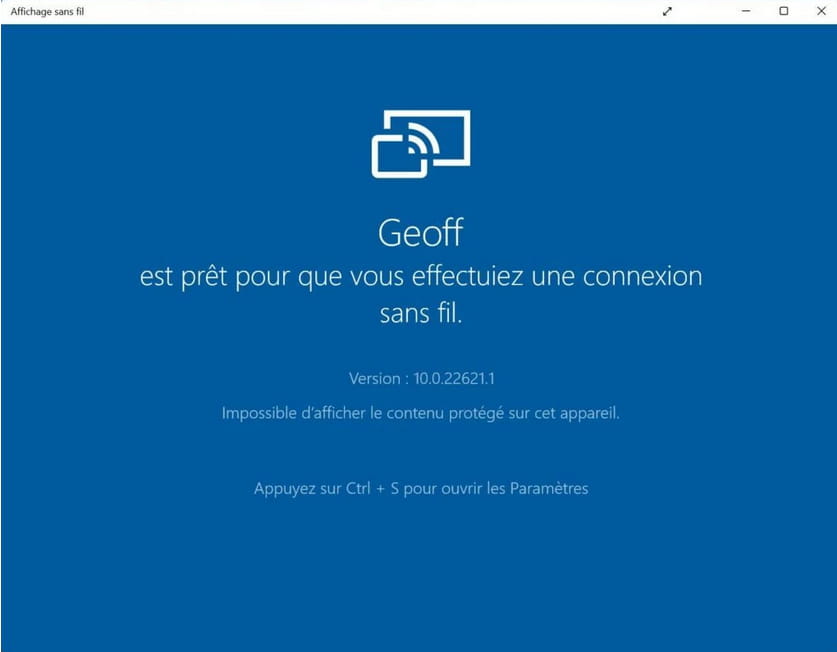
Is Bluetooth enabled on your Lenovo PC?
I don’t see anything else to report.
-
Yes for the small blue window and yes for Bluetooth enabled on my Lenovo
-
And if I press ctrl+s, the page that opens does not list any devices, even though my smartphone is properly recognized by my computer.
-
And if I press ctrl+s the page that opens does not list any device.
That's normal because you need to connect with the Smartscreen of your Galaxy.
Presumably, the connection is made via Bluetooth and the projection on PC via Wifi.
Also, have you checked that Bluetooth is enabled on your Galaxy?
-
Good evening
Thank you for your response.
1-Bluetooth is indeed enabled on my Galaxy as well as on the PC.
2-I can connect with SmartView, but the problem is there. Smartscreen searches for hours and finds no devices.
-
Ah, here we go, SmartView has found my PC and it's asking me to start mirroring. I started the mirroring but nothing is happening on my PC. No screen from my smartphone is displayed.
In summary, small blue window >>>> PC and smartphone on the same Wi-Fi network via Bluetooth >>>> connection with SmartView from my Galaxy. >>>> I click on start mirroring >>>>
Result: I'm going crazy!
-
-
Moderator@musicox
I can only repeat that Smart View is not suitable. It's an app that allows you to cast your smartphone screen to a TV. But it doesn't work with a computer.
Smart View works very well with my Android TV, but it doesn't recognize my PC.
Stop wasting your time with Smart View.
You need to use Link to Windows (at the same time as Mobile connected) and find out what is preventing it from working with your computer. -
@Pierr10
Yes, that works, but the problem is that in the features I don't have the "applications" tab that allows me to see my smartphone screen on my PC. The features include phone, notifications, photos, calls, and settings.
Do you understand my problem? That's why I turned to SmartView, because with Mobile Connect and the link with Windows I can't get my Galaxy screen on my PC! That's exactly why I posted.
It works for you (you can see your smartphone screen, among other things) because on the interface of your "Mobile Connect" app you have the "applications" tab that allows you to open your phone applications and see them mirrored on your PC.
Did I make myself clear? Anyway, thank you for trying to help me.
-
-
Good evening,
If Smartview is not suitable for wireless display, perhaps you have another application that allows it. You need to look in the connections menu; on mine, it's "screencast," on others it's "wireless projection," ...
Note that the Link with Windows + connected mobile does not necessarily display the smartphone. For me, it only gives me notifications, SMS, photos, and calls.
-
Well, here we are back at square one.
Take the time to watch the tutorial (very well done), it's possible. The problem is that I don't know why I don't have the "applications" tab that allows me to share the smartphone screen as shown in the tutorial.
.https://www.youtube.com/watch?v=QiWLm__OH0k
Just start at 3 minutes and 55 seconds (we know what's before that).
That's all.
Thank you for your help.
-
@musicox
As I told you, I also don't have the "applications" tab, which is why I am using wireless display.
That said, it is possible that your Galaxy A21S does not support Miracast technology for wireless display. The sale of this accessory seems to indicate that:
https://www.gsm55.com/cables-et-connectivites/cables-video-pour-samsung-galaxy-a21s.html
-
@thev
I correct my statement.
In fact, it's the opposite. The sale of the accessory indicates that your Galaxy is indeed equipped with Miracast technology.
-
Moderator@musicox
Hello,
I don't know why you don't have the "Connected Mobile" tab.
Check in the "Connected Mobile" settings that the application access permission is enabled (gear icon at the top right, then "Features")
Also, check that "Connected Mobile" is up to date. I'm using version 1.24102.96.0
In the video, it doesn't mention that you can display the mobile screen by clicking on the icon in the top left.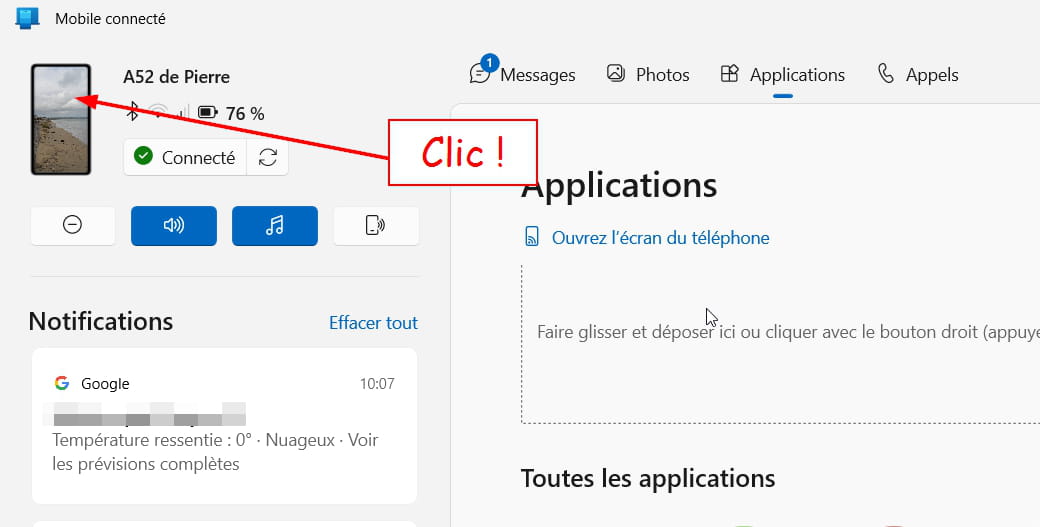
-
@Pierr10
I've finally found the why and how!! (why I don't have the "apps" tab that allows displaying my smartphone screen on my PC).
Here is a copy/paste of an article about "Connected Mobile" and "Link to Windows".
"The app is native with the latest versions of One UI on recent Samsung devices: Galaxy Note 10, Note20, S9, S10, S20, S21, Fold, Z Flip, but also some Galaxy A. You just need to activate it from the notification area. If you don't have the app, download Your Phone Companion – Link to Windows. Let's remember that if you have a device from another brand or a Samsung that is not compatible, you won't have access to all features.
So now I have my answer because my Samsung Galaxy A 21 S is not on the list. Therefore, I don't have access to all the functions, namely "Apps."
There you go.... I'm not giving up, I will keep searching until I find it!!
-
-
Here you go Pierre, I have been busy since yesterday. I will reply to you in an hour. Thank you for your patience.