
"Powerful setup" recently crashed on all games
flo88 Posted messages 28534 Registration date Status Contributor Last intervention -
Hello everyone.
I recently bought a setup from Materiel.net;
-Gainward GeForce RTX 4090 Phantom
-Intel Core i7 14700KF (3.40 GHz - Turbo 5.60 GHz)
-Asus ROG Strix B760-F Gaming WiFi
-RAM: 32GB DDR5 5600MHz
-Kingston Fury Renegade NVMe GEN4 2TB
In the early days after my purchase, I was able to fully enjoy my PC on various demanding games without any issues (Cyberpunk 2077 / Baldur's Gate 3 / Escape from Tarkov and many others, I’m a big consumer of video games) all running at 4K/120FPS most of the time. However, gradually I started encountering crashes in some games and then blue screens indicating that the computer was encountering a problem and needed to restart (not necessarily while gaming at the time of the blue screen) to then function again upon reboot. But very quickly, ALL my games started crashing, whether they were 2D games like Octopath Traveler which barely consumes any resources crashing after 5 minutes or less, or other more demanding games that sometimes crash after several hours or just minutes, as well as blue screens appearing 5 seconds after starting the computer, at the moment the computer starts launching programs like Discord / Spotify, etc., before managing to boot up correctly on the next try.
The temperatures of the different components are good.
My Discord program also won't start, and when it does manage to launch, it crashes after a short while, and some programs like Wallpaper Engine have also crashed.
I then sought to update all my components, but nothing changed. I started running stress tests with OCCT, on the RAM modules for 1 hour, no results, on the GPU for 25 minutes, no results, and on the processor where I encountered several errors in less than 5 minutes.
After 3m27, 3 errors appeared
CPU - 1 error found on physical core #6 - logical core #12
CPU - 1 error found on physical core #6 - logical core #13
CPU - 1 error found on physical core #2 - logical core #4
and I did not push the stress test much further.
I am posting here to seek guidance because from here, aside from a Windows reboot which I think wouldn't solve the problem, I have no idea what to do or think about this situation.
Thank you all in advance for taking the time to help me.
5 answers
-
jeannets Posted messages 28459 Registration date Status Contributor Last intervention Ambassador 6 618
Hello,
After an hour of reading..!! I'm tempted to say that the CPU cooling is not sufficient... and is degrading.... or the NVMe.
So the quality of the CPU installation and the application of thermal paste, between too much and not enough paste... but also the cooler, the intake and exhaust holes, and around the PC..
Your OCCT test produces graphs that show its state during the test; including the evolution of temperature curves, with numbers... It would be interesting to attach these files..
You say that the "temperatures are good" without giving us the numbers for these temperatures... Why is that..??
4K at 120Hz puts a heavy strain on resources... it's already a heater.
The brand and model of the motherboard are the most significant information.
-
Thank you again for the time you are giving me, and I apologize for the omissions related to my first post.
The motherboard model is: Asus ROG Strix B760-F Gaming WiFi
As for the CPU temperature, the I7 14700KF has a reputation for easily reaching the 100-degree mark, and during the second stress test of 5 minutes with Intel Extreme Tuning Utility, it fluctuated between 96 and 100 degrees, and this time without finding any errors at the end of the stress test.
I will do a new one tomorrow so I can send you a graph of it.
I have seen some people lower the CPU voltage because the base tower produces quite a lot of heat/noise, and with water cooling, it tends to act like a radiator :)
I'm adding this just in case the page on the site offers additional information that I'm not aware of: https://www.materiel.net/produit/202305030037.html
-
Hello
CPU: Maximum Turbo Power. 253 W (125W base)
Graphics card 4090: 515W to 550W depending on the tested samples. These are the maximum measurements.
(The sometimes recommended 850W power supply is not always sufficient for extreme overclocking done by overclockers.)
Stress tests are not all equal; they make components heat up more or less and are more or less "tolerant" to errors.
A processor very close to the limit temperatures starts making errors before crashing or activating safety, even if the maximum is designed to prevent that, of course, the processor is not at fault or damaged, it's solely the heat at a given moment somewhere.
In overclocking, it's up to you to set the limit a little below, there are always small inequalities over time within a few degrees or a few mm in a component.
Even if the stress test is theoretically always hotter than during the rest of the usage.
-Temperature is not the only cause of crashes, though.
-
Thank you very much for your response.
I personally haven't touched the BIOS and use the system as it is sold because I have no experience in that area and I've always been afraid to touch something that I shouldn't.
You are advising me to lower certain limits in it, and I have a few questions if you allow me;
- Can I do that through Intel Extreme Tuning Utility, or is it better to do it through the BIOS (F2) at the time of starting the computer?
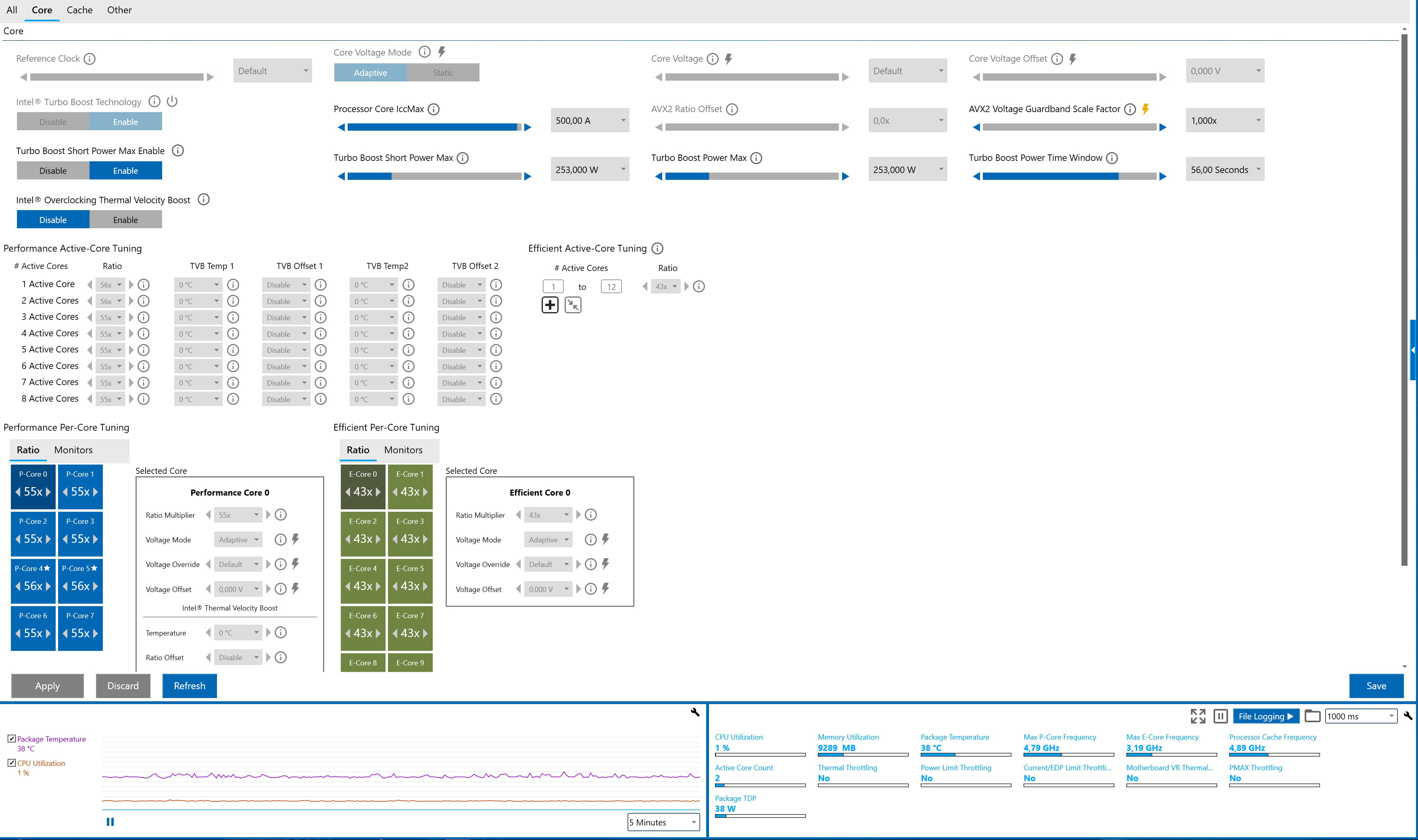
- On the Intel Extreme Tuning Utility, as you mentioned, the Turbo Boost Short Power Max is indeed at 253W, is that what you recommend I reduce? If so, is it to 125W as default, or would simply reducing it by a few watts be enough?
- I am attaching an image of the information provided by Intel Extreme Tuning Utility; perhaps this will give you more information that could help.
Thank you again.
Hi
Known issues affect the big 13xxx and 14xxx, there are tons of articles online. Just randomly:
To solve this problem, motherboard manufacturers regularly release BIOS updates, so make sure to apply them without hesitation.
One point regarding overclocking, a B760 chipset does not allow it. The overclocking is automatic with the Turbo Boost integrated into the CPU. By the way, it’s a shame not to have chosen a Z790 board.
For the power supply, I skimmed through it, but I didn’t see anything about it; you need at least a 1200w in your case.
And for the temperature, a CPU should never exceed 90° under load, so you have poor quality cooling; you shouldn’t mess around with a processor like that, otherwise in summer when it’s 35° outside, you won’t be able to use your PC at all.
Signature
Waiting for more responses; I attract trolls...-
Hello, thank you for your response,
I have indeed updated the BIOS with Armoury Crate and it is less than a month old, the power supply is 1250W and regarding the temperature, it almost consistently reaches 100° only during stress tests. In games, it varies greatly depending on the different games; during loading times, it tends to go above 90° and once in-game, it fluctuates a lot but I wouldn't know if this is "normal/logic" or not due to my lack of knowledge.
And for the choice of the motherboard, it’s a tower sold by the site and I didn’t choose the different components myself precisely because I was afraid of making this kind of "mistake" that I am currently encountering; if I had known haha.
For the choice of the motherboard, it's a tower sold by the site and not me who chose the different components precisely out of fear of making this kind of "mistake" that I'm currently encountering, if I had known.
I had seen that it was a pre-built model, but it's not really a mistake, simply the 790 chipset is the one that pairs best with "K" CPUs.
For the temperature issue, install https://userdiag.com/ and run a long diagnostic and post the link to the results here.
Signature
Waiting for other responses; I'm attracting trolls....
-

