
Toshiba external hard drive crashed
jeannets Posted messages 28459 Registration date Status Contributor Last intervention -
Hello,
I have a big problem with my Toshiba external hard drive. As soon as I plug it into my PC (both desktop and laptop, so it's not them), it completely freezes everything, I can't get anything to work on the computer and it eventually crashes too...
What could be the issue, please?
And especially, crucial question, how can I recover the data on it, because I have a folder for a personal project on it, and I clearly can't lose it, it's several months of work...
I installed a data recovery app, but as I said, as soon as I plug in the hard drive, nothing works, I can't open anything, the drive is detected, it lights up but that's it...
Thank you!
10 answers
-
jeannets Posted messages 28459 Registration date Status Contributor Last intervention Ambassador 6 618
Hello,
I think this disk has a big problem that is freezing your PC... SSD or HDD..?
Is it recognized in the BIOS..?
How is it connected to the PC..? USB 2 or 3..? or others
What is your PC..? Brand, Model, Age..??
Operating system..?? and Version..?
-
Hello,
So I think it's recognized in the BIOS but, as I said, if I plug it in, it ends up freezing my PC. I haven't tried opening the BIOS on startup, though...
However, it is recognized by the PC, in the sense that when I open File Explorer, but if it freezes, I see my hard drive appear on the left, in the drop-down list...
Normally, it's USB 3.0, and even though several ports on my PC are out of order, I still have 4 that work at the back of the machine. It doesn't change anything, the hard drive lights up but freezes the PC...
As for the PC itself, I will directly attach an image of the configuration; it'll be simpler =>

It's an aging machine, clearly, it still allows me to play some recent games and work, but it's definitely showing its age.
I just want to recover the data; if the drive is dead, well, too bad, it's also several years old, but at least I want to retrieve what's on it... I stored everything on it because my PC is getting less and less reliable, it allowed me to secure my files; let's just say I'm really frustrated that it's the drive that's malfunctioning...
Oh, and I bought a new cable too, to see if it could just be that, but without much hope; I'd be too lucky, wouldn't I....
-
jeannets Posted messages 28459 Registration date Status Contributor Last intervention Ambassador 6 618
The image of the config does not provide answers regarding the disk...
-- It would be more desirable to have a clear screenshot of the BIOS showing this disk.
-- Also a screenshot of the "disk management."
-- This Toshiba disk must have a model name..?? and it might work better on USB2 and not on USB3.
-- Perhaps it should be tried on another PC..?
-- To recover the data, a bit more patience is needed..!! And do not consider its death so quickly, without knowing more.
-
Well, if I understood the request correctly, here’s a photo of the BIOS; the hard drive is indeed detected, but when I unplug it, it crashes...

Regarding Disk Management, as I've said since the first message, I can't do anything when the hard drive is connected; I can't open anything, can't start anything, everything freezes....
The disk itself =>
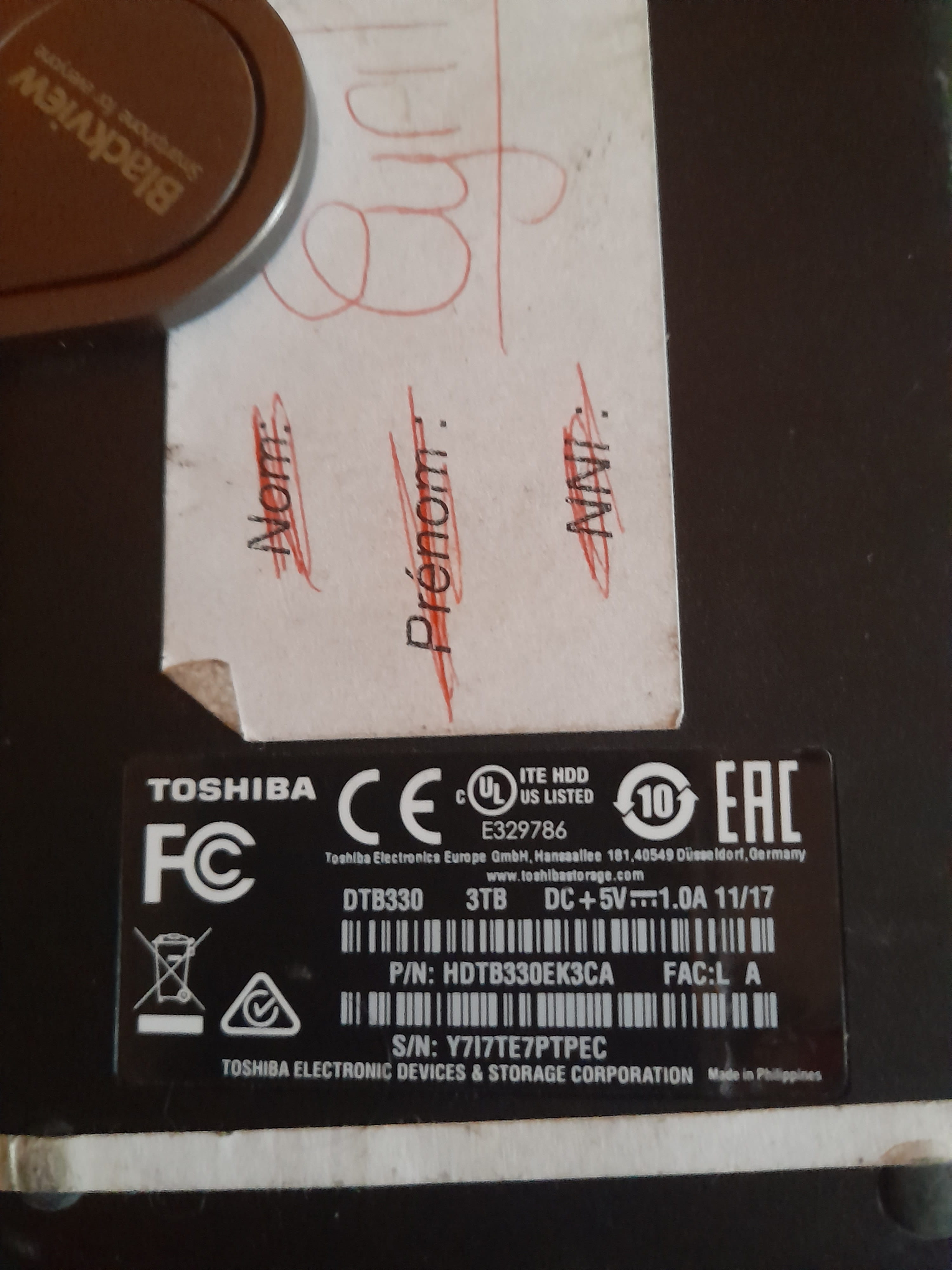
And as I also mentioned, yes I tried connecting it to my laptop, still nothing, it freezes....
So how do I proceed to recover this damn data? A technician?
-
jeannets Posted messages 28459 Registration date Status Contributor Last intervention Ambassador 6 618
I see that this drive is three TB ... and it consumes 1A at 5 volts.
And the computer, I assume a Dell Optiplex 9070OJBV ... is it capable of managing a capacity of 3TB ...??? For an Optiplex, I'm not sure ...
Moreover, it consumes 1A. USB ports are limited to 0.5A. I wouldn't be surprised if it doesn't have enough current to operate ... It would be necessary to use a Y USB cable that plugs into 2 USB ports on the PC to provide enough power ... This drive is designed for USB-3.
As for the BIOS photo, I'm not convinced that it's the Toshiba that's on the USB ...? It could very well be the PC's drive, which is also Toshiba ... especially since the photo is cropped ... and we don't know about the PC's drive ..??
-
I have two internal drives on the PC, a Kingston and a Seagate....
And it was working until a few days ago, it's not a power supply issue.... so the Toshiba is indeed detected as I mentioned in the BIOS when it's plugged in, and as soon as I unplug it, the line disappears...
-
jeannets Posted messages 28459 Registration date Status Contributor Last intervention Ambassador 6 618
Alright, so it is indeed this drive that is detected.. OK.
The overall electrical power of the PC is not at fault. It's only the power available at the PC's USB ports... it's too low, it needs to be connected to two USB ports simultaneously to get 1A.
Has this drive ever worked on this PC..?
-
jeannets Posted messages 28459 Registration date Status Contributor Last intervention Ambassador 6 618
Here is a good guide:
https://4ddig.tenorshare.com/fr/disque-dur/disque-dur-externe-toshiba-non-reconnu.html
Otherwise, there is the option of opening the case to extract the drive..
Here is the principle https://www.youtube.com/watch?v=6FgCMmc8WV0
Then you end up with a standard SATA drive in your hands.
-- You need to put it in a tower as an internal drive... even in yours, in place of the secondary drive... or it should work, I think..
And thus, it will be possible for you to recover your precious files... On one hand and continue the investigations, on the other hand...
The USB module alone could be the cause.
And mounted as an internal drive, there will be no more power issues with USB.
So here are some interesting advantages to get you out of this mess.
It's up to you to act.
-
Thank you all, after all it is what it is, but I went to see a computer technician this afternoon, and based on what it's doing, he told me it was a lost cause, the hard drive was dead.
-
jeannets Posted messages 28459 Registration date Status Contributor Last intervention Ambassador 6 618
If you want to try to recover your files, don't give up just yet.
Keep in mind the advice that has been given to you here...
Beyond this point, you still need to test for any potential defects on the disk outside of Windows, which has not yet been done... and if there are no defects, there are still utility software available, outside of Windows, that can be used for recovery.. Not everything has been tried yet..
In this case, I think your impatience is overshadowing the desire to recover the files..

