
How to change the highlight color on MacBook
Aliboron Martin Posted messages 3661 Registration date Status Contributor Last intervention -
Hello,
how to change the highlight color on MacBook
2 answers
-
Hello,
-
Select the text you want to highlight.
If the text is in a text box or in a figure, clicking on the text box or figure selects all the text within it.
-
In the Format sidebar
 , click the Style button located at the top.
If the text is in a text box, table or figure, start by clicking the Text tab at the top of the sidebar and then click the Style button.
-
In the Font section, click
 .
. -
Next to Text Background Color, click the color source on the left or the color wheel on the right, then select a color.
The color source shows the colors that correspond to the template you are using. The color wheel opens the color picker window where you can choose any color.
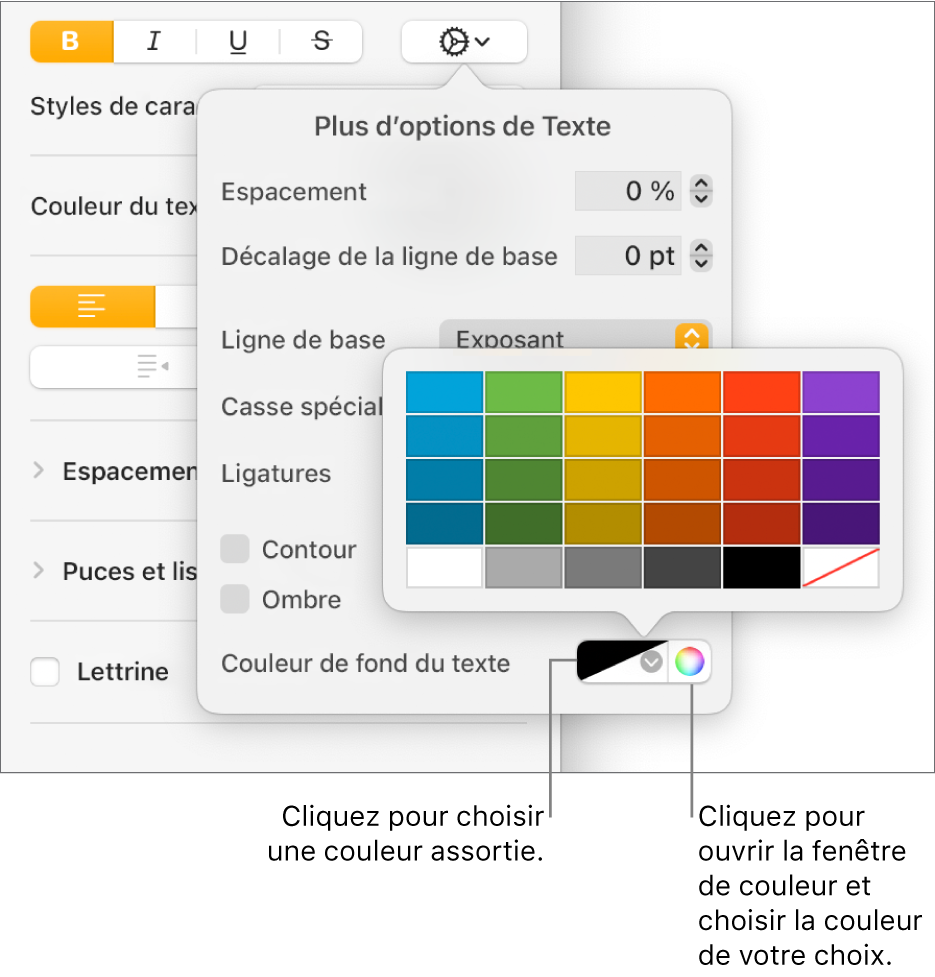
-
Click anywhere in the document to close the controls and apply the color.
Tip: If you frequently add colors behind text, you can create a character style using a specific text background color. You can then select this style from the Character Styles context menu to highlight the text with that color. You can also create a keyboard shortcut to apply the character style.
https://support.apple.com/fr-fr/guide/pages/taned4110e43/mac
See here as well:

-
-
If it is more about the contrast color, meaning the one that marks the text selection anywhere in the Finder, then you will find the "highlight color" setting in the system preferences, under the "General" tab:

Hello at your place!
Bernard

