
Error message: Unable to find the script file C:\
Solvedbazfile Posted messages 58539 Registration date Status Moderator Last intervention -
Hello,
for the past few days, I have been seeing this message when starting my laptop: Unable to find the script file C:\Users\ivann\AppData\Local\Config.vbe.
I have run a scan using FRST, here are the 3 results:
FRST.txt: https://pjjoint.malekal.com/files.php?id=FRST_20240229_b7y6b9y14h9
Addition.txt: https://pjjoint.malekal.com/files.php?id=20240229_w9d11n610p8
Shortcut.txt: https://pjjoint.malekal.com/files.php?id=20240229_s14w14g13r13o11
Thank you in advance for your help!
2 answers
-
The fixlog is OK.
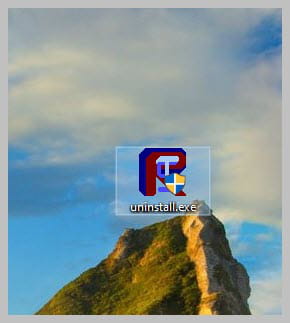
Uninstall FRST, rename the FRST file you downloaded to uninstall, and once the file is renamed, open it; the uninstallation will happen automatically upon rebooting the PC.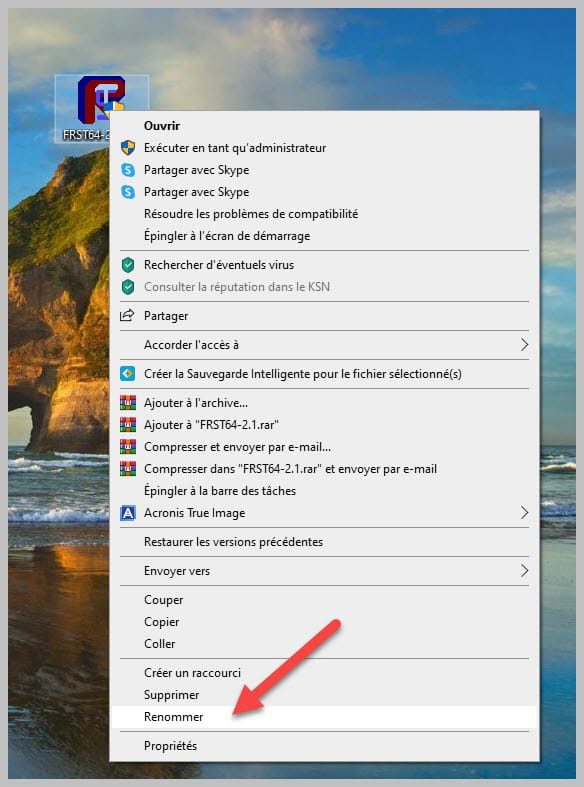
bazfile
Moderator/Security Contributor.
A hello, a reply, a thank you are always appreciated. -
Hello.
If it’s not you who installed it and if you are not using it, uninstall WebAdvisor by McAfee as it is adware.
Procedure to follow in the order indicated:
1- Open FRST as an administrator by right-clicking on FRST and selecting run as administrator
2 - Copy the entire script that is in the following box:Start:: CreateRestorePoint: CloseProcesses: HKLM\SOFTWARE\Microsoft\Windows Defender: [DisableAntiSpyware] Restriction HKLM\SOFTWARE\Microsoft\Windows Defender: [DisableAntiVirus] Restriction HKLM\...\Print\Monitors\Canon BJ Language Monitor TS3400 series: CNMLMGF.DLL (File not found) Task: {E0F10DCF-44AD-40E8-9370-FB5DA59F93FB} - System32\Tasks\Microsoft\Windows\UpdateOrchestrator\USO_UxBroker => %systemroot%\system32\MusNotification.exe (File not found) Task: {3FAE5C32-3C87-4C91-812D-BE5623781D4A} - System32\Tasks\NvProfileUpdaterOnLogon_{B2FE1952-0118-45C3-BAEC-A80AA35AC5B8} => C:\Windows\System32\wscript.exe [200704 2023-05-10] (Microsoft Windows -> Microsoft Corporation) -> //Nologo Config.vbe Task: {5FFF9A85-1CED-4926-A0B8-741B1DFC4FB5} - System32\Tasks\Oem\xvpnHelperTask => "%localappdata%\OEM\PromoX\XvpnHelper\XvpnInstaller.exe" /install (File not found) CHR HKLM\...\Chrome\Extension: [fheoggkfdfchfphceeifdbepaooicaho] CHR HKLM\...\Chrome\Extension: [klekeajafkkpokaofllcadenjdckhinm] CHR HKLM-x32\...\Chrome\Extension: [fheoggkfdfchfphceeifdbepaooicaho] CHR HKLM-x32\...\Chrome\Extension: [klekeajafkkpokaofllcadenjdckhinm] S1 WinSetupMon; system32\DRIVERS\WinSetupMon.sys [X] CustomCLSID: HKU\S-1-5-21-839964540-2842495572-2942080995-1001_Classes\CLSID\{82A6D7A6-FC2E-4DFD-AAEF-E3BBF9AD71AD}\localserver32 -> "C:\Program Files\CEWE Photoservice\CEWE Photoservice\AutoBookService.exe" -ToastActivated => File not found FirewallRules: [{9D3A302B-6A6A-4BD4-8DED-CBE9D1C9CC1A}] => (Allow) C:\Program Files\Mozilla Firefox\firefox.exe => File not found FirewallRules: [{2B218BA8-FB20-4E44-8FD7-8167698C5EFC}] => (Allow) C:\Users\ivann\AppData\Roaming\Zoom\bin\Zoom.exe => File not found FirewallRules: [{295A9A03-F97A-47DD-B09E-091CFDA2A175}] => (Allow) C:\Users\ivann\AppData\Roaming\Zoom\bin\airhost.exe => File not found FirewallRules: [{8FD76466-D29B-4D83-AF0A-92351ADB4005}] => (Allow) C:\Users\ivann\AppData\Roaming\Zoom\bin\airhost.exe => File not found FirewallRules: [{44464551-F01E-4B1D-801C-11DA20221712}] => (Allow) C:\Users\ivann\Documents\Programs\ApowerMirror\ApowerMirror.exe => File not found FirewallRules: [{F2E1AD24-44C5-471E-964C-BF0F5349D4E9}] => (Allow) C:\Users\ivann\Documents\Programs\ApowerMirror\ApowerMirror.exe => File not found End::3- Once the script is copied, click on Fix, FRST automatically takes the script from the clipboard.

Let the fix proceed; once it is complete, you will be asked to restart your PC. Please do so as soon as prompted, see below.
Once your computer has restarted:
4- You will have a Fixlog file on your desktop, then send this fixlog report to https://www.cjoint.com/ and provide the generated link from https://www.cjoint.com/ in your response.5- CHECK AND LET ME KNOW IF YOUR ISSUE IS STILL PRESENT
bazfile
Moderator/Security Contributor.
A hello, a response, a thank you are always appreciated.-
Here is the Fixlog file: https://www.cjoint.com/c/NCcmMom8bbH
Since then, I haven't received any messages; I think it worked well - thank you very much!
-
