Big bug with the taskbar. Windows 10
Core-Poration Posted messages 7 Status Member -
Hello,
I just had a big problem with my taskbar. I couldn't launch a game when I decided to restart my PC to see if it would solve the issue.
But since I restarted it (and restarted it several times after noticing the bug), the taskbar is partly empty, almost all the application icons are missing. Otherwise, the date/time, Windows logo, and search bar at the bottom left are visible but unusable. My cursor shows the blue loading circle when I hover over the taskbar, and every time I click on it, it restarts the Windows browser (at least it has the same visual effect, and yes, I've tried restarting the Windows browser manually, which doesn't solve anything).
I've noted that some applications like Mozilla Firefox no longer work properly, Steam works but I tried to launch 2 games, and none of them worked, and all shortcuts like WIN+R, WIN+E, etc. no longer work (everything related to the Windows key seems to be malfunctioning).
Things I've tried so far: Restarting the PC, restarting the Windows browser from the task manager, running Malwarebytes, and using these commands.
SFC /scannow
DISM /Online /Cleanup-Image /CheckHealth
DISM /Online /Cleanup-Image /ScanHealth
DISM /Online /Cleanup-Image /RestoreHealth
SFC found and repaired corrupted files, but even after restarting the PC, nothing has changed, so I don't think that was the cause of my problem.
I hope to resolve the issue quickly because I will have a hard time sleeping otherwise :(
(Also a small detail, some applications like Firefox or Discord have trouble starting and often become "unresponsive", but I noticed that clicking on the taskbar (which restarts the Windows browser) tends to unblock them. I feel like the PC is in an infinite loop trying to load the taskbar, and that's what's blocking it from doing other things)
12 answers
-
Hello.
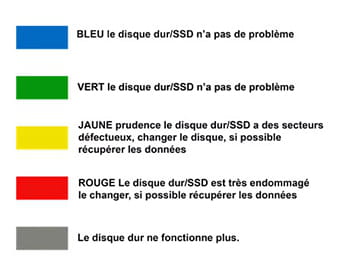
Test your hard drive with CrystalDiskInfo and use the color codes below to interpret the results:
bazfile
Moderator/Security Contributor.
A hello, a response, and a thank you are always appreciated. -
Hello,
Which antivirus do you have?
Did you leave Windows Defender or install another active antivirus?
Sometimes it can cause conflicts, never have more than one active antimalware scanner.
Windows Defender is enough. -
CrystalDiskInfo tells me that everything is fine, everything is blue.
I have MalwareByte and Avast, but I've never seen anything related to Windows Defender appear on my PC, so I don't feel like I have it. -
Uninstall Avast and switch Malwarebytes to the Free version by disabling the trial of the Premium version. (Unless you have paid for the Premium version)
You will find Windows Security in the Start menu > All apps.
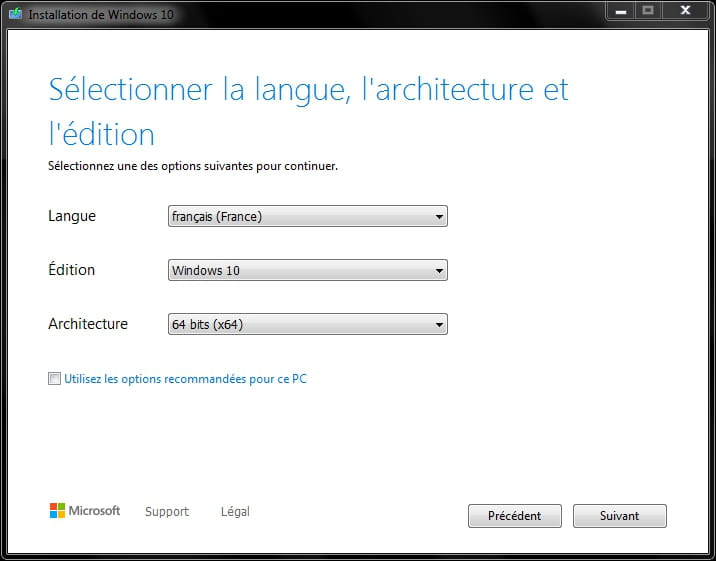
You can repair or update Windows:To perform an update or repair without data loss, use the tool to download a Windows ISO file.
Windows 11 if compatible, you can check with WhyNotWin11
https://github.com/rcmaehl/WhyNotWin11/releases
Windows 10 https://www.microsoft.com/fr-fr/software-download/windows10/
Windows 11 https://www.microsoft.com/fr-fr/software-download/windows11
Once the file is downloaded, open it with 7-Zip and extract everything to a folder anywhere except directly on C:\
https://www.7-zip.org/download.html
Click on the setup.exe that is in the extracted folder.
-
Uh I tried the Windows 10 update thing and as soon as I clicked on the executable, the taskbar started working again, and the window said "Thank you for upgrading to Windows 10." Is it normal for it to be that instant? Did it really work? I'll check if it works after restarting, in any case, thank you ^^
-
In the end, I restarted the PC and the problem is back again, I tried to reuse the executable and it always ends just as quickly, but that didn't fix the problem this time. It might have been a coincidence, I have no idea what fixed the problem this time, maybe just time? The number of restarts of Windows Explorer? Anyway, the problem persists.
-
Did you download the MediaCreationTool to download the ISO as I wrote?
And this: "open it with 7-Zip and extract everything into a folder anywhere except directly on C:\"
https://www.7-zip.org/download.html
Click on this setup.exe?
For Windows 11, you can even download the ISO file directly. -
The Windows 10 link you gave me is downloading an executable, am I supposed to be able to open that like an ISO? I want to try, but it doesn’t seem logical to me.
-
When I say the tool, I mean the second link at the bottom for Windows 10, where it says Download the tool now.
Sorry. -
Or do I have to download it with your app? I don't understand how it works, but I'll go take a look...
-
-
So I'm a bit lost, at the same time I haven't slept for 24 hours, and I was already short on sleep when I woke up...
But now I just saw a message when trying to launch Firefox saying that there was not enough RAM to run this program, I've never had that before so it really doesn't seem to be going well with my PC...
I think I've had 7-zip for a long time, but in any case I'll see tomorrow, my PC is working again but I don't think it will last once I restart it.
Sorry for all the confusion :( and thank you for the help.