
How to fix error 0x80096004?
Solved
bazfile Posted messages 58442 Registration date Status Modérateur Last intervention -
Hello everyone, My PC, when purchased in 2013, was running Windows 8, I had to upgrade it to 8.1, which was fine since then, but now Microsoft has stopped managing updates since 01/01/2023 and having a paid antivirus ESET, it also asked me to upgrade to Windows 10, which I did (following your instructions) except for the Edge browser, I prefer to keep Chrome with my sites. What is annoying are several things at startup that irritate me and that I don't know how to fix, such as:
- Classic Shell needs to be configured for the new browser.....!!!!
And especially, WINDOWS UPDATE BLOCKS an update with error code: 0X80096004 and I have been looking for a solution for 3 days without destroying my migration that I managed to do, alone and when I don't know how to do something, I ask for help.
I hope you will be willing to help me, as you have always been good advice.
Thank you for explaining to me step by step by email, as I am now 77 years old and my knowledge is now limited.
Sincerely
P.S.: I also have EXCEL and Word under Office 2003 and it too refuses to update (error KB907417), I would like to exclude it as before from Windows Update, but I can't find where the option to exclude an update is; Ended
- Error message when opening my Asus PC with Windows 10
- Code 0x8000000a: An error prevents the photo from being displayed
- Error 0x80080005 - 0x90018 during Windows 10 installation
- PC powers on but error (0xc0000102) prevents normal use of the PC.
- Error 0x8007042B when installing Windows update
- How to Fix - You Will Need a New App
8 réponses

Hello.
Perform a Windows 10 repair without data loss (everything is preserved), despite what is indicated on the screens, it is indeed a repair not a Windows installation.
Download this Microsoft tool, open the tool, and follow the instructions below:

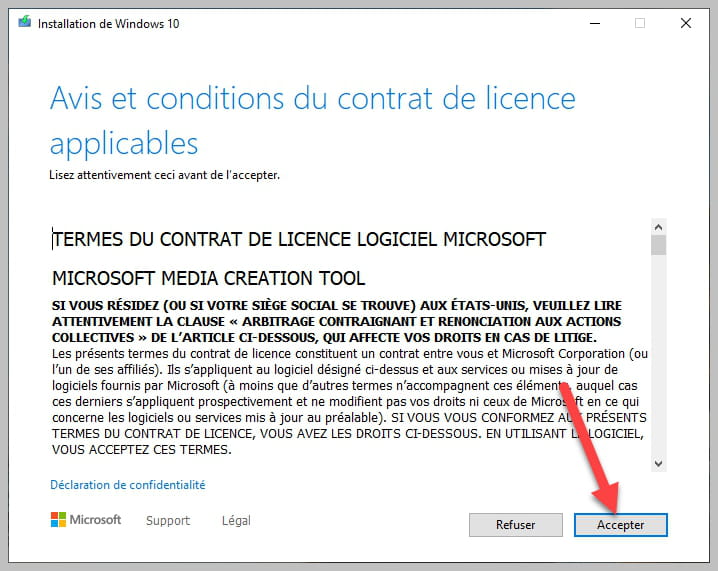


Be sure to keep checked as in the picture.
bazfile
Moderator/Security Contributor.
a hello, a response, a thank you are always appreciated.
But this morning when I connected, I received a message saying you have reached the maximum of the stop point.
Have you still received this message? Or is this message no longer appearing?
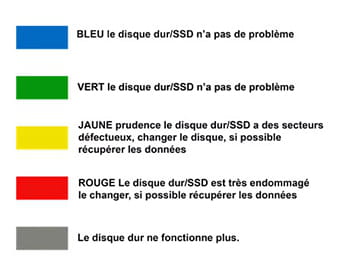
As a precaution, test your hard drive with CrystalDiskInfo and use the color codes that follow to interpret the results:


Hello, indeed the message didn’t come back, but I have another one that remains, with Windows update, which despite everything that has been done, 2 updates have failed and are flagged as critical by my antivirus.

Regarding Office 2003, I would like to uninstall this update, but with this version, I don’t see where to do it; as for the other one, I don’t understand, after everything that has been done, this failure is recurring.
Can you still help me, as you offered....!!
ASAP
It's another problem normally, the initial issue being resolved you should have created a new post.
For the first update that failed, download it and install it manually:
For the second one do the same:
https://www.catalog.update.microsoft.com/Search.aspx?q=KB907417
Good evening, it doesn't work despite your perseverance in wanting to help me, I received a message

Apparently I am not authorized for the first one, I tried to do the second but at restart, "message, we could not finalize the installation" and bam, cancellation of updates 3 times. I'm giving up on the first one and tomorrow, calmly, I'll redo the second. It's a hassle, or I'm just not skilled enough
Have a good evening
You received this message because Windows Update is running, restart your PC and try to manually install the updates again, if it doesn't work see this page (method 1).
Thank you Bazile, but I haven't redone it, as I'm not feeling well, but I keep your precious emails and I will do it later.
I'm especially grateful for your help
Have a good day
Hello, I followed your directive for the 1st update and I received a message

Does this have an impact....!!! As for the 2nd one, I'm stuck on what needs to be done....!! I'm stuck. Thank you for helping a bad student who is having a lot of trouble

Can I ask you again to guide me? However, in a CCM newsletter this morning, I saw that Windows 10 must have a license key before 31012023 or it won't be supported anymore. I'm a bit lost on the fact that I may have migrated to Windows 10 for nothing
Looking forward to hearing from you....!!! Have a good day
I saw that Windows 10 must have a license key before 01/31/2023 or it will no longer be supported.
No, you didn’t understand. The newsletter just says that Microsoft will no longer sell Windows 10 licenses starting from that date, so it has nothing to do with Windows 10 support.
For issues with updates not working https://www.malekal.com/vider-catalogue-softwaredistribution-mise-a-jour-windows-update/
Hello, I still have the 2 updates that are failing

I don't know what else to do, my ESET Antivirus keeps asking me to do the updates (critical)
Maybe you can still advise me Bazfile. Have a good day and maybe see you soon
Hello again, I just did a test, and you see


Maybe considering the age of Office 2003 (which still works) the updates are no longer happening, can we remove it or at least ensure it is no longer included in updates, as this was done by ESET support a few years ago with a hands-on approach...!!! What do you think....!!! ASAP
There's only the Office update left, but there's a problem with Office 2003. Here's what Microsoft says https://support.microsoft.com/fr-fr/office/quelles-versions-d-office-fonctionnent-avec-windows-10-0fc85c97-da69-466e-b2b4-54f7d7275705
Hello, yes I noticed that the problem came from the Office 2003 update, I bought this software and it works, by the way I have all my personal management on it, yet I can still use it. Would it be possible to block this update request.
I hope I’m not asking too much, or should I check with ESET about this.
Have a nice day
Apparently a lot of people have this problem since Office 2003 is not really compatible with Windows 10, in your case it cannot be downloaded, all of this is not really important.
For Windows Update:
Empty the update catalog, either manually or with the "complete internet repair" software (be careful to check only the Clear Windows Update History box) everything is explained on this page https://www.malekal.com/vider-catalogue-softwaredistribution-mise-a-jour-windows-update/
Hello and thank you for taking care of me for a while. I think I've managed to sort everything out, but it's tough because the approach is different, and it's a good thing I had to. Migrating to Windows 10 while wanting to keep everything from my 2013 PC is no small feat as one gets older.
You have been wonderful in understanding, meeting me at my level as a user but not as a computer specialist....!!!
It's a shame I don't have a photo; you have mine and I understand your anonymity due to your position.
In the future, if I have any more requests on the forum, how can I reach you and in what category, as apparently my initial request was not in the right one and was redirected by CCM.
Best wishes to you.
Originally, this question was posted in the "Bugs and suggestions CCM" forum, which only deals with issues related to the forum (difficulties connecting or posting questions, etc.), the question regarding Windows Update under Windows 10 should have been posted in the Windows 10 forum.
To correctly use the forum:
As I wrote, I was redirected to the right forum, but I'm sorry if I bothered you. I have been subscribed to the Forum for a long time and have always received satisfactory answers.
I hadn't seen the Windows 10 section and anyway my initial question has been accepted and redirected.....!!
Best regards
-
Canon mb5350 - cartridge replacement impossible
à 09:34 -
Texture issues in enshrouded
le 2 Jun -
Select next line csh foreach
le 31 May -
Win32 kamso then rootkit detection
le 31 May -
Win32:spyware-gen [trj] detected by avast
le 31 May -
Unknown video error on the freebox player
le 31 May -
Make it or break it
le 31 May -
How to open a cbr file
le 31 May -
Please log in with manager privileges.
le 31 May -
Wake on lan with livebox
le 31 May
Thank you, I will do it this weekend, (a bit tired) from having searched this morning, I will let you know if I succeeded
Thank you very much bazfile and see you later
@+
Hello,
It's done, but very, very long. I was even able to fix the classic shell error, but this morning when I logged in, I got a message saying you have reached the maximum breakpoint.....!!! roughly, I didn't have time to copy the code 0X.......!!!!! my PC has been boosted, much smoother.
Thank you Bazfile to you and the team. Have a nice weekend.