
Samsung Galaxy Tab E stuck on Google message

Pierr10 Posted messages 13855 Registration date Status Moderator Last intervention -
Hello, I just sold my son's tablet, a Samsung Galaxy Tab E, which my son reset first. The buyer just contacted me to say that it is stuck on the Google sign-in page, the message "this device has been reset. To continue, sign in with a Google account that has already been synced on this device." I logged into my Google account from my PC and in the security settings I disconnected the tablet, so it should work, right? But the buyer says that after restarting it’s still the same message, he can’t sign in. Obviously, he’s not happy and he’s asking me for my password to continue.......I don’t know what to do......Please, is there anyone who knows how?
Thanks in advance!
- Why isn't my Samsung Galaxy Tab 2 charging anymore?
- Issue with Samsung Galaxy Tab 3 (Google Play Store)
- Connection issue with my Samsung Galaxy Tab 3
- SAMSUNG GALAXY TAB 3 stuck on Samsung + dead Android robot
- Samsung Galaxy Tab 3 charge à 0 %
- Samsung Galaxy Tab 2: upgrading from Android 4.1.2 to Android 4.2.2
2 answers
-
Hello,
The FRP mode of the tablet is activated.
https://www.prodigemobile.com/tutoriel/guide-frp-mode-protection-android/
The tablet is therefore expecting the password of the Google account that was initially used with the tablet.
The easiest way would be for you to have the tablet in your hands again to provide this password and thus unlock the tablet. (Do not share this password with the buyer!).
Once the tablet is operational again, you need to disable the FRP mode. Do not follow what is indicated in the link I provided.
You must enable developer mode:
https://www.blogdumoderateur.com/android-comment-activer-options-cachees-mode-developpeur/Then in Settings => Developer options, allow OEM Unlocking.
Then you can indeed remove the Google account.
What is well conceived is clearly stated,
And the words to say it come easily.
(Boileau)-
Hello Pierr10,
It's me again and I'm contacting you for some additional help please!
So, I have the tablet again, the buyer agreed to return it, but I'm stuck on the instructions you gave me to activate the developer mode, I can't find the instructions :-
- Select the About tablet tab,
- Click on Software information
Can you please help me?.......starting from "settings"
It's a Samsung Galaxy Tab E tablet
Thank you in advance
Hello,
I don't have your tablet. Here are the screenshots taken on mine. It shouldn't be too far off.

Then:
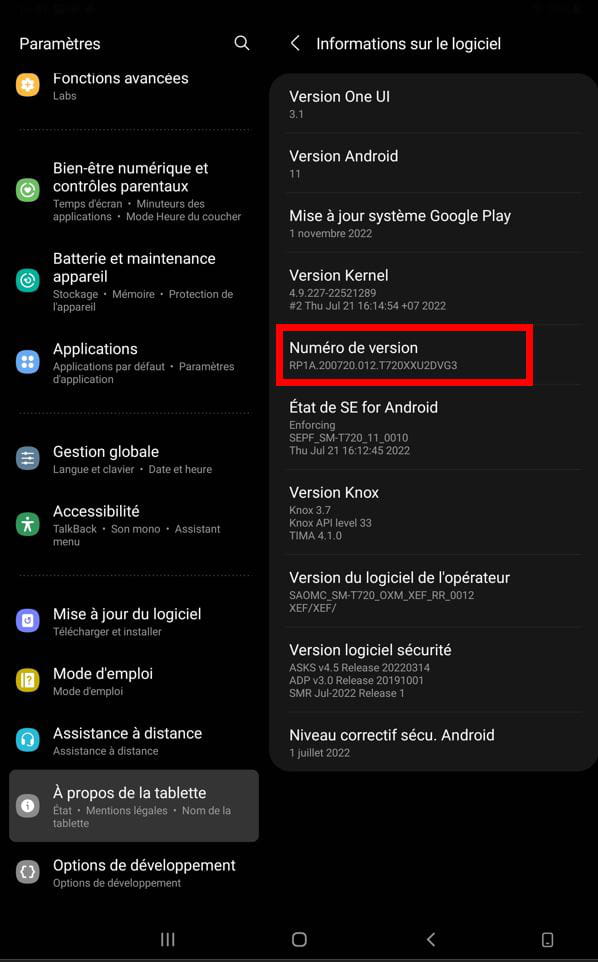
You tap Build number until developer mode is activated. (You will receive a warning).
Once that's done, you will see Developer options appear in the main menu of Settings (visible in the screenshots). You click on it and can allow OEM unlocking).
Good evening Pierr10,
Thank you for your response. I will ask the buyer to return the tablet to me, but of course, it depends if he can trust me to send it back to him afterwards!
Have a good evening
-

