Mynewtab.co in Firefox
Solvedbazfile Posted messages 58540 Registration date Status Moderator Last intervention -
Hello,
When I open Firefox, "mynewtab.co" opens. I can't get rid of it.
I repaired Firefox, no luck.
Thanks in advance for your help :)
5 answers
-
Hello.
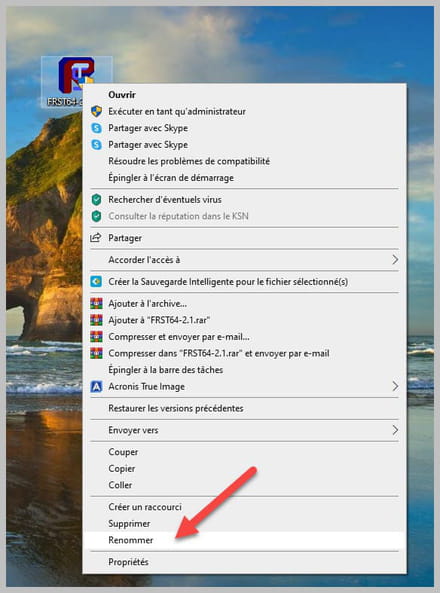
Download FRST once downloaded, save it to the desktop, then right-click FRST and choose Run as administrator you will have this:

Click on Analyze

Note, wait until the messages saying the analysis is complete appear.

At the end of the analysis you will have two text files on the desktop FRST and Addition.


Then send the FRST and ADDITION reports to PJJOINT see THIS TUTORIAL then provide the two links generated by PJJOINT in your reply.
bazfile
Moderator/Security Contributor.
a hello, a reply, a thank you are always welcome. -
Procedure to follow in the indicated order:
1- Open FRST as administrator by right-clicking on FRST and selecting Run as administrator
2 - Copy the entirety of the script that is in the box below:Start:: CreateRestorePoint: CloseProcesses: HKLM\Software\...\Authentication\Credential Providers: [{C885AA15-1764-4293-B82A-0586ADD46B35}] -> HKLM\SOFTWARE\Microsoft\Windows Defender: [DisableAntiSpyware] Restriction HKLM\SOFTWARE\Microsoft\Windows Defender: [DisableAntiVirus] Restriction HKLM\SOFTWARE\Policies\Microsoft\Windows\WindowsUpdate: Restriction FF Homepage: Mozilla\Firefox\Profiles\fw9vke2k.default -> hxxps://mynewtab.co?pId=FZ210427&searchEngine=bing&iDate=092322 FF NewTab: Mozilla\Firefox\Profiles\fw9vke2k.default -> hxxps://mynewtab.co?pId=FZ210427&searchEngine=bing&iDate=092322 FF Homepage: Mozilla\Firefox\Profiles\vefchyd3.default-release-1668757258055 -> hxxps://mynewtab.co?pId=FZ210427&searchEngine=bing&iDate=092322 Task: {CCDFC0B8-01A3-4E74-A820-4F13F51D269E} - System32\Tasks\Microsoft\Windows\Mobile Broadband Accounts\MNO Metadata Parser => C:\WINDOWS\System32\MbaeParserTask.exe (No file) Task: {E0F10DCF-44AD-40E8-9370-FB5DA59F93FB} - System32\Tasks\Microsoft\Windows\UpdateOrchestrator\USO_UxBroker => C:\WINDOWS\system32\MusNotification.exe (No file) Task: {EEEA7109-26A3-449F-A46C-354AC1681587} - System32\Tasks\Microsoft\VisualStudio\Updates\BackgroundDownload => C:\Program Files (x86)\Microsoft Visual Studio\Installer.14013ce805b74a71b35600dad6ff992e\resources\app\ServiceHub\Services\Microsoft.VisualStudio.Setup.Service\BackgroundDownload.exe (No file) S1 WinSetupMon; system32\DRIVERS\WinSetupMon.sys [X] FirewallRules: [UDP Query User{E6BD54DA-C19A-4E27-A2F8-1359F02DF4C2}C:\users\nebet\appdata\local\wire\app-3.27.4223\wire.exe] => (Allow) C:\users\nebet\appdata\local\wire\app-3.27.4223\wire.exe => No file FirewallRules: [TCP Query User{DA6EC027-A85D-4A7A-9C53-8B5D14372BFE}C:\users\nebet\appdata\local\wire\app-3.27.4223\wire.exe] => (Allow) C:\users\nebet\appdata\local\wire\app-3.27.4223\wire.exe => No file FirewallRules: [UDP Query User{0B8B180F-254E-4625-9FB3-3FA211C9672E}C:\users\nebet\appdata\local\wire\app-3.26.4124\wire.exe] => (Allow) C:\users\nebet\appdata\local\wire\app-3.26.4124\wire.exe => No file FirewallRules: [TCP Query User{0A689D53-5979-4E4B-A001-D03F739E0486}C:\users\nebet\appdata\local\wire\app-3.26.4124\wire.exe] => (Allow) C:\users\nebet\appdata\local\wire\app-3.26.4124\wire.exe => No file FirewallRules: [UDP Query User{64EECBB8-D1DE-49E8-B9BC-3AA5C9C26A35}C:\program files\java\jdk-11.0.14\bin\java.exe] => (Allow) C:\program files\java\jdk-11.0.14\bin\java.exe => No file FirewallRules: [TCP Query User{17AE52A0-81C9-4806-B0ED-A366E87653E6}C:\program files\java\jdk-11.0.14\bin\java.exe] => (Allow) C:\program files\java\jdk-11.0.14\bin\java.exe => No file FirewallRules: [{CA710C83-CE1D-48A5-82F4-0A0B62555C39}] => (Allow) C:\Users\nebet\AppData\Roaming\Zoom\bin\airhost.exe => No file FirewallRules: [{B15CC39B-F5B8-41EB-909D-7B9C32EBA02C}] => (Allow) C:\Users\nebet\AppData\Roaming\Zoom\bin\airhost.exe => No file FirewallRules: [UDP Query User{5C260298-344F-4293-8194-8CF0D58ED420}C:\program files\java\jre1.8.0_202\bin\javaw.exe] => (Allow) C:\program files\java\jre1.8.0_202\bin\javaw.exe => No file FirewallRules: [TCP Query User{6EE50D5B-DF56-4429-8B2A-1E6D12916AE3}C:\program files\java\jre1.8.0_202\bin\javaw.exe] => (Allow) C:\program files\java\jre1.8.0_202\bin\javaw.exe => No file EmptyTemp: End::3- Once the script is copied, click Fix, FRST will automatically take the script from the clipboard.

Let the fix run; once it is finished you will be asked to restart your PC, do it as soon as prompted, see below.
Then once your computer restarts :
4- You will have a file Fixlog on your desktop then send this report fixlog to PJJOINT and provide the link generated by PJJOINT in your reply.5- CHECK AND TELL ME IF YOUR PROBLEM STILL EXISTS
bazfile
Moderator/Security Contributor.
a hello, a reply, a thank you are always appreciated. -
Hello,
Thank you very much!
Here are the two links generated by PJJOINT:
https://pjjoint.malekal.com/files.php?id=FRST_20221118_s13b5v5y10f6
https://pjjoint.malekal.com/files.php?id=20221118_d8e14p9p15w12
-
Here's the link generated by PJJOINT: https://pjjoint.malekal.com/files.php?id=20221118_m5y15x11k9u11
It looks like it worked.
Thank you so much =) !
-