
Press F1 or F2 at startup
jeannets Posted messages 28455 Registration date Status Contributor Last intervention -
Hello,
I have an old Dell 4609 that was working very well, and upon rebooting, it asks me to press F1 or F2. I end up in the BIOS, but I don't know what to do. From the various sites I've seen, it's a Dell issue that should be fixable, but I haven't managed to do it. I've changed the battery and the fan,
But it's still the same. If someone can help me, I would be very grateful.
Thank you in advance
28 answers
- 1
- 2
-
jeannets Posted messages 28455 Registration date Status Contributor Last intervention Ambassador 6 618
Hello,
You need to install a new CMOS battery and clean the contacts if they are oxidized...
Start the PC, go into the BIOS and enter the configuration data... The current time, the disk, etc... finally press F10 "Save"
It should then restart without asking questions... Then launch Windows, if it has a non-corrupted hard drive.
-
Hello, thank you for your reply.
I replaced the battery, and the connectors are in very good condition.
I think the problem lies in the BIOS.
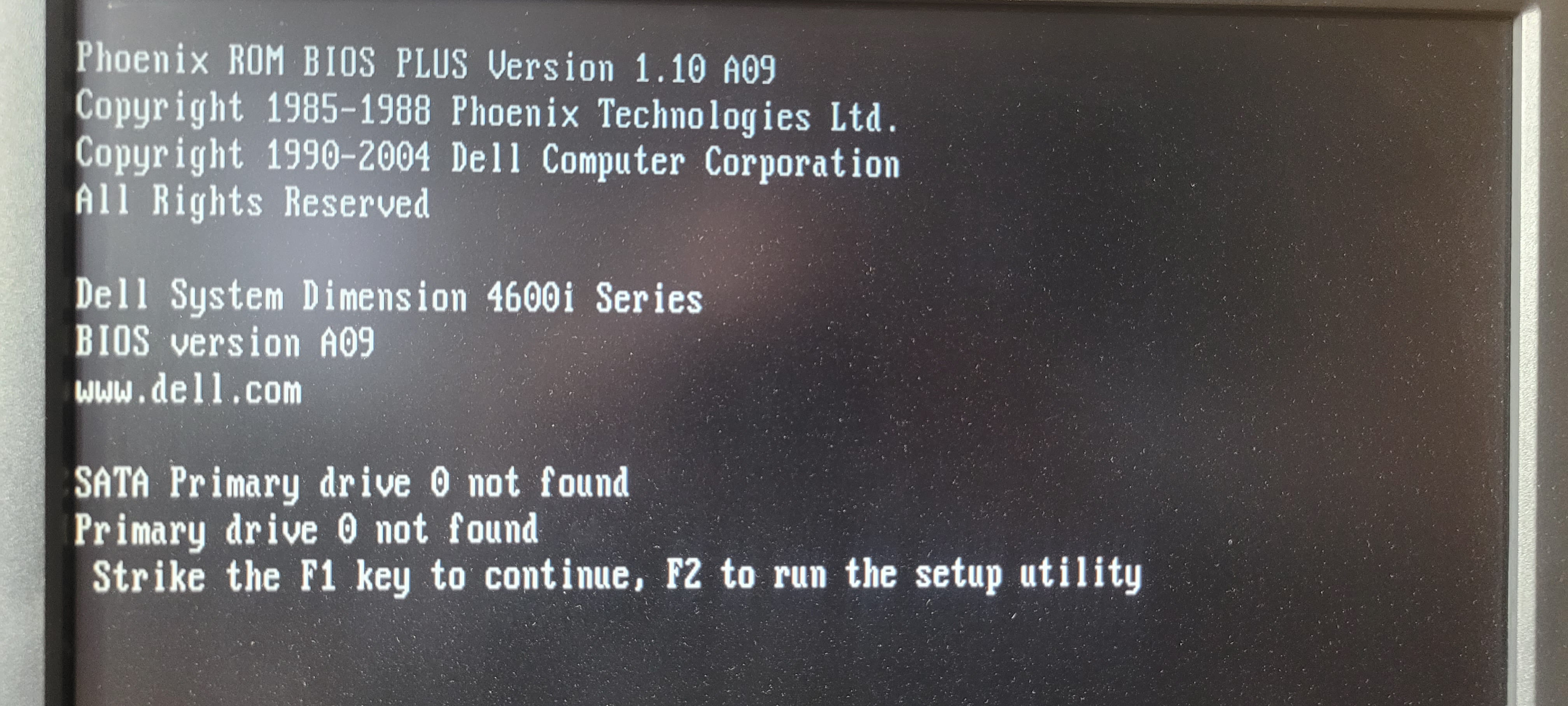
I have the impression that it doesn't recognize the HDD.
I don't know how to fix this.
I can send you a photo of the BIOS for more details if you want.
Thank you in advance.
-
jeannets Posted messages 28455 Registration date Status Contributor Last intervention Ambassador 6 618
Yes, clear photos help a lot... not millions of pixels... 500k is enough for clarity and legibility.
But you should provide a bit more information about your PC... Dell 4609 which seems to be untraceable... the model might not be accurate...?? and what is its year of birth...? Is it a laptop or a desktop...?
If the hard drive is original...? it might be dead... and not recognized...? especially if it has been turned off for a long time...?
What is the brand and model of this drive...? do you need to take it out to read that...?
-
Good evening,
This is a Dell Dimension 4600 (small typing error, sorry). It's a desktop unit that was working well and was very often turned on.
How do I send you photos? It might be a bit heavy.
I will open it tomorrow morning to give you the hard drive references.
Thank you again for your help.
-
jeannets Posted messages 28455 Registration date Status Contributor Last intervention Ambassador 6 618
When you are in a "Reply," there is a caption bar above... click on the mountain landscape icon to insert an image... A window appears and you click on "Browse" to select from your files on your computer...
This means that your image must be saved in advance...
I found the Dell 4600... it's not new, the documents are from 2004... so things have changed since then...
-
-
-
-
I posted some photos. I'll put up the one of DD tomorrow morning.
I tried to replace the DD with another one, but the same message at startup.
Thanks again
-
jeannets Posted messages 28455 Registration date Status Contributor Last intervention Ambassador 6 618
"The hard drive is not installed" in English on the 2nd photo... is that true or false..??
-- It should be noted that at that time, many PCs booted from the floppy disk... and some work was done from the floppy disk.. The hard drive did not have the current capacities and was only used to store data...
Windows 3 operated from DOS, while Windows 95 and Windows 98 were standalone and were all the rage..!!
On this PC, only the floppy disk and CD-ROM are recognized.
The status bar at the bottom shows the keys that can be used to modify something... so it's worth a try.
-
Thank you for your response and for your time. This PC runs on Windows 98.
I will try to modify it with the keys, but I don't understand how it has been or can be modified.
I will keep you updated tomorrow if that's alright with you.
Have a good evening.
-
jeannets Posted messages 28455 Registration date Status Contributor Last intervention Ambassador 6 618
OK, I will probably read it on Monday
-
Thank you,
I tried with the different + and -, but upon reboot, the same message appears. I feel like the hard drive doesn't exist.
I'll send you the photo after the change.
-
-
Hello,
Thank you. It happened when starting the PC. So it's more broken than just poorly connected? If that's the case, it's really bothersome. Can it be repaired?
Thanks again
-
Not really repair it, you need to change the disk, but given the age of the PC, it must be an IDE interface.
The best thing is to remove the disk first to see its model, then take it to a computer shop to see if they have one lying around in a drawer; it will definitely be second-hand, don't spend more than 15€ on it.
-
-
jeannets Posted messages 28455 Registration date Status Contributor Last intervention Ambassador 6 618
Is there only one disk in this PC..? If so, scan what's written on the disk label.
It seems that this PC also accepts SATA disks..
-
Hello,
It is indeed an IDE interface. I will demonstrate it again for you and send you a photo.
Thank you
-
jeannets Posted messages 28455 Registration date Status Contributor Last intervention Ambassador 6 618
give the brand and model of this disk..
-
-





- 1
- 2