
Redirected web page
SolvedHello,
when I try to play on a gaming site, once I log in, I am redirected to CrystalBlocker and I can't refuse to install it, so I open another page to be able to play on my multiplayer site.
What can I do to definitively stop this redirection, please?
Thank you for your help.
9 answers
-
Moderator
No infection on your PC if you're sure your browsers are not synchronized and since this only happens on one site, it’s the site itself that's causing this redirect. Try to see if it gets better by installing adblock on your browsers.
You just have a few orphan processes. If you want to delete them, follow these steps:
Procedure to follow in the order indicated:
1- Open FRST as an administrator by right-clicking on FRST and selecting run as administrator
2 - Copy the entire script that is in the box below:Start:: CreateRestorePoint: CloseProcesses: HKLM\SOFTWARE\Policies\Microsoft\Windows\WindowsUpdate: Restriction Task: {1649C8C0-2BA3-497C-B72D-F25231D025C2} - System32\Tasks\Microsoft\Windows\Media Center\RecordingRestart => C:\WINDOWS\ehome\ehrec.exe /RestartRecording (No file) Task: {1DD10ECD-28D3-49E8-86CF-3D23EEA1BFBA} - System32\Tasks\Microsoft\Windows\Media Center\PeriodicScanRetry => C:\WINDOWS\ehome\MCUpdate.exe -pscn 0 (No file) Task: {2AB30C0F-B976-4DFE-B128-D7E48C8067B6} - System32\Tasks\Microsoft\Windows\Media Center\RegisterSearch => C:\WINDOWS\ehome\ehPrivJob.exe /DoRegisterSearch $(Arg0) (No file) Task: {39FC0223-30E0-453D-8342-510920861C53} - System32\Tasks\Microsoft\Windows\Media Center\OCURDiscovery => C:\WINDOWS\ehome\ehPrivJob.exe /OCURDiscovery $(Arg0) (No file) Task: {40B8D08D-AF11-4869-A5DA-74E7E8B3A0F5} - System32\Tasks\Microsoft\Windows\Media Center\ConfigureInternetTimeService => C:\WINDOWS\ehome\ehPrivJob.exe /DoConfigureInternetTimeService (No file) Task: {56D0B123-D4E6-4B96-B6E2-2CF464151F09} - System32\Tasks\Microsoft\Windows\Media Center\PvrScheduleTask => C:\WINDOWS\ehome\mcupdate.exe -PvrSchedule (No file) Task: {593A9E34-ED18-49FE-9040-9DBBFDD57D0F} - System32\Tasks\Microsoft\Windows\Media Center\ActivateWindowsSearch => C:\WINDOWS\ehome\ehPrivJob.exe /DoActivateWindowsSearch (No file) Task: {5FEEE7C3-0A9F-45E9-BAE6-1590B33D9D23} - System32\Tasks\Microsoft\Windows\Media Center\ehDRMInit => C:\WINDOWS\ehome\ehPrivJob.exe /DRMInit (No file) Task: {615BA2D3-D00D-4605-82E8-9665B6326ACE} - System32\Tasks\Microsoft\Windows\Media Center\PBDADiscoveryW2 => C:\WINDOWS\ehome\ehPrivJob.exe /wait:90 /PBDADiscovery (No file) Task: {63A2FAE2-B792-4DE6-94D3-CD53D22011B8} - System32\Tasks\Microsoft\Windows\Media Center\InstallPlayReady => C:\WINDOWS\ehome\ehPrivJob.exe /InstallPlayReady $(Arg0) (No file) Task: {8F15B1D9-13AC-4830-A404-9D3162396B34} - System32\Tasks\Microsoft\Windows\Media Center\PBDADiscovery => C:\WINDOWS\ehome\ehPrivJob.exe /PBDADiscovery (No file) Task: {928E1B86-3576-47A7-8988-6203462AF09E} - System32\Tasks\Microsoft\Windows\Media Center\mcupdate => C:\WINDOWS\ehome\mcupdate.exe $(Arg0) (No file) Task: {A2777959-8A6C-4D83-9184-BBD97535AF60} - System32\Tasks\Microsoft\Windows\Media Center\MediaCenterRecoveryTask => C:\WINDOWS\ehome\mcupdate.exe -MediaCenterRecoveryTask (No file) Task: {AC0DE31F-C6A4-4816-A08A-3C74A7327F26} - System32\Tasks\Microsoft\Windows\Media Center\ReindexSearchRoot => C:\WINDOWS\ehome\ehPrivJob.exe /DoReindexSearchRoot (No file) Task: {B4747E2A-A7E2-42E6-89AA-E8613A8C83F9} - System32\Tasks\Microsoft\Windows\Media Center\ObjectStoreRecoveryTask => C:\WINDOWS\ehome\mcupdate.exe -ObjectStoreRecoveryTask (No file) Task: {BED41CCD-EBC2-4B1E-B07C-3A53CA5C3E26} - System32\Tasks\Microsoft\Windows\Media Center\SqlLiteRecoveryTask => C:\WINDOWS\ehome\mcupdate.exe -SqlLiteRecoveryTask (No file) Task: {C09165CA-2131-4A24-8F32-C05621F21ABC} - System32\Tasks\Microsoft\Windows\Media Center\PBDADiscoveryW1 => C:\WINDOWS\ehome\ehPrivJob.exe /wait:7 /PBDADiscovery (No file) Task: {C8FECB90-6435-452E-B5C6-8A70A2883981} - System32\Tasks\Microsoft\Windows\Media Center\PvrRecoveryTask => C:\WINDOWS\ehome\mcupdate.exe -PvrRecoveryTask (No file) Task: {DD7716C8-AB34-46B3-96E5-77BB31B1E207} - System32\Tasks\Microsoft\Windows\Media Center\DispatchRecoveryTasks => C:\WINDOWS\ehome\ehPrivJob.exe /DoRecoveryTasks $(Arg0) (No file) Task: {E6806DE5-8A7E-4EDE-A70D-C00236B1CB62} - System32\Tasks\Microsoft\Windows\Media Center\UpdateRecordPath => C:\WINDOWS\ehome\ehPrivJob.exe /DoUpdateRecordPath $(Arg0) (No file) Task: {FB867073-0AF3-494B-8110-21C38306ED4B} - System32\Tasks\Microsoft\Windows\Media Center\OCURActivate => C:\WINDOWS\ehome\ehPrivJob.exe /OCURActivate (No file) U3 idsvc; no ImagePath HKLM\software\microsoft\Windows\CurrentVersion\Telephony\Providers => ProviderFileName2 -> ndptsp.tsp (No file) EmptyTemp: End::3- Once the script is copied, click on Fix, FRST will automatically take the script from the clipboard.

Let the correction take place. Once it's finished, you will be asked to restart your PC, do it as soon as prompted, see below.
Then once your computer is restarted:
4- You will have a Fixlog file on your desktop. After that, send this fixlog report to PJJOINT and then provide the generated link from PJJOINT in your response.Since your PC isn't infected, this will be all for what concerns the virus/security forum.
bazfile
Moderator/Security Contributor.
A greeting, a response, a thank you are always appreciated.-
-
Moderator@player
The fixlog is OK, as for the virus/security forum there's nothing more to do, your PC is not infected from my side that will be all.
You can uninstall FRST, rename the FRST file you downloaded to uninstall, then once the file is renamed, open it, the uninstallation will occur automatically with a restart of the PC.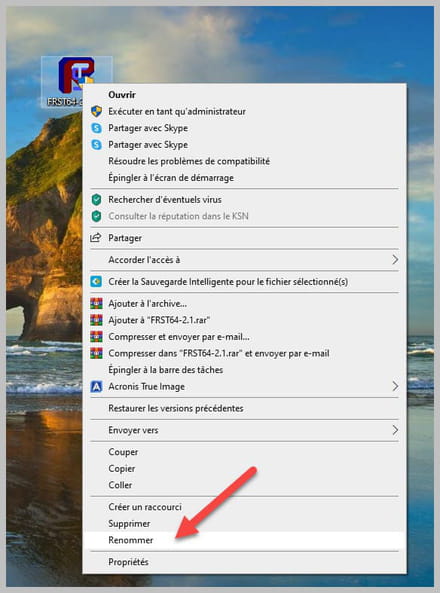
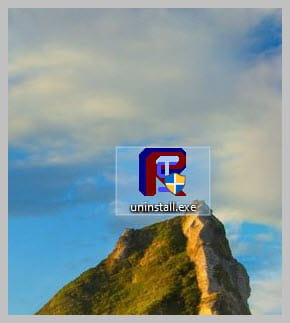
-
-
Moderator
Hello.
Reset the concerned internet browser with this software, and read the page very carefully; the effects of the reset are explained there.
bazfile
Moderator/Security Contributor.
A hello, a reply, a thank you are always appreciated. -
Hello again, I had the issue on Edge Chromium and Google Chrome.
I have already reset it and I blocked access to the site using the lock icon on Google Chrome, and on Edge I managed to prevent that.
Thank you already, I will read that! I’ll be back afterwards.
-
non
-
-
@player
Let me explain, this only happens on the Mundijeux site which constantly redirects us to Flash Puffin and it bugs all the time since the end of Flash Player. So I have other issues, including a slowness of the PC itself, meaning that even at the Windows level, the pages are frozen. In fact, when moving the cursor it's impossible to close it with the cross that no longer turns red.
Thank you.
-
@player
What should I do then, please?
-
-
Moderator
Download FRST, once downloaded save it on the desktop then right-click on FRST and choose Run as administrator you will have this:
Click on Scan

Warning, wait for the messages indicating that the scan is finished to appear.

At the end of the scan, you will have two text files on the desktop FRST and Addition.

Then send the FRST and ADDITION reports to PJJOINT then give the two links generated by PJJOINT in your response.
bazfile
Moderator/Security Contributor.
a hello, a response, a thank you are always appreciated.-
-
@player
Hi, I'm getting a network error waiting for AddThis and adservice.google are blocked in my padlock, do I need to allow them?
Thank you
-
-
Moderator@player
I have 49 third-party cookies blocked :/ I need to allow them
I don't see the connection with FRST; without the FRST analysis, I can't do anything for you.
You can also download it here https://www.commentcamarche.net/telecharger/securite/10729-frst-farbar-recovery-scan-tool-64-bits/
-
@bazfile
I can't download it completely because it's waiting for all these cookies, I imagine more redirects!
I'm trying again, I'm unlocking my cookie filter and there we go, it's the padlock on the left side of the address bar where I have blocked all these cookies.
Is it integrated into Google Chrome or should I download it with Edge? Thank you.
-
-
here are the links:
https://pjjoint.malekal.com/files.php?id=20220926_j9u11h14m5b9
https://pjjoint.malekal.com/files.php?id=FRST_20220926_p11p15l10p9h10
there you go, thanks
-
Weirdly, it's still there! Should I remove it with CCleaner? I renamed it uninstall.exe, I restarted twice and it's still there.
Is the shortcut in my downloads?
What should I do, please?
-
-
@bazfileok thanks but I launched reset browser I'm waiting for it to finish for google c
-
@player
and afterwards I will check if there is a hardware issue or internet connection, even though it's 1Mb/70Kb or I don't know because after our actions I still had the redirection but I don't have it on Edge
thank you again in the meantime
-
-
Hello,
I'm posting to close the subject.
I used the browser to reinstall Google Chrome, it failed, anyway I tried to uninstall it manually afterwards without success, then I reinstalled it on top from the site (the problem was there because now it's almost good).
As for CrystalBloqueur, I still have the issue but it's Google Chrome that offers it to me, however I don't want it, it drives me crazy... but the thing I don't understand is that it's impossible to say no, and also why is this redirect happening when I log in to a site !!!!!
In any case, thank you for wasting your time with me, but it hasn't been useless because the machine runs smoother!
Now I just need to repair Edge and properly set up my processes to make my old machine lighter. Any tips are welcome.
In any case, thanks, I'm marking it as resolved, thanks ;)
-
I don't know how to do it oops! :/
