Spontaneous Arrival of Cool File Viewer
Solved
XavierMichelD
Posted messages
144
Status
Member
-
bazfile Posted messages 58498 Registration date Status Moderator Last intervention -
bazfile Posted messages 58498 Registration date Status Moderator Last intervention -
Hello,
He comes from nowhere but he's here. How to get rid of him.
Thanks in advance.
Xavier
He comes from nowhere but he's here. How to get rid of him.
Thanks in advance.
Xavier
4 answers
-
Hello.
Cool File Viewer is a legitimate application available in the Microsoft store https://apps.microsoft.com/store/detail/cool-file-viewer/9N29TP7ZMKV3
If it appears in the installed programs, uninstall it; if it does not appear, do the following:
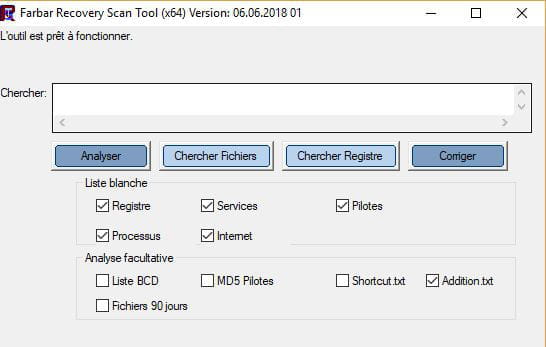
Download FRST, once downloaded save it to the desktop, then right-click on FRST and choose Run as administrator you will see this:
Click on Analyze
Attention, wait for the messages saying the scan is complete to appear

At the end of the scan, you will have two text files on the desktop FRST and Addition
Then send the FRST and ADDITION reports to CJOINT see THIS TUTORIAL then provide the two links generated by Cjoint in your response.
bazfile
Moderator/Security Contributor.
a hello, a response, a thank you are always appreciated.-
-
-
I sent the FRST and Additions files. I notice that my NOD 32 antivirus did not find this Cool File... and that all my Excel files are blocked by this annual payment requirement, which is a real scam. I am on Windows 10 64 bits and I do not want Microsoft Edge. How can I remove it?
Thank you in advance.
Xavier -
You need to include the links to both files in your message, otherwise I can't see them. Read the procedure again, which I remind you:
Then send the FRST and ADDITION reports to CJOINT see THIS TUTORIAL then provide the two links generated by Cjoint in your reply. -
-
-
-
-
Hello,
There are only a few obsolete/orphan processes, some unnecessary adware, and restrictions on Windows Defender. If you want to remove them, follow these steps:
Procedure to follow in the order indicated:
1- Open FRST as an administrator by right-clicking on FRST and choosing Run as administrator.
2 - Copy the entire script that is in the box below:Start::
CreateRestorePoint:
CloseProcesses:
ContextMenuHandlers1: [ANotepad++64] -> {B298D29A-A6ED-11DE-BA8C-A68E55D89593} => -> No file
ContextMenuHandlers1: [BriefcaseMenu] -> {85BBD920-42A0-1069-A2E4-08002B30309D} => -> No file
ContextMenuHandlers3: [{4A7C4306-57E0-4C0C-83A9-78C1528F618C}] -> {4A7C4306-57E0-4C0C-83A9-78C1528F618C} => -> No file
ContextMenuHandlers6: [BriefcaseMenu] -> {85BBD920-42A0-1069-A2E4-08002B30309D} => -> No file
AlternateDataStreams: C:\ProgramData\TEMP:0FF263E8 [168]
FirewallRules: [{05EB2151-F29E-4436-B933-CAD3891BA7F1}] => (Allow) C:\Program Files (x86)\ASUS\AI Suite III\ASUSDMS.exe => No file
FirewallRules: [{AFD64D09-F890-4991-AD2C-0D739614CAB4}] => (Allow) C:\Program Files (x86)\ASUS\AI Suite III\ASUSDMS.exe => No file
HKLM-x32\...\Run: [] => [X]
HKLM\SOFTWARE\Microsoft\Windows Defender: [DisableAntiSpyware] Restriction
HKLM\SOFTWARE\Microsoft\Windows Defender: [DisableAntiVirus] Restriction
HKLM-x32\...\Run: [ISUSPM] => C:\ProgramData\FLEXnet\Connect\11\\isuspm.exe [2075480 2013-06-24] (Flexera Software LLC -> Flexera Software LLC.)
HKU\S-1-5-21-774505180-2724163677-2308238838-1001\...\Run: [ISUSPM] => C:\ProgramData\FLEXnet\Connect\11\ISUSPM.exe [2075480 2013-06-24] (Flexera Software LLC -> Flexera Software LLC.)
C:\ProgramData\FLEXnet
EmptyTemp:
End::
3- Once the script is copied, click on Fix; FRST will automatically take the script from the clipboard.

Let the fix process complete. Once it's done, you will be asked to restart your PC; do so as soon as prompted, see below.
Then, once your computer has restarted:
4- You will have a Fixlog file on your desktop; then send these reports to https://www.cjoint.com/ see this tutorial, then provide the link generated by Cjoint in your next message.
bazfile
Moderator/Security Contributor.
A hello, a response, a thank you are always appreciated.