Host.rooback
Solved
lolitablue
-
bazfile Posted messages 58537 Registration date Status Moderator Last intervention -
bazfile Posted messages 58537 Registration date Status Moderator Last intervention -
Hello,
Configuration: Windows / Opera 79.0.4143.50
Can I delete this file that is flagged as a virus by Zone Alarm?
Thank you
Configuration: Windows / Opera 79.0.4143.50
Can I delete this file that is flagged as a virus by Zone Alarm?
Thank you
1 answer
-
Hello,
Give the access path of host.rooback indicated by Zone Alarm.
Download FRST once downloaded save it to the desktop then open it you will have this:
Click on Analyze at the end of the analysis you will have two text files on the desktop FRST and Addition, .
Be careful to wait for the messages saying that the analysis is finished, then send these reports to https://www.cjoint.com/ see this tutorial then give the two links generated by Cjoint in your next message.
bazfile
Moderator/Security Contributor.
a hello, a reply, a thank you are always appreciated.-
Hello and thank you for your help.
I wanted to read the contents of the hosts.rollback file and opened it with Notepad.
Zonz alarm no longer detects it as a virus!!
I had an analysis done by FRST64, and it is not detected there either!
Is this normal?
Thank you
Here are the two created links
https://www.cjoint.com/c/KIDjZ6k5CqN
https://www.cjoint.com/c/KIDj0P21aIN -
The Hosts.roolback file may be an older version of the hosts file, see this page.
You can reset the hosts file with RstHosts https://toolslib.net/downloads/viewdownload/15-rsthosts/ if you want, you can also delete the hosts.rollback file located in C:\Windows\system32\Drivers\etc\hosts.rollback
There is no infection on your PC, just restrictions on your browsers. If you want to remove these restrictions, follow these steps:
Procedure to follow in the indicated order:
1- Open FRST as an administrator by right-clicking on FRST and selecting run as administrator
2 - Copy the entire script from the box below:Start::
CreateRestorePoint:
CloseProcesses:
HKLM\SOFTWARE\Policies\Mozilla\Firefox: Restriction
HKLM\SOFTWARE\Policies\Google: Restriction
HKLM\SOFTWARE\Policies\Microsoft\Edge: Restriction
HKLM\SOFTWARE\Policies\Microsoft\Internet Explorer: Restriction
HKLM-x32\...\Run: [] => [X]
FF Plugin-x32: @update.ccleanerbrowser.com/CCleaner Browser;version=3 -> C:\Program Files (x86)\CCleaner Browser\Update\1.8.1187.1\npCCleanerBrowserUpdate3.dll [No file]
FF Plugin-x32: @update.ccleanerbrowser.com/CCleaner Browser;version=9 -> C:\Program Files (x86)\CCleaner Browser\Update\1.8.1187.1\npCCleanerBrowserUpdate3.dll [No file]
End::
3- Once the script is copied, click on Fix, FRST will automatically take the script from the clipboard.
Let the fix proceed, once it is done you will be asked to restart your PC, do so as soon as it asks you, see below.
Then once your computer has restarted:
4- You will have a Fixlog file on your desktop, then send these reports to https://www.cjoint.com/, see this tutorial, then provide the link generated by Cjoint in your next message. -
-
-
For information for those who have had or will have the same problem as me...
You wrote:
3- Once the script is copied, click on Fix, FRST automatically takes the script from the clipboard.
I followed this procedure... but I got this window that appeared...
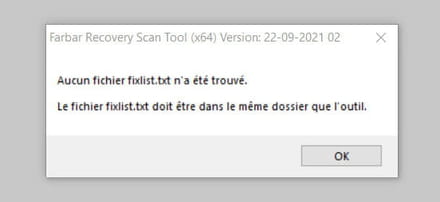
So I created a fixlist.txt file and restarted my PC as requested and apparently it's good.
Here is the link for the Fixlog file:
https://www.cjoint.com/c/KIEg4fOeMwN
-