
Vcruntime140.1.dll
Tommm
-
billmaxime Posted messages 50526 Registration date Status Contributor Last intervention -
billmaxime Posted messages 50526 Registration date Status Contributor Last intervention -
Hello,
I am on Windows 10 Pro with a computer that doesn't belong to me, I don't want to make any mistakes and I'm trying to install the educadhoc software but a system error message indicates that vcruntime140_1.dll is missing. I have read several comments on the issue and installed extensions (Microsoft Visual C++ 2015 Redistributable (x64) - 14.0.24215 and Microsoft Visual C++ 2015 Redistributable (x64) - 14.0.24123 as well as the same ones in *86) but it doesn't change anything. I first installed the 215 in *64 and *86 then uninstalled and restarted with the second one but nothing. I really need help to get this application for digital school books to work. Thank you very much.
I am on Windows 10 Pro with a computer that doesn't belong to me, I don't want to make any mistakes and I'm trying to install the educadhoc software but a system error message indicates that vcruntime140_1.dll is missing. I have read several comments on the issue and installed extensions (Microsoft Visual C++ 2015 Redistributable (x64) - 14.0.24215 and Microsoft Visual C++ 2015 Redistributable (x64) - 14.0.24123 as well as the same ones in *86) but it doesn't change anything. I first installed the 215 in *64 and *86 then uninstalled and restarted with the second one but nothing. I really need help to get this application for digital school books to work. Thank you very much.
7 answers
-
-
Thank you for your response, I have read it well but I don't know which method to use. Do you recommend that I install Visual C++ AIO Installer?
-
re
for your issue, it's one of these two:
Visual C++ Redistributable 2015 or 2017
you can download them from this page --> click here
also check this page --> click here
WARNING: the PC must be up to date
@+
-
I'm really sorry, but I've tried one and then the other and nothing works; the error message keeps coming back, preventing the software from starting. I should mention that I installed 2017, then uninstalled it to install 2015. Do I need to install both together?
-
re
is your PC up to date?
have you checked this page? --> click here
@+
--
the radiation level is higher at the unemployment office than at Chernobyl -
re
in addition to my previous message --> click here
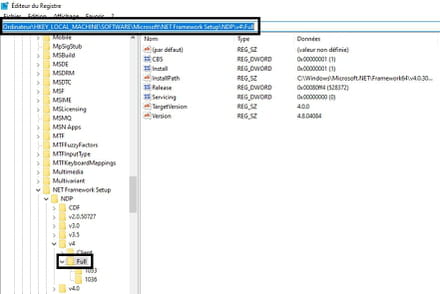
check this page to see which versions of .NET Framework are installed on the PC --> click here
in the registry image
@+
--
the radiation level is higher at the employment center than in Chernobyl -
Hi
did you manage to solve your problem?
@+
--
the radiation level is higher at the job center than at Chernobyl.

