Gigaset A545, the three handsets flash "base" during a call
Solved
pavo
-
baladur13 Posted messages 47405 Registration date Status Moderator Last intervention -
baladur13 Posted messages 47405 Registration date Status Moderator Last intervention -
Hello,
On a Gigaset, the three handsets are flashing ""base" when I receive a call, it doesn't ring, the voicemail seems to be working, you can leave a message. But the red voicemail light is not flashing when it should.
I tried the recommended maneuvers in the manual, with no results.
I reset it with no better outcome.
Thank you
Configuration: Macintosh / Safari 13.1.2
On a Gigaset, the three handsets are flashing ""base" when I receive a call, it doesn't ring, the voicemail seems to be working, you can leave a message. But the red voicemail light is not flashing when it should.
I tried the recommended maneuvers in the manual, with no results.
I reset it with no better outcome.
Thank you
Configuration: Macintosh / Safari 13.1.2
Related links:
- How to transfer a call from one Gigaset handset to another
- Gigaset A130 "Base" flashing on the handset screen
- Gigaset combination disconnected from its base
- Additional handset for Siemens Gigaset C620A base
- Call failure / access to settings combined Gigaset A510
- The contact's name does not display during a call.
6 answers
-
Hello
which means that the base is not defined
connect the base alone and reset everything
https://gse.gigaset.com › CustomerCare › Manuals
--
Take the time to comment!
A thank you is appreciated.
Mark as resolved if your problem has been solved. I use the informal "you" with everyone. -
I explained myself poorly: the three combined flash "<a href='https://www.commentcamarche.net/telecharger/vie-quotidienne/4549-base/'>base</a>" all the time.
I tried calling the landline with my mobile: the landline phones don’t ring, while everything seems fine on the mobile like a normal call, and we have access to the <a href='https://www.commentcamarche.net/messagerie/'>voicemail</a>, we can leave a message, but it’s not indicated (the red light stays off)
thank you for your response -
install your wireless devices according to the manual. -
connection, pairing, registration, etc
--
Take the time to comment!
A thank you is appreciated.
Mark as resolved if your issue has been solved. I address everyone informally. -
Hello,
Do you have an A545 (with a single button on the base) or an A545A (model with built-in answering machine and multiple buttons on the base)?
First, check that the base is powered on. (This is easier on the A545A because a light comes on when the answering machine is in use)
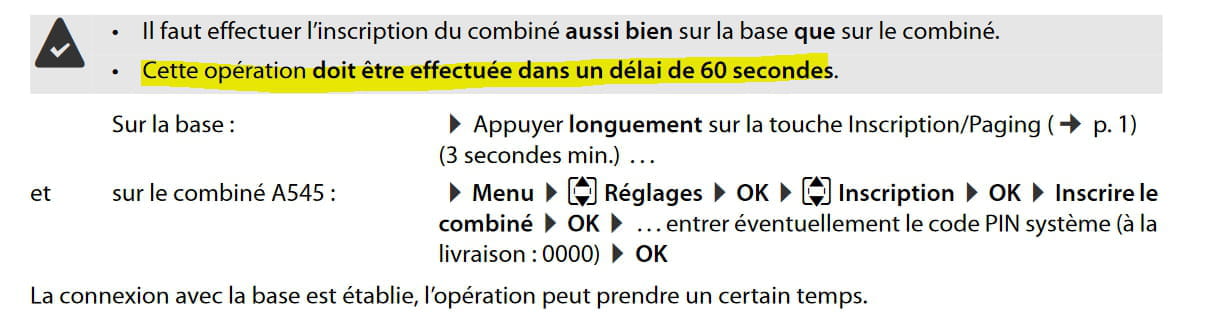
Next, try the registration procedure extracted from the manual on page 20 (22 of the DPF) described below:
This procedure must be performed on each handset (3 times in your case)
The manual: https://gse.gigaset.com/fileadmin/legacy-assets/CustomerCare/Manuals/A5x/A540-A540A/A31008-M2601-N151-1-7719_13-06-2016_fr_FR.pdf
--
It’s very difficult to catch a black cat in a dark room.
Especially when it's not there...-
Thank you, in fact I think it's the power source that's not working: the handset is discharging and there's no red light on the answering machine.
- Make sure to check the outlet the base's power supply is plugged into...
Otherwise, power supply units are also available
https://www.gigaset.com/fr_fr/power-supply-for-gigaset-c707/
So let's see if the issue isn't with the base itself.
-
-
-
Ok
Thank you for the feedback...
The handsets should be kept, they can serve as additional handsets when paired with a new base.
--
Very difficult to catch a black cat in a dark room.
Especially when it’s not there...