
Issue with a Word doc web table row that keeps disappearing
Arno-bva78
Posted messages
16
Status
Member
-
Raymond PENTIER Posted messages 58226 Registration date Status Contributor Last intervention -
Raymond PENTIER Posted messages 58226 Registration date Status Contributor Last intervention -
Hello,
I have a rather annoying problem (but it doesn’t prevent me from working) that I’d like to solve with a Word document Word downloaded and opened and edited with office.com (office.com are the WEB applications of the Office suite: Word, Excel, etc... that can be used for free without all the features) in the form of a worksheet (a ready-to-fill sheet in table form when you open the document: see screenshot) : when I bring my paragraph/text as close as possible to the column lines (there is no space between the paragraph and the column line), everything is fine but as soon as this is done and I click inside the column, the line disappears on its own and I have to click again for it to reappear, and it does this every time I click again. Can you help me solve this annoying problem please?
PS: I remind you that I am working on office.com for free and therefore I don’t have all the features and that this table is already created when I download and open the doc, I didn’t build it myself in Word. See screenshot. The problem occurs often but randomly
Thanks in advance.
Link to screenshot :
In the first one the problem does not appear, when I click above the paragraph before the line, the table line stays in place and does not disappear (you can’t see the text but the white space before the table line is there because I didn’t paste the text up to the line) :

On this one, the problem appears, I click above the paragraph just before the line that will disappear when I click on it and when I click again at the same spot it reappears (sorry I know it isn’t very clear but it’s hard to explain clearly, I would have loved to make a video but I can’t):

I have a rather annoying problem (but it doesn’t prevent me from working) that I’d like to solve with a Word document Word downloaded and opened and edited with office.com (office.com are the WEB applications of the Office suite: Word, Excel, etc... that can be used for free without all the features) in the form of a worksheet (a ready-to-fill sheet in table form when you open the document: see screenshot) : when I bring my paragraph/text as close as possible to the column lines (there is no space between the paragraph and the column line), everything is fine but as soon as this is done and I click inside the column, the line disappears on its own and I have to click again for it to reappear, and it does this every time I click again. Can you help me solve this annoying problem please?
PS: I remind you that I am working on office.com for free and therefore I don’t have all the features and that this table is already created when I download and open the doc, I didn’t build it myself in Word. See screenshot. The problem occurs often but randomly
Thanks in advance.
Link to screenshot :
In the first one the problem does not appear, when I click above the paragraph before the line, the table line stays in place and does not disappear (you can’t see the text but the white space before the table line is there because I didn’t paste the text up to the line) :
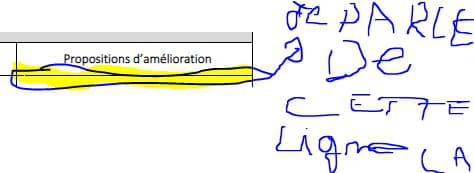
On this one, the problem appears, I click above the paragraph just before the line that will disappear when I click on it and when I click again at the same spot it reappears (sorry I know it isn’t very clear but it’s hard to explain clearly, I would have loved to make a video but I can’t):

3 answers
-

Hello.
You just have to not raise the text ...
Also check if there is any 'spacing before'. In Word normally it's here ---------->
--
It's good, retirement!
Especially in the Antilles ...
Raymond (INSA, AFPA) -
Okay, I’ll take a look, thanks. However, since you still haven’t understood what Office.com is, these are the apps from the Office suite that you can use on the web for free without all the features. “Word Normal,” as you call it, are just the classic Office applications.
Screenshot so you can see what it looks like: -
Indeed I still haven’t understood, since the list of available features hasn’t been communicated to us by your good offices...
--
Well, retirement is fine! Especially in the Antilles...
Raymond (INSA, AFPA)

