
Automatic line return in a Word 2016 table
pinpin38000
Posted messages
2
Status
Member
-
m@rina Posted messages 27763 Registration date Status Moderator Last intervention -
m@rina Posted messages 27763 Registration date Status Moderator Last intervention -
Hello,
As a middle school teacher, I create my lessons in Word and to create lines for my students to complete, I make single-column tables without outer borders. This allows for nice lines when printing and enables me to create them quickly.
I have more and more students working directly on Word on their laptops; for various reasons, they can of course delete the table, but this inevitably shifts the rest of the document.
My request is the following: I want that when my students fill in the table, which has a single column and no outer borders, their text is automatically moved to the next line at the end of the line, thus creating the illusion of having written on the line and allowing for a nice result when printing, as in the following example:

Thank you in advance for your responses.
As a middle school teacher, I create my lessons in Word and to create lines for my students to complete, I make single-column tables without outer borders. This allows for nice lines when printing and enables me to create them quickly.
I have more and more students working directly on Word on their laptops; for various reasons, they can of course delete the table, but this inevitably shifts the rest of the document.
My request is the following: I want that when my students fill in the table, which has a single column and no outer borders, their text is automatically moved to the next line at the end of the line, thus creating the illusion of having written on the line and allowing for a nice result when printing, as in the following example:
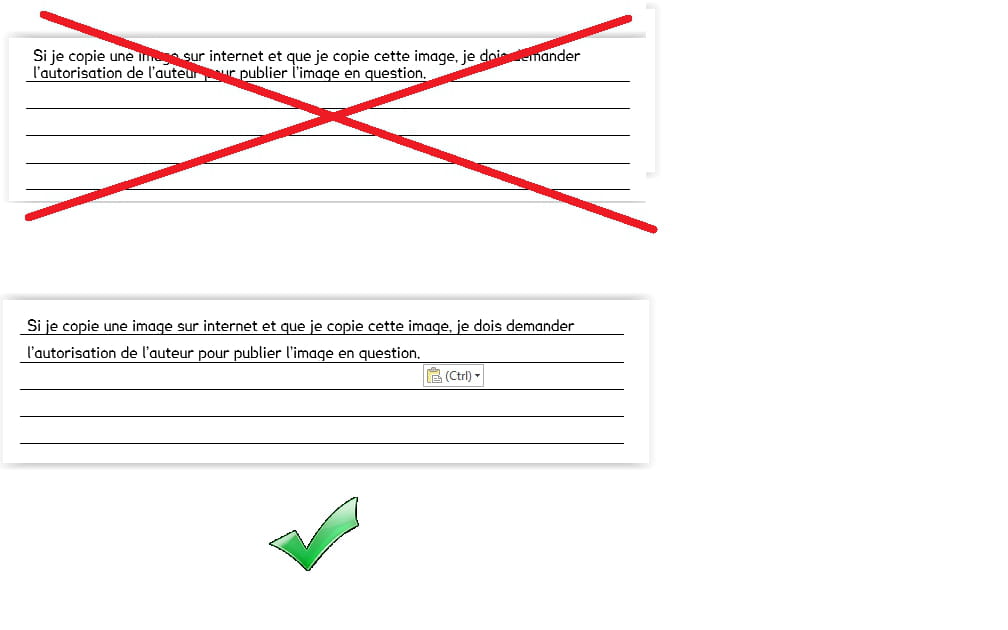
Thank you in advance for your responses.
1 answer
-
Alas, it's not possible.
... except maybe with a macro!
--
Retirement is great! Especially in the Caribbean... :-)
Raymond (INSA, AFPA, CF/R)-
-
Hello,
Even with a macro, it’s not possible. There are very few event macros in Word, and none can be triggered by pressing the Enter key.
If you're hell-bent on this presentation, you'll need to hack something else together... But it will definitely be a hack, like putting a background with horizontal lines on a text box... but still... is it really worth complicating your life?
m@rina
-

