[Grouped Subject] Chrome crashed / Blank page
Solved
Flechette31
-
pistouri Posted messages 19010 Registration date Status Contributor Last intervention -
pistouri Posted messages 19010 Registration date Status Contributor Last intervention -
Hello;
My Google Chrome browser, which was still working a few hours ago, has crashed.
When I open the browser, I get a blank page, my bookmarks are at the top, and the search in the search bar isn't working; notifications pop up in the bottom right to tell me that my extensions have crashed. And the browser shows "has crashed".
I ran Avast, Malwarebytes, and CCleaner, and they found nothing.
I uninstalled and reinstalled Chrome, but the problem persists... I don’t know why...
Thank you in advance for any help you can provide.
My Google Chrome browser, which was still working a few hours ago, has crashed.
When I open the browser, I get a blank page, my bookmarks are at the top, and the search in the search bar isn't working; notifications pop up in the bottom right to tell me that my extensions have crashed. And the browser shows "has crashed".
I ran Avast, Malwarebytes, and CCleaner, and they found nothing.
I uninstalled and reinstalled Chrome, but the problem persists... I don’t know why...
Thank you in advance for any help you can provide.
9 answers
-
Hello,
try resetting Chrome using https://www.commentcamarche.net/telecharger/utilitaires/19335-resetbrowser/
--
bazfile
Moderator/Security Contributor.
a hello, a reply, a thank you are always appreciated. -
pistouri Posted messages 19010 Registration date Status Contributor Last intervention Ambassador 8 732
-
Trials Origins Component (Google Chrome).
Version 1.0.0.7 of the Trials Origins component
The content of the Signatures section is added to the command line when creating the rendering process for extensions and pages.
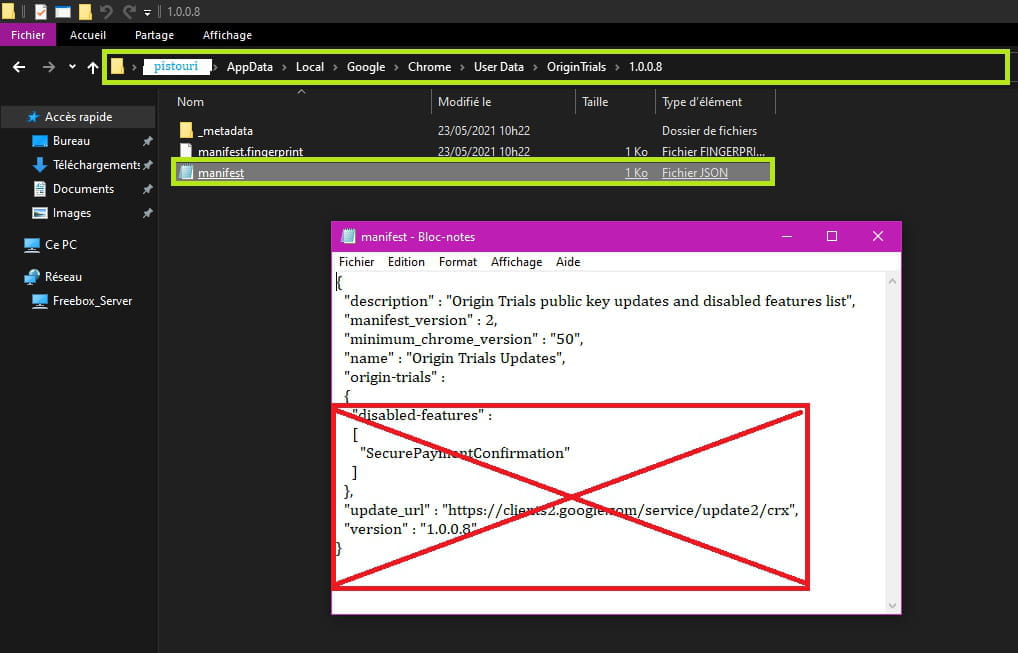
But the command line is too long, so the window refuses to create the process.- The manifest.json file that contains the signature bug opens with Notepad; I hadn't realized in the ' open with' choice that I needed to select ' more options' and select Notepad.
In the red box below, here is what needed to be deleted:
"disabled-features" :
[
"SecurePaymentConfirmation"
]
},
"update_url" : "https://clients2.google.com/service/update2/crx",
"version" : "1.0.0.7"
}
With version 1.0.0.8 of "Origin Trials", the problem is resolved.
The procedure - Fix for Chrome Crashes on Linux
Google has released a patch to fix Chrome crashes on Windows and Linux
Google does not provide additional information regarding the bug or the reason behind it, but based on the fix procedure, users believe that one of the Origin Trials experiences was the source of the problem.
Fix for Chrome Crashes on Windows
 Close all open Chrome windows.
 Open Chrome again. You will still see the broken behavior.
 Keep Chrome open for about 5 minutes.
 After 5 minutes, close Chrome, then relaunch the browser.

If you are using Linux, the procedure is slightly different.
Fix for Chrome Crashes on Linux
 Navigate to the Google directory containing the user profile ~/.config/google-chrome/
 Delete the contents of the [Chrome User Profile] \ Origin Trials subdirectory. This should include the subdirectory named " 1.0.0.7".
 Delete the [Chrome User Profile] \ Local State file.
 Start Chrome, which should load as expected.
SOURCE
-
-
pistouri Posted messages 19010 Registration date Status Contributor Last intervention Ambassador 8 732
Hello,
The news has dropped: Unexpected crash of Google Chrome.
Google Chrome's browser keeps crashing.
Fortunately, Google should soon provide a fix.
That's what I had sensed and written here
The follow-up==► Chrome 90 crashes completely on PCs
Especially with W10
- Frozen tabs
- Impossible to start
- extensions blocked
Another solution
==► Windows 10 and Chrome crashes, solution
Procedure to try to fix the problem.
You need to follow these steps
Repair the Google Chrome installation by running the installation file again.
Enable synchronization in Chrome regarding history, bookmarks, passwords, etc.
Close the browser.
Open the file explorer to go to this address: %LOCALAPPDATA%\Google\Chrome\User Data
Delete the "Local Stafe" file after making a backup
If Chrome is still crashing, try the following procedure
Open the file explorer to go to this address
%LOCALAPPDATA%\Google\Chrome\User Data
Backup everything and store a copy on another drive. Rename the "User Data" folder to something completely independent.
Restart Chrome.
If these two methods do not work, there is a third approach, but it is more delicate.
Registry intervention
Uninstall Chrome
Delete the Google folder in C:\Users\USERNAME\Appdata\local
Delete the Google folder in C:\Program Files (x86)
Open the registry editor and delete the following registry entries: HKEY_CURRENT_USER\SOFTWARE\Google
HKEY_LOCAL_MACHINE\SOFTWARE\Google
Reinstall Chrome.

....
--
pistouri-
- I made a detailed and illustrated tutorial for the Local Stafe file on this post
This will allow for a comprehensive grouped topic if certain procedures are ineffective, as some are still struggling. - Google has just released version 1.0.0.8 of "Origin Trials"
To update Origin Trials
Open Google Chrome.
Clear everything in the address bar (URL)
Paste
Chrome://components
Then press the Enter key or right-click, paste, and go to chrome://components
Scroll to the bottom of the page to the component section --►Origin Trials
Click on --►Check for updates
Wait a few seconds --►Component updated
Close and restart Google Chrome or refresh Chrome (F5 key)
Example
Before (old version):
After (version 1.0.0.8):
A+
-
Erratum ==► Local State
A translation error or the publication (perhaps originally) of the first procedure below
It is in the penultimate line Local StateRepair the Google Chrome installation by running the installation file again.
Enable synchronization in Chrome for history, bookmarks, passwords, etc.
Close the browser.
Open File Explorer to go to this address: %LOCALAPPDATA%\Google\Chrome\User Data Delete the file " Local State " after making a backup
It is not Local State but indeed -► Local State
......
-
-
-
Same here, only since this evening around 9 PM, I feel a bit reassured to see that I'm not the only one with this surprising problem.
-
Hello,
Same problem here and also around 9 PM.
Nothing has been working since forever. It says in a pop-up that it's Adblock Plus and Dropbox that are crashing Chrome, but I can't access the extensions. -
Same for me except that the popup tells me it's the Colorzilla extension.
I think it's a general crash and that Google Chrome is just listing the extensions it can't load in the popup since it has completely crashed. -
pistouri Posted messages 19010 Registration date Status Contributor Last intervention Ambassador 8 732
Hello,
Official solution for the Google Chrome bug May 2021
The official solution
Google has provided a rather simple workaround for Windows users. The company states that users should first close all Chrome windows and then reopen the browser, which will trigger the broken behavior on Windows devices. Google indicates that you need to keep Chrome open for about 5 minutes, then close the browser and relaunch it. "The behavior should now be resolved," the company explains.

Meanwhile, it seems that the beta version of Google Chrome also resolves the whole issue, so there is a chance that everything will return to normal when Google releases the next stable update for the browser. Therefore, if you are part of the beta program, you are likely not experiencing the bug.
In summary:
1- Close Google Chrome if the browser is open.
2- Open Google Chrome.
3- Keep Chrome open for about 5 minutes.
4- Close Google Chrome.
5- Relaunch Google Chrome
Source
.......
--
pistouri -
pistouri Posted messages 19010 Registration date Status Contributor Last intervention Ambassador 8 732
Hello,
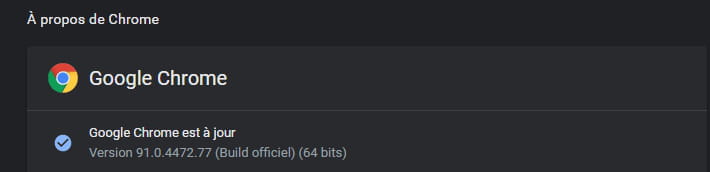
For those who are late, Google has released a new version of Google Chrome (Update).
Google Chrome 91 version 91.0.4472.77, available now.
Update Google Chrome:
Method 1
From the browser
Open Google Chrome and clear everything in the address bar.
Copy/paste:
chrome://settings/help
Restart Google Chrome
Then press Enter or right-click, paste, and access chrome://settings/help
Chrome version 91 is installed.
Method 2
To download at the ==► official site
Or on one of the practical sheets from CCM
==► Google Chrome 32 bits
==► Google Chrome 64 bits
Among the new features:
Chrome 91 saves even more battery
Text search on websites now allows you to find text that is not directly displayed
Changes to the WebOTP API
This allows websites to obtain one-time passwords sent via SMS
Tab search on Chrome OS shows recently closed tabs.
Copying and pasting for files
You can now copy a file from anywhere on your computer and then paste it into an email.
Chrome 91 includes version 9.1 of the V8 JavaScript engine.
A+
--
pistouri