Sentinel One
Solved
Vali
-
bazfile Posted messages 58538 Registration date Status Moderator Last intervention -
bazfile Posted messages 58538 Registration date Status Moderator Last intervention -
Hello everyone.
Our landlord got hacked and our wi-fi is connected to theirs (I'm sorry, I don't know much about this). So, he provided us with a separate wi-fi connection, distinct from his network. Following that, his IT technicians gave a USB drive with SentinelOne to check if our PCs were infected. Everything is fine, phew. My problem is that SentinelOne won't uninstall (it asks for a key that I don't have). How can I remove this thing without the key?
Thank you for your help.
Our landlord got hacked and our wi-fi is connected to theirs (I'm sorry, I don't know much about this). So, he provided us with a separate wi-fi connection, distinct from his network. Following that, his IT technicians gave a USB drive with SentinelOne to check if our PCs were infected. Everything is fine, phew. My problem is that SentinelOne won't uninstall (it asks for a key that I don't have). How can I remove this thing without the key?
Thank you for your help.
11 answers
-
Hello,
Follow the tutorial here to the letter, especially on this point:
Revo Uninstaller
Contact Options Sentinelone.com
And if I can't find the program I want to uninstall?
If you can't find the program you need to uninstall below, follow these steps to remove the program:
Start your computer in Safe Mode.
Press the Windows key + R on your keyboard, type appwiz.cpl, then click OK.
Choose the program you want to uninstall from the list and click Uninstall/Delete.
The technocrats, if they were given the Sahara, in 5 years, would have to buy sand elsewhere.
Coluche. -
Hello MPMP10.
I installed Revo, which successfully uninstalled SentinelOne Agent. Thank you very much!! :-)
However, I still have an issue: it still appears in the task manager. When I try to "end task," I get the following error message: "Access denied. You need administrator privileges to terminate this task. Close the manager, then run it as an administrator and try again."
I logged into my administrator profile, launched Revo (which still found nothing), and opened the manager, which indicates that no tasks are running... I don't understand.-
Restart your PC to see...
Otherwise:
https://www.astuces-aide-informatique.info/3155/reparer-windows-10#reparer_windows_en_utilisant_loutil_de_reparation_integre_a_windows_10 -
-
You're welcome...
OK.
The data is retained, I've done it four times...
Otherwise, you just need to move them to an external hard drive.
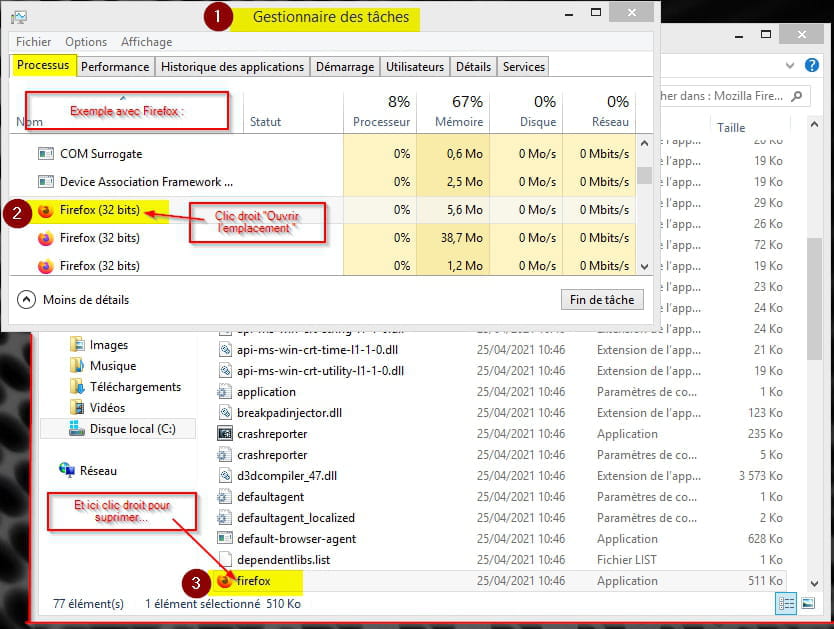
Have you tried right-clicking on the process and then searching for the location to delete it?
Have you restarted the PC to see if the process is still present?
Did Revo specify that certain files would be deleted on the next Windows startup? -
I'm going to back up my computer again (making sure not to include that **** thing).
Yes, I had simply started by deleting the folder (and also the executable). Nothing works.
I get the following error message: "You need permission to perform this action. You require permission from SentinelHelperService to modify this file." I think I'm at an impasse...
Oh yes: I've restarted my PC at least 4-5 times. And yes, Revo indicated that files would be deleted, but everything was still there. So I went through the process again, turned it off and then back on (not just restarting), and now Revo couldn't find anything anymore. -
OK,
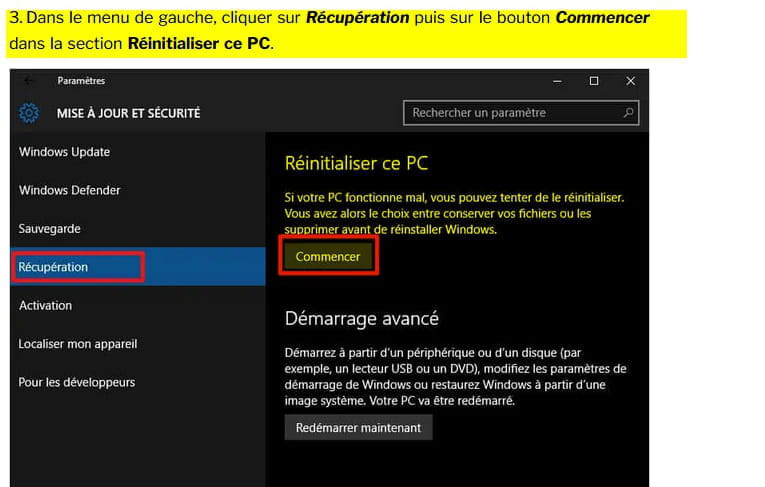
Check with MisteryBean (whom I greet in passing) otherwise look into the reset.
Personally, for stubborn files I boot from the menu using a live antivirus CD (on the RAM) and then I remove the intruder and restart Windows normally.
In this configuration, there's no need for authorization from SentinelHelperService or TrustedInstaller for example to remove a stubborn file.
https://support.kaspersky.com/fr/14226
Otherwise:
https://www.commentcamarche.net/faq/8648-tuer-un-processus-recalcitrant
https://www.mediaforma.com/windows-10-tuer-processus-commande/
-
-
Hello,
We can try to finish cleaning the traces:Read the entire procedure before posting the reports
--> Download the FRST version of Farbar, compatible with your system, and save the file on your Desktop
--> For a 32-bit system
--> For a 64-bit system
How to tell which version, 32-bit or 64-bit, is running on my system?
--> Wait for your browser to offer the download for saving, without clicking anywhere, especially not on the sponsors of the page.
--> Close all applications, including your browser
--> Double-click on FRST.exe and click Yes to accept the Disclaimer
--> Under Vista, Windows 7 / 8 and 10, you need to launch the file by right-clicking -> Run as administrator
--> Wait until it indicates The tool is ready to run
--> On the main menu, click on Analyze and wait for the analysis to complete
--> At the end of the scan, the reports FRST.txt and Addition.txt are created. Post these reports in your next response.
--> The reports are saved in the same location as the tool and under C:\FRST\Logs
--> The SmartScreen filter may trigger an alert. Click on Actions or More information then click Run anyway
---------------------------------------------------------------------------------------------
The reports FRST.txt and Addition.txt are expected
All reports must be hosted on https://security-x.fr/up/ and you indicate the links obtained in your response
--
Security Contributor. -
Good evening MisteryBean.
I followed your instructions.
Here are the links: https://up.security-x.fr/file.php?h=Rc3291eabe83780a5842ba7aa6be43621 (FRST) and https://up.security-x.fr/file.php?h=R3d309b2b3ba69d67c9b986d9f63dad32 (Addition).
I will restart my PC and see if SentinelOne Agent is still in the Task Manager.
Thanks, anyway! :-)
---
I restarted my PC and SentinelOne Agent is still in the Task Manager... -
Hello,
I'm going to restart my PC and see if SentinelOne Agent is still in the Task Manager.
FRST is a diagnostic tool, it doesn't alter anything on the PC, so it's normal that Sentinel is still there.
As bazfile said, you need to log in to an administrator profile (valer_ur8arpb).
Once you are on that profile, run a new FRST scan and post the new reports.
-
Hello MisteryBean.
I tried from the admin profile: nothing at all in the FRST txt file.
So I went back to my user profile, running FRST as an admin (via right-click). I do have a FRST.txt file, but no Addition.txt.
Here is the link: https://up.security-x.fr/file.php?h=R566c067346758437dbd2bd50b3bea4b0-
The FRST report is incomplete; start over.
- RE_
I think it's Panda that's blocking, try disabling it on the admin profile while you run the scan.
If that doesn't work, start the PC in safe mode with networking on the admin profile and run the scan.
Follow from a phone or another PC if possible.
--> Start in safe mode with networking from the settings: https://www.malekal.com/demarrer-windows10-mode-echec/#Demarrer_Windows_10_en_mode_sans_echec
--> In the tutorial, you need to scroll down to Recovery Options
--> Choose option 5 for safe mode with networking.
-
-
OK, it worked! :-)
Here are the links: https://up.security-x.fr/file.php?h=R1a539e44593a99468893d405e677e657 (FRST) and https://up.security-x.fr/file.php?h=Rfa367b7ea19f1d024423ff04a58d9144 (Addition) -
RE_
Still in safe mode with networking, do the following:
--> Download the FIXLIST file to the same location as the FRST program (FRST64) <= (Important)
--> Open FRST (or FRST64) as an administrator and click on Fix
--> Let the tool work
--> The PC should restart in normal mode.
--> A fixlog file is created in the same location as FRST, post it
--> Let me know if you still have the problem.
-----------------
-------------------------------------
You don't have much space left on C:, so system restore is disabled.WARNING: System Restore is disabled (Total:117.15 GB) (Free:15.26 GB) (13%)
Check after rebooting in normal mode, how much free space you have on C: and Re-enable system restore
-
Thank you so much!! I still have a few files that contain the word "sentinel" and a folder in ProgramData. Is that a problem?
I really don't know how to thank you!- OK.
But this isn't normal...!
Check with SFCFix to repair the operating system:
https://forum.malekal.com/viewtopic.php?t=52301&start=#p401703
https://forum.malekal.com/viewtopic.php?t=50094&start=
-
-
Hello MisteryBean.
Here is the FIXLIST file: https://up.security-x.fr/file.php?h=R7eb09ebcae8d430be429e7f66a80cc10
Here is the information for the hard drive:
used - 106,855,247,872 bytes - 99.5GB
free - 18,936,119,296 bytes - 17.6GB
I no longer have SentinelOne in my task manager!!! :-D -
RE_
OK for the fixlog.
free - 18,936,119,296 bytes - 17.6GB
It's still a bit tight, you should see if you can move your personal files to an external drive. After that, 120GB is a bit tight with Windows 10 and a few installed programs, I think in the long run, you'll need to change the SSD/HDD for a larger one.
Have you reactivated the restore?
-----------
-----------------------
For the remaining files/folders, you can indeed delete them manually, but make sure of what you're deleting. Otherwise, you can leave them, they won’t interfere since they're no longer active.
------------
----------------------
To automatically delete all files/folders created by FRST and the tool itself, rename FRST/FRST64.exe to uninstall.exe and run it.
The procedure requires a restart
Good luck :-)
--
Security contributor. -
I don't have a recycle bin/trash via right-click... :-) I also checked "send to" just in case. But it's not a big deal, as long as it's no longer active, that's enough!
For the recycle bin when you want to delete a file or folder, it's right-click and delete.
A little addition to what has been said:FOR INFORMATION:
Your version of Windows 10 is not up to date; to check, go to this page, click on Update Now, this will start the download of the Microsoft tool, just open it and it will allow you to update Windows 10 to the latest version and tell you if it is compatible with your PC. Be careful, this update takes some time; if you have a laptop, plug it into the power, as it would be a shame to run out of battery before the update is complete.
bazfile
Moderator/Security Contributor.
A greeting, a response, and a thank you are always appreciated.