Wi-Fi feature disabled
Solved
goldzab
Posted messages
72
Status
Member
-
goldzab Posted messages 72 Status Member -
goldzab Posted messages 72 Status Member -
Hello,
I bought a new desktop computer running Windows 10, but the problem is, I can't connect to the internet. It detects my Wi-Fi dongle, but even though Wi-Fi is enabled, it doesn't offer any connection.
My laptop, tablet, and mobile phone all connect to the Wi-Fi without any issues... Nevertheless, I've tried restarting my Freebox router several times with no success.
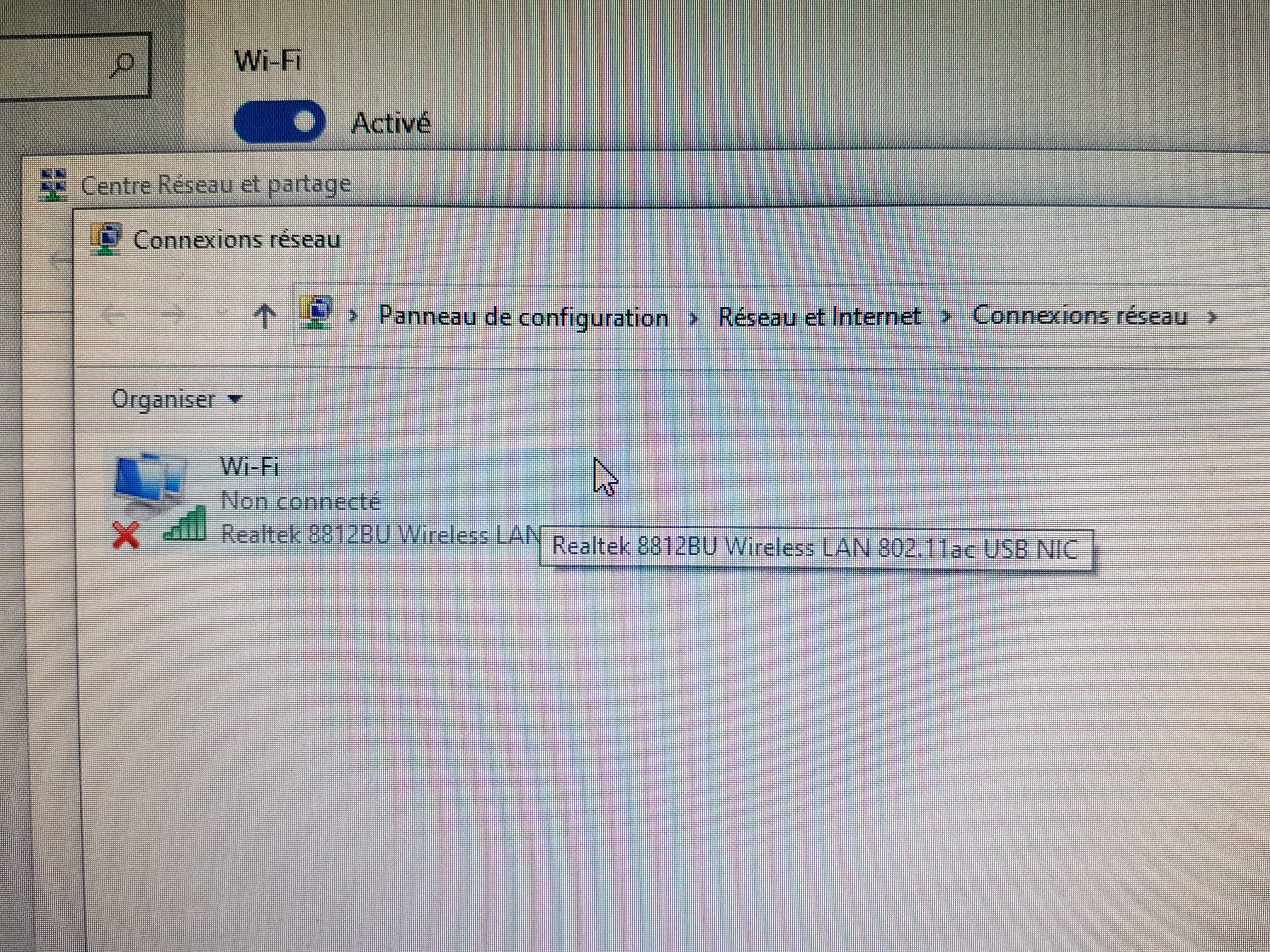
In the Network and Sharing Center, under Network Connections, I can see my Wi-Fi dongle "Realtek 8812BU Wireless LAN 802.11ac USB NIC" is enabled but not connected. When I click on connect, nothing happens. I also tried updating the card drivers, but it says everything is already up to date.

When trying to troubleshoot, I received the following messages:
the wireless feature is disabled: not fixed
problem with the wireless network card or access point: not fixed
For your information, this Realtek dongle connected to Wi-Fi without any problems with my two previous desktop computers. I even moved my computer to my coffee table to be right next to the Freebox and connected it with an Ethernet cable, still nothing! It doesn't even show me the Wi-Fi networks around me, it offers me none! Whereas when I’m on my laptop, it detects liveboxes and freeboxes around me just fine.
There is no on-off button on my dongle, so that can't be the reason. I've also tried combinations of the Fn + all the F1, F2, F3... keys on the keyboard with no success (I don't have a key with the Wi-Fi symbol on my keyboard).
What do you recommend I do to finally connect to an internet network and access my Freebox?
Thanks in advance
Configuration: Windows / Chrome 89.0.4389.128
I bought a new desktop computer running Windows 10, but the problem is, I can't connect to the internet. It detects my Wi-Fi dongle, but even though Wi-Fi is enabled, it doesn't offer any connection.
My laptop, tablet, and mobile phone all connect to the Wi-Fi without any issues... Nevertheless, I've tried restarting my Freebox router several times with no success.
In the Network and Sharing Center, under Network Connections, I can see my Wi-Fi dongle "Realtek 8812BU Wireless LAN 802.11ac USB NIC" is enabled but not connected. When I click on connect, nothing happens. I also tried updating the card drivers, but it says everything is already up to date.
When trying to troubleshoot, I received the following messages:
the wireless feature is disabled: not fixed
problem with the wireless network card or access point: not fixed
For your information, this Realtek dongle connected to Wi-Fi without any problems with my two previous desktop computers. I even moved my computer to my coffee table to be right next to the Freebox and connected it with an Ethernet cable, still nothing! It doesn't even show me the Wi-Fi networks around me, it offers me none! Whereas when I’m on my laptop, it detects liveboxes and freeboxes around me just fine.
There is no on-off button on my dongle, so that can't be the reason. I've also tried combinations of the Fn + all the F1, F2, F3... keys on the keyboard with no success (I don't have a key with the Wi-Fi symbol on my keyboard).
What do you recommend I do to finally connect to an internet network and access my Freebox?
Thanks in advance
Configuration: Windows / Chrome 89.0.4389.128
13 answers
-
Hello,
Here is the latest driver available https://www.realtek.com/en/component/zoo/category/rtl8812bu-software install this driver, restart your Freebox, and then restart your PC.
bazfile
Moderator/Security Contributor.
A hello, a response, a thank you are always appreciated. -
Hello. I downloaded this driver, installed it, restarted my Freebox and then the PC, but it didn’t change anything. My Realtek adapter is still enabled but not connected (like in the image from my previous post). And there’s still no Wi-Fi network available. Any other ideas?
-
Check that WiFi is enabled on your Freebox http://mafreebox.freebox.fr/
- It is well activated. I’m actually writing from my laptop which doesn’t need a wifi key and I’m connected to the internet without any issues. And just to remind you, this realtek USB key worked yesterday on my old computer. I even tried reinstalling my old PC and inserting the realtek key and right after booting, it offered me several networks including mine with the option to connect directly to my network. Whereas on the new computer, it doesn’t show any networks at all. If I couldn’t connect on my laptop or my mobile phone, I would be questioning the Freebox, but no, it works everywhere except on the new PC, so it’s not the router that’s the problem. We need to find out how to connect to the realtek key... it’s really not normal that it’s recognized and activated, but it’s impossible to connect to it... anyway, every time I run a diagnostic or troubleshoot, I get the same message "problem with the wireless network card or the access point." Since I have a lot of USB connections, I even tried plugging it into different USB 3 or USB 2 ports, but nothing works, it’s recognized each time without being able to detect a network and connect.
- Check that Windows 10 is up to date go to this page click on Update now this will start the download of the Microsoft tool, just open it and it will allow you to update Windows 10 to the latest version and will tell you if it is compatible with your PC, be aware that this update takes some time, if you have a laptop plug it into the power supply because it would be a shame to run out of battery before the update is finished.
Also see https://free.fr/assistance/2352.html
- This is a PC that I had assembled (Cybertek) with the installation of Windows 10, so logically it's the latest version they installed. I still tried the tool and it didn't install anything, just showed the message "thank you for installing the latest update of Windows 10." I have version 20H2 from October 2020, which seems to be the latest. As for the Free link, it doesn't help me much, sorry.
-
-
My nephew, who is coming to spend a few days at our place, offered to share his mobile phone's connection. I told him that since the PC doesn't pick up any Wi-Fi network, it probably wouldn't work... but within a few seconds, his Wi-Fi network appeared (the only one it detects), and I was able to connect to it. It's incomprehensible, I'm not even 3 meters away from my Freebox.
Since my nephew is leaving next Saturday, I would still like to find another solution to access the internet other than his Wi-Fi sharing. Any ideas?

-
In fact, even on network sharing, it works but keeps disconnecting in "no internet, secured" mode.
-
Hi,
when the nephew has left, you still have the option of using an ethernet cable between the box and the PC, you do have an ethernet port on it, right?
oh yes, sorry, you already tried:
For your information, this Realtek adapter was picking up the wifi without any issues with my two previous desktop computers. I even moved my computer to my coffee table to be just next to the freebox and connected it with an ethernet cable, still nothing!
so the ethernet card also has a driver issue, huh?
What error is reported for ethernet?
Does the ethernet card appear in the device manager?
if not,
what model of FBX?
try configuring the box with two different SSID names for the 2.4 and 5 GHz networks (wifi section in freebox OS), for example gold2 and gold5.
While the nephew is there, go update the drivers on driver cloud if needed.
-
In fact, when I plug in the Ethernet cable, nothing happens and I don't even have the Ethernet menu in the network and internet settings.
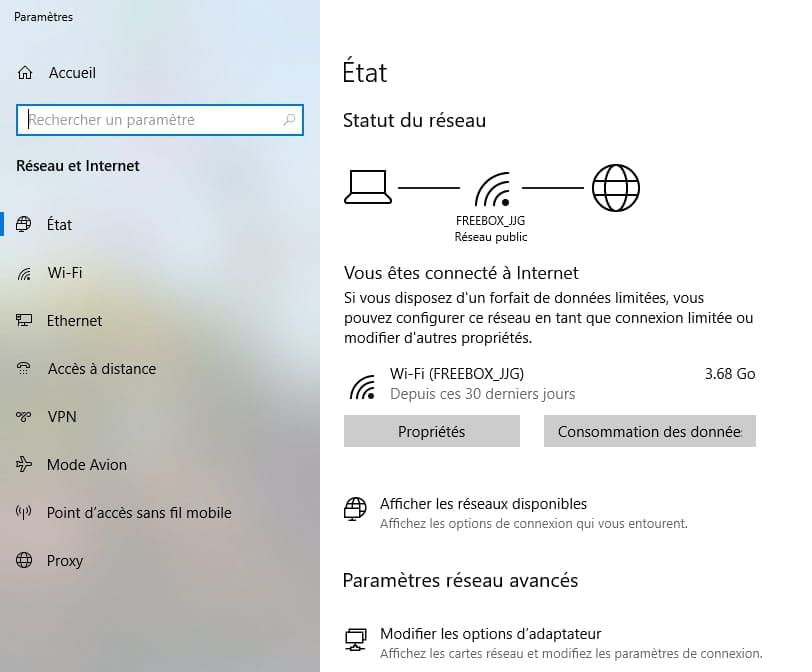
I took a screenshot of my laptop that works fine both on Wi-Fi and Ethernet.

In this image, you can clearly see the Ethernet menu in the left column, but on my new computer, it does not exist. I have tried all Ethernet ports; none work, while the cable works fine with other computers.
All drivers are up to date and it is a Freebox Delta.
I can only connect on my new computer through the network sharing of my nephew's phone (20 MB) or even mine, but it only lasts for a few seconds to a maximum of 1 minute and 30 seconds. It cuts off every time, and the troubleshooting resolves the network interruption each time (only to cut out again...) with the following messages:
"The connection between your access point, router or cable modem and the internet is interrupted - detected"
"The default gateway is not available - fixed"
"Wi-Fi does not have a valid IP configuration - fixed"
or even
"Problem with the wireless network card or access point - not fixed"
I admit I don't know what to do anymore... -
I don't feel like I see an ethernet card; the Realtek is the USB WiFi dongle and it seems to me that the miniports are something else.

I also tried looking at the network cards in the command prompt, and I don't know if it's normal, but it doesn't name any ethernet card; as for the Realtek WiFi card, it is disconnected (which surely confirms that I see it activated, but that it's impossible to connect to it).

Could it be possible that the company that assembled my PC forgot something? Or that my Realtek USB WiFi key, which has worked on my two previous PCs since 2011 (and still works with the latest one), has become obsolete? -
For ethernet, I think I will contact the company that assembled my computer on Monday, they should know if there is an ethernet card on the computer. After, I admit that I would prefer to get the internet to work via Wi-Fi. I tried updating with 3 different versions of the driver "Realtek 8812BU Wireless LAN 802.11ac USB NIC" without success. It is still recognized, active, but impossible to connect and especially apart from sharing networks from my mobile phone or my nephew's, I don't see any Wi-Fi networks (mine, my neighbors'...).
I went to check the OS of my Freebox and my protection type seems to have become obsolete (WPA1 - TKIP), could that be related?
They recommend using WPA2 - AES protection, should I choose this type of protection? Could it change something?
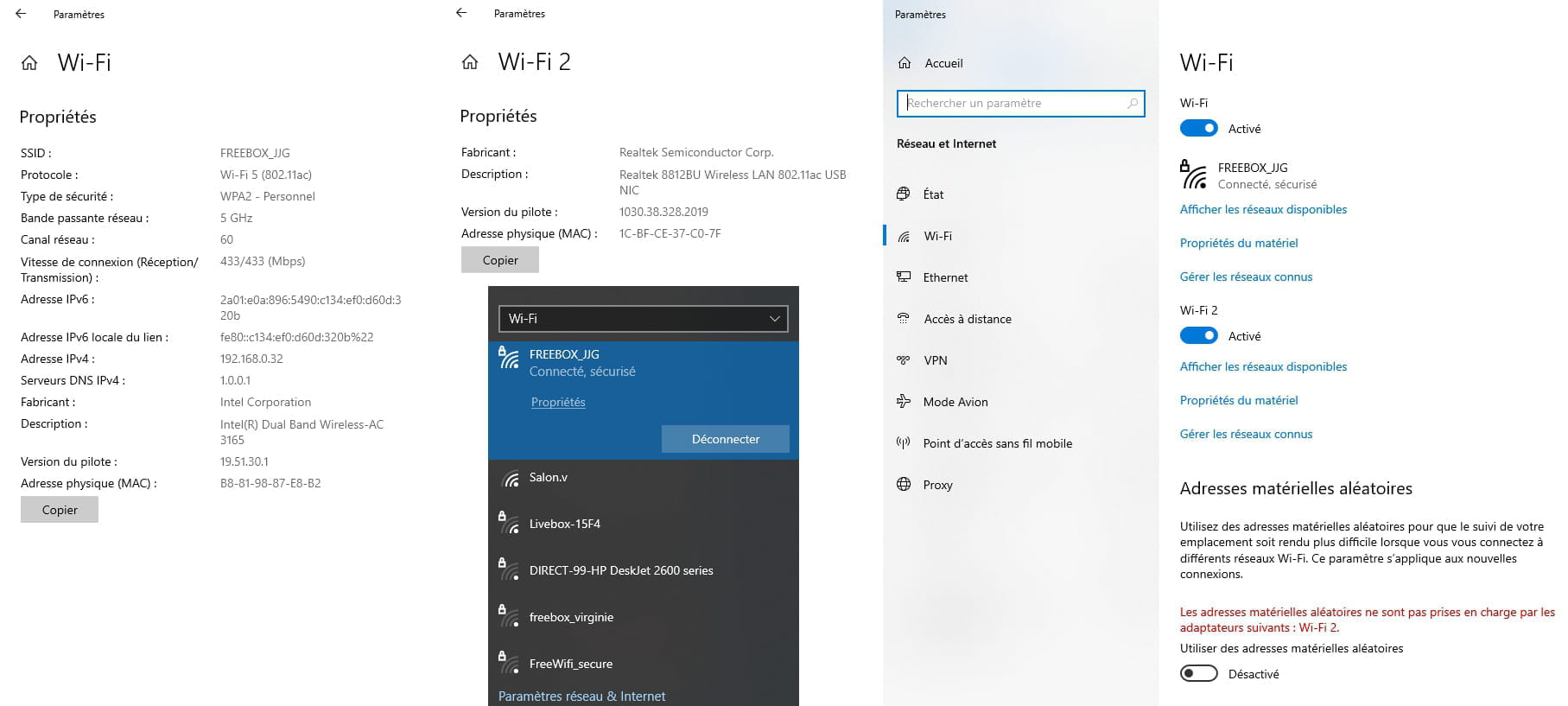
As for the different networks, as we can see in the image, my old PC is still visible on the 5g Wi-Fi card
On the other 5g Wi-Fi card, there are my mobile phone, my partner's phone, and our Chromecast connected to the TV.
Finally, on the 2.4g card, there are our indoor and outdoor cameras, as well as my e-reader.-
Yes, use WPA2/AES, it's better in terms of security and the state of the art with WPA3.
But if you can't see the network, it won't make much difference.
Otherwise, can you install Acrylic and scan for networks to see if you can find more.
Otherwise, a live USB Linux, Ubuntu for example to see if the hardware works or not.- I changed the security type to WPA2/AES. However, one thing changed: when I turned on my new computer, it detected two Wi-Fi networks this morning, "salon.v" and "Freebox 4D113F" (probably from a neighbor). So now, with Acrylic, it only detects these two networks. I haven't made a live USB Linux; that seems quite complicated to do, plus I don't have a blank USB stick. Any other ideas?
-
-
This is a PC that I had assembled (Cybertek)
On your invoice, you should have the reference of the motherboard; provide that reference.
--
bazfile
Moderator/Security Contributor.
A hello, a response, and a thank you are always appreciated. -
I looked at your screenshots,
it's not normal to have 2 WiFi 5GHz cards on the box.
I don't know if you've mentioned it already, but what's your fbx?
Do you have a pop repeater?
Have you activated a guest network on the 5GHz only?
-
I didn't activate a guest network. It's my brother (a programmer in Belgium) who set that up for me, saying it was better to distribute the hardware.
- It doesn't explain why you have 2 5 GHz networks, there’s no reason for that.
Are you sure it’s not a guest network?
Is it on the same channel as the other one?
Can you try to disable that network?
This situation is very strange and troubling, but since I don't have a fbx, I can't say how abnormal these two 5 GHz networks are. I know that Bazfile has a Freebox; he might be able to confirm if there’s a problem. This is a motherboard - Asus STRIX X570-F GAMING - X570/AM4/DDR4/ATX
So you do have an Ethernet network card which is the Intel I211; it’s not normal that it does not appear.
See https://rog.asus.com/fr/motherboards/rog-strix/rog-strix-x570-f-gaming-model/helpdesk_download in the "drivers and tools" tab; the card's driver is LAN.
Intel site https://downloadcenter.intel.com/fr/download/25016/Intel-Network-Adapter-Driver-for-Windows-10
@ Brupala https://forum.universfreebox.com/viewtopic.php?t=72431- So,
is it normal to have 2 5 GHz cards (tri-band)?
Is it only on the Delta and the Pop or also on the others?
In any case, having channels configured at 160 MHz width in DFS is normal, it's unavoidable, there's no room otherwise except on channel 48 or 50.
It would be better for the box to be limited to 80 MHz, as very few Wi-Fi cards operate at 160 MHz anyway.
It would be a good idea to give different SSID names to the 2.4 and 5 GHz networks, in order to differentiate them according to the devices, as it doesn't seem to be the case here.
-
-
Thank you, I will try. In the meantime, I reconnected my old PC and took screenshots showing that I have several network cards, and that it's possible to connect via Ethernet or Wi-Fi. By the way, my USB dongle is categorized as Wi-Fi 2; I don't know if that's important... Anyway, even though it has become quite slow after 5 years, for a computer costing 800 euros, it was a good computer. I thought that by buying an assembled computer for 2,100 euros, I could get a super PC... for now, the only positive point is that instead of taking 10 minutes to boot up with my old PC, it takes less than 10 seconds...
Wi-Fi screenshots from my old PC using the same Realtek Wi-Fi key

When I see that the new PC doesn't detect any Wi-Fi network and only recognizes my Realtek network card but refuses to connect to it, I despair.
Here are the components of the PC that I had assembled:
When I received my PC, I also had 2 CDs; I haven't used them, and I don't know if they are useful or if I needed to install something with them...
In the meantime, I downloaded the links and I will try to install them shortly…-
Forget about the Asus CDs; the drivers they contain are outdated. You need to rely on the Intel website for the network card driver, and for the other drivers for your motherboard, use the Asus website https://rog.asus.com/fr/motherboards/rog-strix/rog-strix-x570-f-gaming-model/helpdesk_download. Also, update the chipset driver, as it's often the one that is not up to date and causes issues.
- Finally, the ethernet menu has been installed and as a result, by connecting with the ethernet cable to my Freebox, I am connected without any interruption!!! A huge thank you! Now, for me, the ideal would be to connect via Wi-Fi. Especially since my printer is a Wi-Fi printer!!!
The drivers from the Intel site allowed me to restore ethernet, probably activating the ethernet card.
However:
for the LAN driver, when I click on the AsusSetup application (in administrator mode), nothing happens!
For the chipset driver, when I click on the AsusSetup application (in administrator mode), it gives me an error message.
Any ideas to successfully connect my Realtek Wi-Fi stick? Or could it be that this 2011 stick has become obsolete for a PC of this category (even if it still works today with my previous computer)? It always detects it but cannot connect (red cross for the Realtek Wi-Fi stick)

-
-
Clearly, the integrator only did half the job regarding the firmware and drivers :-(
The realtek adapter was indeed recognized (but non-operational) at first?
--
and ... Here we go! -
The LAN driver, when I click on the AsusSetup application (as an administrator), nothing happens!
Of course, it's the Ethernet driver, you've already installed it via the link from Intel that I gave you, so there's no need to do it again, I don't understand why Cybertech didn't install it for you.
The chipset driver, when I click on the AsusSetup application (as an administrator), it gives me an error message.
Of course, you gave me the wrong motherboard reference, previously you told me:It's a motherboard - Asus STRIX X570-F GAMING - X570/AM4/DDR4/ATX
When I see your last screenshot, two motherboards are indicated (see the photo below for the motherboards indicated by the arrows), given the error message your motherboard is a board with an Intel chipset and not a motherboard with an AMD chipset as you told me the first time.
In fact, your motherboard is the ROG STRIX Z490-F GAMING whose drivers are here https://rog.asus.com/fr/motherboards/rog-strix/rog-strix-z490-f-gaming-model/helpdesk_download.
For the Ethernet card, it's still an Intel card but it's an Intel I225 you're lucky the driver is the same as for the other motherboard that's why the Ethernet works with the driver you downloaded from the Intel website so everything is OK on that side.
I believe you don't really know what you bought hence your approximations, download and install the chipset driver from the "Drivers and Tools" tab on this page https://rog.asus.com/fr/motherboards/rog-strix/rog-strix-z490-f-gaming-model/helpdesk_download

bazfile
Moderator/Security Contributor.
A hello, a response, and a thank you are always appreciated.-
I'm sorry, since I haven't received the invoice yet and I couldn't remember the brand I purchased, I went to my order, and it's Cybertek who made the mistake of listing 2 motherboards in the summary that I captured, while I only bought one! So it's indeed their fault. I downloaded the chipset driver and ran it, but so far, there hasn't been any change regarding the Realtek wifi dongle; it is still recognized, active, but I can't connect to it.
-
-
I had already done it. I tried again, but it still doesn't work. I think that maybe this adapter is not compatible with this computer. Since I have a wifi printer and next month I'm starting my home-based freelance secretary business, I need to solve this problem quickly. Even though it's possible to work via ethernet, I'll also need to print and with a wifi printer, it's complicated. I’m thinking of buying a new adapter (hoping it works), I was considering this one, do you think it's a good choice?
https://www.amazon.fr/Adaptateur-2-4GHz-Dongle-Desktop-Compatible/dp/B08CK6HDMS/ref=sr_1_3?__mk_fr_FR=%C3%85M%C3%85%C5%BD%C3%95%C3%91&crid=LHVVBODYQBFF&dchild=1&keywords=cl%C3%A9+wifi+1300+mbps&qid=1618905038&sprefix=cl%C3%A9+wifi+13%2Caps%2C219&sr=8-3 -
-
Yes, this key looks good, but it has no brand; from experience, I’m wary of no-name products. There’s this USB WiFi adapter that is very good, and you can go to the manufacturer's website to find the drivers and manual see this page.
-