
CPU at 100%, GPU at 0%
Luca45000
-
Micka1690 Posted messages 1 Registration date Status Member Last intervention -
Micka1690 Posted messages 1 Registration date Status Member Last intervention -
Hello everyone,
I've noticed that my CPU is almost constantly at 100% in a game like Warzone or Battlefield 5, while my graphics card shows an utilization of 1% or 2% (VRAM used and temperature around 60°C). The card is indeed being used as I'm running these games at over 100 fps in high resolution. I feel like I'm being limited by my CPU in these games.

Meanwhile, in Rocket League, with fps capped at 144Hz, my CPU is at 30% and my GPU at 50%. In this case, the 3D section of the GPU in the task manager is being utilized.

Thank you for shedding some light on this. I don't know if there's a solution, but I would at least like to understand why the GPU utilization is almost zero.
For example, is it normal that when playing a 4K 60Hz video on YouTube, it's my CPU that works rather than my GPU?

My setup:
i5 9600k 6c/6t manually overclocked to 4.7GHz 1.29V
NVIDIA GTX 1660 super (PNY)
Gigabyte Z390 Gaming X motherboard
2x8GB 3200MHz RAM (XMP enabled)
Cooler Master 550w 80+ bronze power supply
Optimized Windows 10
I've noticed that my CPU is almost constantly at 100% in a game like Warzone or Battlefield 5, while my graphics card shows an utilization of 1% or 2% (VRAM used and temperature around 60°C). The card is indeed being used as I'm running these games at over 100 fps in high resolution. I feel like I'm being limited by my CPU in these games.

Meanwhile, in Rocket League, with fps capped at 144Hz, my CPU is at 30% and my GPU at 50%. In this case, the 3D section of the GPU in the task manager is being utilized.
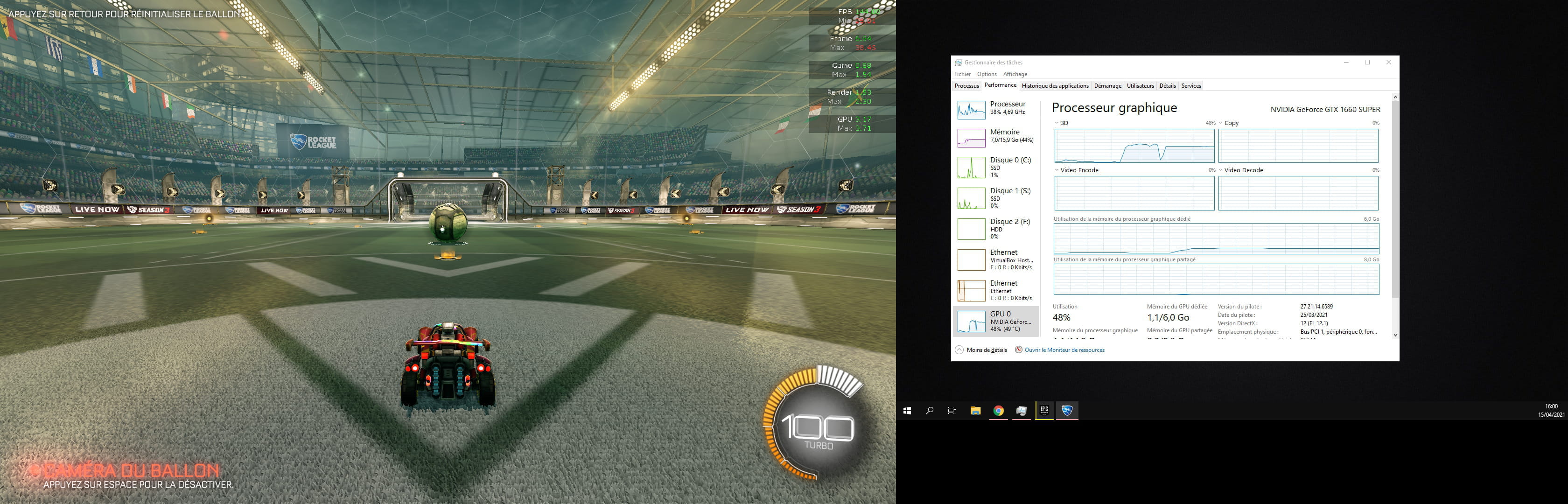
Thank you for shedding some light on this. I don't know if there's a solution, but I would at least like to understand why the GPU utilization is almost zero.
For example, is it normal that when playing a 4K 60Hz video on YouTube, it's my CPU that works rather than my GPU?

My setup:
i5 9600k 6c/6t manually overclocked to 4.7GHz 1.29V
NVIDIA GTX 1660 super (PNY)
Gigabyte Z390 Gaming X motherboard
2x8GB 3200MHz RAM (XMP enabled)
Cooler Master 550w 80+ bronze power supply
Optimized Windows 10
2 answers
-
Hi
First of all, don't worry, a GTX 1660 Super can never bring an i5 9600K to its knees.........
The Task Manager often displays erroneous data.
Instead, check the usage of your 1660 with HWmonitor.
--
Signature
Euskadi Ta Askatasuna-
Thank you for being so responsive!
Indeed, I'm amazed to see such differences between the Task Manager (TM) values and HWmonitor.


The GPU is indeed at 100% :)
The TM shows me 95% utilization while on average across the 6 cores we are at 72% utilization according to HWmonitor.
However, I've read that the CPU should ideally be between 30% and 50% when gaming. Mine tends to be around 75% in demanding games. What do you think the reasons are?
-


