Language issue on Alcatel XL385 cordless phone
Aveyron2012
-
baladur13 Posted messages 47406 Registration date Status Moderator Last intervention -
baladur13 Posted messages 47406 Registration date Status Moderator Last intervention -
Hello.
My Alcatel XL385 phone switched back to English during a power outage.
I can't change it back to French in the menu.
Could you please advise me?
Thank you.
My Alcatel XL385 phone switched back to English during a power outage.
I can't change it back to French in the menu.
Could you please advise me?
Thank you.
5 answers
-
Hello
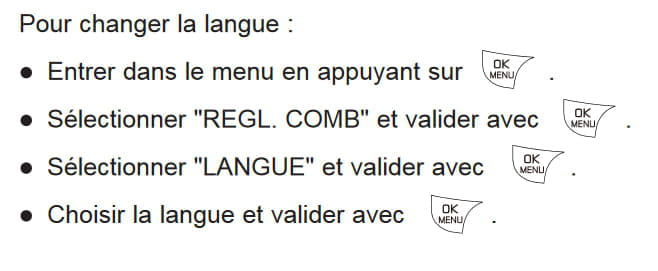
Here is the procedure in French
Perform the same operations with the Menu/OK button
Instead of REGL. COMB, you need to select HS.SETTINGS
Instead of LANGUE, you need to select LANGUAGE
The language to choose is FRENCH
--
It is very difficult to catch a black cat in a dark room.
Especially when it is not there... -
Hello.
The French translation is good.
Another issue is with the sound amplifier; it does not work when you press it!
Can you please explain to me how to proceed?
Thank you.-
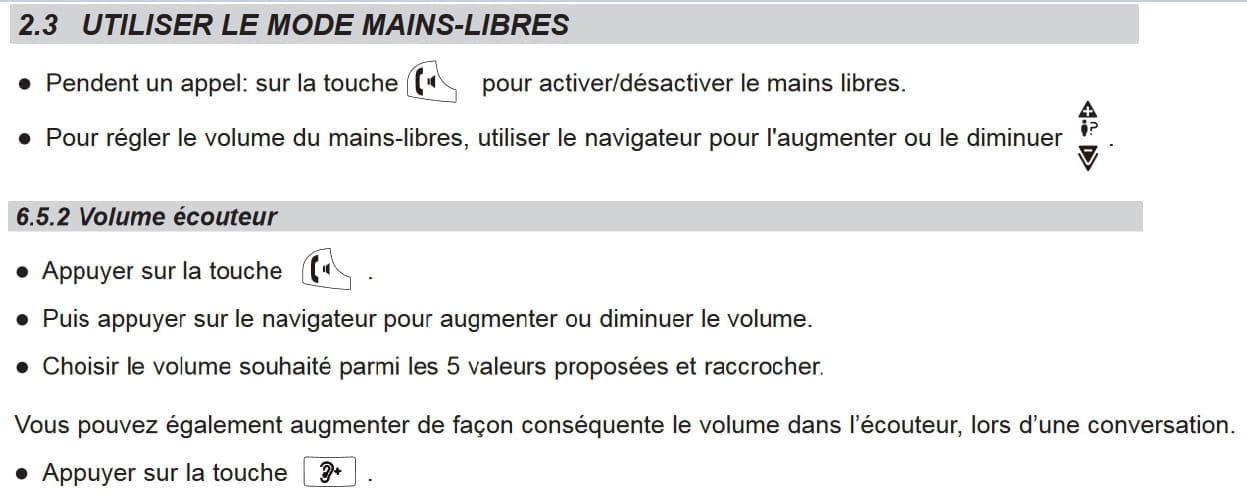
Sound amplifier... are you referring to the "Hands-free" option or the use of the "Audio Boost" button?
Here is a way to adjust the volume of the handset, condensed excerpts from the XL375 manual (more complete):
The XL375 manual, for all useful purposes: https://www.alcatel-home.com/sites/default/files/product/657/files/alcatel-phones-xl375-voice-mode-emploi-fr.pdf
-
-
-
-
Thank you for your response. I was able to switch it back to French. However, the display shows "HANDSET 3" instead of "ALCATEL 1." How can I fix this?
Thank you for your advice.-
Hello,
Off-topic reply
https://forums.commentcamarche.net/forum/affich-37400380-telephone-alcatel-xl-385
That said, how many handsets do you have?
If you have an XL385 voice model, there is probably still something to check regarding how the language is programmed on the base (answering machine language)
See the XL375 manual for more details on page 14 § 9.4.2 - Changing the announcement language
https://www.alcatel-home.com/sites/default/files/product/657/files/alcatel-phones-xl375-voice-mode-emploi-en.pdf
Finally, we can also try to disconnect the handset from the base and then reconnect it
But is it really that annoying to have Hanset1 instead of Alcatel 1?
-