I5-9400F @2,9 GHz boosté à @4 GHz
Solved
Fiixove
Posted messages
108
Status
Member
-
Fiixove Posted messages 108 Status Member -
Fiixove Posted messages 108 Status Member -
Hello,
I followed a tutorial to improve the performance of my CPU (I5-9400F), and I used the Quick CPU software.
My CPU used to run at 2.9 GHz, and now it runs at 3.9/4 GHz constantly.
I checked the resource monitor, and my CPU is at 135% of its maximum power, which, I must admit, does not reassure me too much.
I would like to reset my CPU to default, so I have several questions:
1. Is this dangerous for the machine? The CPU temperature has increased from 25/30 to 40/45° at rest, and during games, it can reach 75. Moreover, it is constantly at 3.9/4 GHz and never goes below that.
2. Is there a way to reset the CPU to default settings?
3. Could this affect the lifespan/condition of my CPU?
In the meantime, I managed to set the CPU back to 2.9 GHz using Quick CPU to avoid damage...
I hope for a response that could help me, thank you very much (I am really very worried about the CPU).
I followed a tutorial to improve the performance of my CPU (I5-9400F), and I used the Quick CPU software.
My CPU used to run at 2.9 GHz, and now it runs at 3.9/4 GHz constantly.
I checked the resource monitor, and my CPU is at 135% of its maximum power, which, I must admit, does not reassure me too much.
I would like to reset my CPU to default, so I have several questions:
1. Is this dangerous for the machine? The CPU temperature has increased from 25/30 to 40/45° at rest, and during games, it can reach 75. Moreover, it is constantly at 3.9/4 GHz and never goes below that.
2. Is there a way to reset the CPU to default settings?
3. Could this affect the lifespan/condition of my CPU?
In the meantime, I managed to set the CPU back to 2.9 GHz using Quick CPU to avoid damage...
I hope for a response that could help me, thank you very much (I am really very worried about the CPU).
8 answers
-
Hi,
Well, your CPU took a hit, but generally speaking, these beasts are resilient; they have a wide temperature range.
Since the CPU boosts, it's more pronounced with Intel than with AMD; overclocking, what you did, is no longer essential. Properly designed programs know how to utilize this boost.
So, 1. With the boost, it overclocks when necessary and possible; with OC, it overclocks all the time.
2. Going the other way?
3. When we OC, we play with the voltage, increasing it in increments of 0.1 V, let's say, and we increase the frequency by 20 MHz. We run a long stress test of about 30 minutes, and we keep increasing voltage and frequency until the stress test fails, at which point we lower the frequency by one or two notches and retest. In short, it can take all day to properly OC. -
Hello
The turbo mode is blocked; in the software, you just need to go back to what you did. The processor is not at risk of being on its maximum mode all the time; it will simply consume unnecessary power.
The 9400f is impossible to really overclock anyway.
--
Signature
Euskadi Ta Askatasuna -
RE: Problem partially solved, but in reality it stays almost all the time at 2.9 GHz in high performance mode and never drops (even for small tasks). For normal usage mode, everything is fine, but now it never exceeds 2.9 GHz while before I’m almost sure the Intel boost would make it go higher when I was playing before the changes...
If you need more information to help me, I’m available
RERE: Well, I think I’ve managed to improve it, the processor fluctuates from 0.90 GHz to 3.30/3.50 GHz which seems better to me. I will try to restart and see how it holds up.
RERERE: At startup, the processor is at 4 GHz and gradually it goes down. What I find abnormal is that it changes frequency a lot (it can be at 0.90 GHz at one moment and then a second later at 2 GHz). It occasionally exceeds 2.9 GHz and hits around 3.5 GHz or a bit more. I'm not sure I've solved the problem 100%. What do you think? Thank you in advance for your responses and I’m still available. -
You need to perform a Clear CMOS which will restore your CPU to its normal values.
--
Misnaming things adds to the misery of the world (Albert Camus) -
RERERERE: Well, the processor behaves normally in regular usage mode, but in performance mode, it's still at max (an average of 3.9 GHz). Any ideas? Because I don't understand.
-
Hi,
Before making your change with Quick CPU, had you already measured the CPU's clock speed with the different modes (performance, etc.)?
What I see in your comments is that you are almost panicking at the thought of having overheated the CPU. So, golden rule: you don't optimize software or hardware. If you want more performance, you need to upgrade to more powerful hardware. Yes, it costs money and can sometimes be expensive, but the gain will be far greater than any kind of tweaking. -
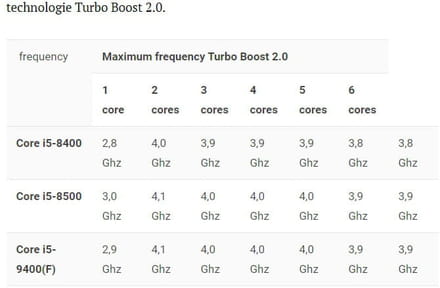
The boost frequency chart of a 9400F:
https://img-19.ccm2.net/mW6Cvra6q-NbNIHiZxi8Tn7Yh1M=/440x/33abce0f0223418bb26a8e165aebb12e/ccm-ugc/Sans_titre.jpg
With HWmonitor it is easy to check if this is correct, but keep in mind that Intel is the sole master of its technology.
--
Signature
Euskadi Ta Askatasuna -
Well, after a reset of the processor settings and the new windows update, everything is back to normal :) I'm closing the chat
--
// Fiixove //
Don't forget the hello and the thank you, and I will help you without any problem.