
Display issue on Premiere Pro
Anonymous user
-
MagSouh Posted messages 575 Status Member -
MagSouh Posted messages 575 Status Member -
Hello,
I have a big problem with Premiere Pro. What should be the "guides" "outlines" when selecting a text area are not showing up! I only see the cursor in the Program window; I can see my text, but I don't know if it is selected when I click on it because nothing appears. The same goes for an image I want to enlarge, for example; I click in the empty space.
This is what doesn't show up:
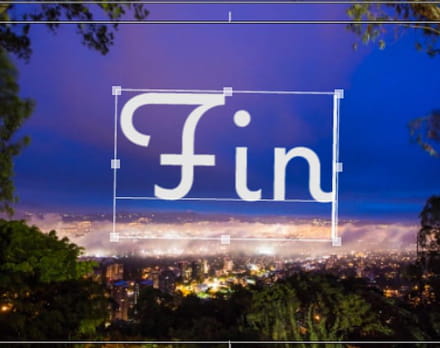
I read on some sites to display the guides by going to "View," but I don't even have that tool in my toolbar... I only have "File Edit Element Sequence Markers Window Help."
Does anyone have a solution? It's very challenging to work like this.
I have a big problem with Premiere Pro. What should be the "guides" "outlines" when selecting a text area are not showing up! I only see the cursor in the Program window; I can see my text, but I don't know if it is selected when I click on it because nothing appears. The same goes for an image I want to enlarge, for example; I click in the empty space.
This is what doesn't show up:
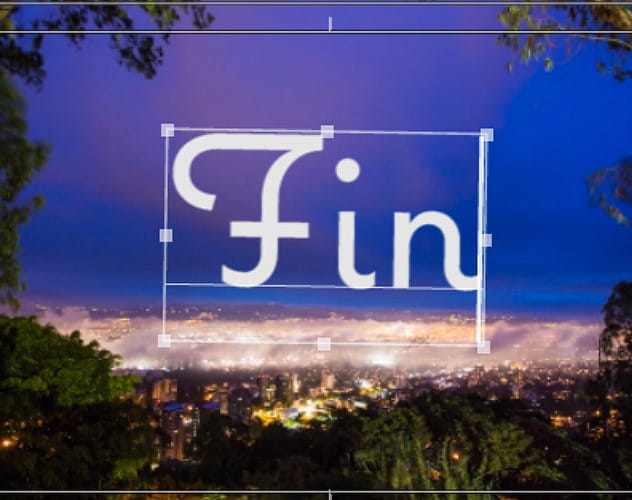
I read on some sites to display the guides by going to "View," but I don't even have that tool in my toolbar... I only have "File Edit Element Sequence Markers Window Help."
Does anyone have a solution? It's very challenging to work like this.
