My PC freezes twice an hour at the same interval.
Flechette31
-
flechette31 -
flechette31 -
Hello,
As mentioned in the title, I noticed that my desktop PC freezes twice an hour today. I noted the freeze times and they are as follows:
3:18 PM, 3:34 PM, 4:18 PM, 4:34 PM, 5:18 PM, 5:34 PM, ...
This is quite annoying especially when playing online,...
When I say freeze, I mean the image and sound are frozen for about 5 seconds.
I built my PC myself, but I didn't make any mistakes since it works very well apart from this issue.
Here are its specifications:
CPU: i7 8700k
Motherboard: Asus Z370E
GPU: MSI 2080 Gaming X Trio
RAM: G.Skills 16 GB (2x8) Trident Z RGB
SSD: Samsung 970 Evo 500 GB
HDD: Seagate Barracuda 1 TB
OS: Windows 10
It seems that during the freezes, I can hear the hard drive... Is there possibly a link?
Thank you in advance for any help you can provide!
P.S.: I hope I chose the right section of the forum; I wasn't sure where to post my problem.
As mentioned in the title, I noticed that my desktop PC freezes twice an hour today. I noted the freeze times and they are as follows:
3:18 PM, 3:34 PM, 4:18 PM, 4:34 PM, 5:18 PM, 5:34 PM, ...
This is quite annoying especially when playing online,...
When I say freeze, I mean the image and sound are frozen for about 5 seconds.
I built my PC myself, but I didn't make any mistakes since it works very well apart from this issue.
Here are its specifications:
CPU: i7 8700k
Motherboard: Asus Z370E
GPU: MSI 2080 Gaming X Trio
RAM: G.Skills 16 GB (2x8) Trident Z RGB
SSD: Samsung 970 Evo 500 GB
HDD: Seagate Barracuda 1 TB
OS: Windows 10
It seems that during the freezes, I can hear the hard drive... Is there possibly a link?
Thank you in advance for any help you can provide!
P.S.: I hope I chose the right section of the forum; I wasn't sure where to post my problem.
20 answers
-
Also, you can disable or remove the automatic startups of some third-party elements (Not Microsoft) by unchecking them or deleting them by right-clicking > Delete in the "Logon" and "Scheduled Tasks" sections with Autoruns launched as an administrator.
Check your services in the "Services" section, but do not disable them; it's better to set them to "Manual" (if needed) using services.msc from Windows, by right-clicking on the Start button > Run
Restart Windows for the changes to take effect. -
Hi,
Right-click on This PC > Manage
You can see in the Event Viewer
And the Task Scheduler.
If that’s not enough, you can check for viruses/malware with RegRun Reanimator
https://greatis.com/security/reanimator.html
You can use the three options:
> Fix Malware Issues
> Deep Scan
> On-Line Multi-Antivirus Scan
But be careful about everything you delete, it may detect legitimate Windows files or drivers.
If you're unsure, run the files through VirusTotal Uploader by right-clicking > Send To > VirusTotal
https://support.virustotal.com/hc/en-us/articles/115002179065-Desktop-Apps -
Hello,
First of all, thank you for your help!
So I checked the event viewer and found the task at 3:34 PM that repeats every hour. In fact, there are several in 2 different areas: "application" and "security."
In the application area, there are 2:
- "The low-level offline migration succeeded." source security - SPP
- "The scheduling of the software protection service restart at 2020-10-25T12:13:50Z succeeded. Reason: RulesEngine." source security - SPP
In security there are also 2:
- "The logon of an account was successful. Object:
Security ID: SYSTEM
Account Name: POWER$
Account Domain: WORKGROUP" source Microsoft Windows security.
- "Special privileges assigned to new logon.
Subject:
Security ID: SYSTEM
Account Name: SYSTEM
Account Domain: NT AUTHORITY" source Microsoft Windows security.
Is this normal in your opinion? What should I do if not?
I will nonetheless follow through with the malware scanning you suggested. -
I checked the malware with Regrun, the suspected file is "SearchFilter C:\PROGRAMDATA\SEARCHFILTER\SEARCHFILTER.VBS" but after checking on VirusTotal it seems that it's not dangerous.
-
No, it's bad, very bad, it's VirusTotal that misinterpreted
What method is it detected at startup?
You can delete that, whether you detected it by Fix Malware Issues or Deep Scan.- This also smells bad, it smells like a hacker opening an account with elevated privileges on your machine
- “The logon of an account was successful. Object:
Security ID: SYSTEM
Account Name: POWER$
Account Domain: WORKGROUP” source Microsoft Windows security.
- “Special privileges assigned to the new logon.
-
-
Seriously?! You're freaking me out here!! It's crazy how they can put that on my PC when I'm being super careful, no illegal downloads or anything...
"It is detected at startup by what method?" I don't understand what you mean or how I can find that out?
And so is it 100% sure that I should only delete the concerned file "searchfilter.vbs" or should I delete the entire "searchfilter" folder that includes the concerned file + api file etc.? I tried to fix the problem with RegRun but it didn't remove it from the PC, I still see it in program data...
Then for the potential hacking, what should I do? :/
And thanks again for your help!!! -
It may have been renamed with the .del extension by RegRun?
Or you haven't restarted
If RegRun hasn't deleted it, normally it's a user error (Not used to it)
You can delete the folder.
As for the hacks, I don't know what it does. -
-
yes
Then remove anything that started with Regrun or Autoruns if you see it.
Note: Your browser may have been infected, or it may have transmitted the infection from an unreliable site through a malicious script that uses an "exploit."
To browse on somewhat unreliable sites, you need a script blocker, like NoScript. -
hi, download this then run a scan
--
Computing: A blend of an imprecise science and a fallible human activity-
- Ah, I'll let you continue with Fabul :), I wouldn't want to intrude
but if you wish, you can do a complete scan with Kaspersky, it hardly misses anything and it's more thorough than Malwarebytes, but you need to disable Malwarebytes first to avoid a conflict between the two.
-
-
I haven't seen it on autorun... In any case, I just deleted it from my PC, so at least that's done =)
Also, my PC has been freezing for a while; I wasn't paying too much attention to it, but today I can't take it anymore, that's why I posted on the forum.
Can we do something about this:
"- "The logon of an account has been successfully completed. Object:
Security ID: System
Account Name: POWER$
Account Domain: WORKGROUP" source Microsoft windows security.
- "Special privileges assigned to the new logon."
? -
With RegRun, you can click on Send Report, and send me the regrunlog report from your desktop
on Cjoint (Not to Greatis support)
https://www.cjoint.com/
Put the link here afterwards
You can also create the report that Seb asked for
Hi Seb :)-
-
Seb, If he sends the report, and you want to follow up, install RegRun Reanimator
To open the log and analyze it, close the first window by clicking the X in the top right corner
(Not in the bottom right Exit)
In the second window, under the Reanimator tab, click on Read Report
You open the regrunlog.txt file directly
You need to download the regrunlog.txt file, not copy the plain text
Otherwise, recreate it from the text. -
I'll let you continue because I don't have my PC on hand and you know the topic better than I do ;), but thanks for the offer :) Have a good evening!
-
-
-
-
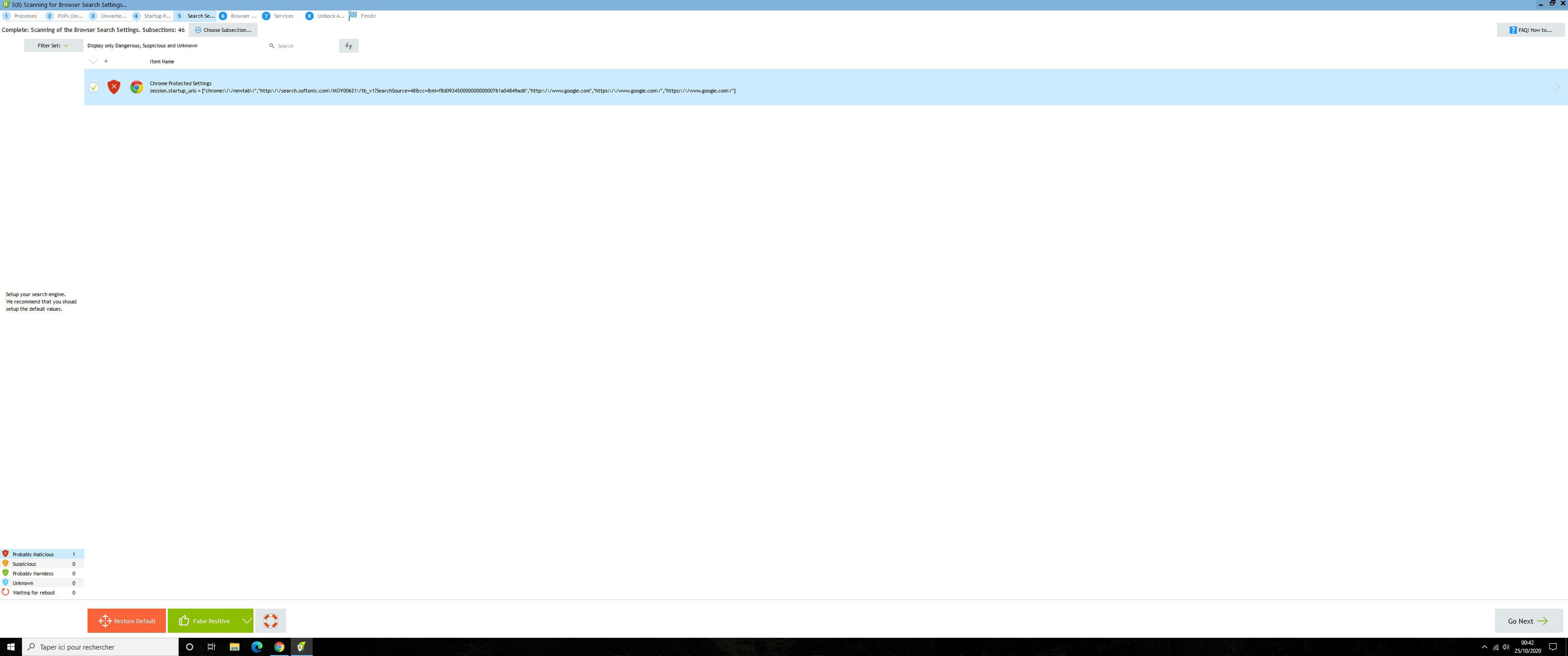
I also have this showing up as malicious on RegRun:
"Chrome Protected Settings session.startup_urls"...
I deleted it the first time, I lost my saved passwords and Gmail account, so I had to log back into my various Gmail accounts after deleting this file.
However, I ran another scan and it continues to show up as malicious. I don't think it's dangerous; is it a RegRun error?-
Your browser may have been infected.
Did you check, select the item, click the red button to delete, and restart?- Sometimes, RegRun can give you hints so that you can take actions yourself as well.
Like resetting your browser.
It depends on the problems.
You can use ResetBrowser to reset your browser.
-
-
When you have finished analyzing your own report, as mentioned here https://forums.commentcamarche.net/forum/affich-36902603-mon-pc-freeze-2-fois-par-heure-au-meme-intervalle#18
And when it has completed the Malware analysis
You can click on:
Upload and Check Unknown Files using VirusTotal
(Top left)
When the analysis window starts and finishes analyzing the first item, double-click on the item; this will open a VirusTotal page where you must confirm that you are human.
Then you will look at the results.
But it's looking good, it detected no malware directly, just benign, unknown, and inaccessible ones.-
Then you can look to the left of the RegRun Reanimator window behind (Where you see a lot of items)
Click on All Items, I also see
Chrome Protected Settings
["chrome:\/\/newtab\/","http:\/\/search.softonic.com\/MOY00621\/tb_v1?SearchSource=48&cc=&mi=f8d09345000000000000761a04849ad6","http:\/\/www.google.com","https:\/\/www.google.com\/","https:\/\/www.google.com\/"]
That means you should reset your browser with ResetBrowser
As I noted here:
https://forums.commentcamarche.net/forum/affich-36902603-mon-pc-freeze-2-fois-par-heure-au-meme-intervalle#29 -
So I have 3 files that are displayed,
- Banners.ddl I don't know what it is, virustotal doesn't recognize it as malicious for now
- CLientpronote I know that, it's my work software
- Dropbox.ddl I don't use Dropbox but well, everyone knows it.
I imagine my PC should be clean now, do you think that solves the freezing issues or was it unrelated? -
-
-
-
-
You can restart Reanimator
> Fix Problems
> Online Multi-Antivirus Scan
After the scan, click on File Info on the right to find where the file is on the disk
Analyze it by clicking on VirusTotal
Edit:
Or even, you have the file multiav_report.html now on your desktop -
Well...
When I do fix problems it shows me:
"Chrome Protected Settings session.startup_urls"...
I can't copy and paste everything, the message won't post on the forum, I don't understand why... but it gives an http address to Google several times and to the Softonc site.
I just can't get rid of it for sure ^^' and I don't know why it gives an address to "softonc", it rings a bell but I can't remember what it is... is it dangerous?
Then when I do the online multi antivirus scan it only shows "client pronote" the software I know, Dropbox has disappeared and I deleted banners, it was software I wasn't using anymore. -
Chrome Protected Settings session.startup_urls = ["chrome:\/\/newtab\/","http:\/\/search.softonc.com\/MOY00621\/tb_v1?SearchSource=48&cc=&mi=f8d09345000000000000761a04849ad6","http:\/\/www.google.com","https:\/\/www.google.com\/","https:\/\/www.google.com\/"]
This is what I couldn't copy and paste into the forum message, I had to try 7/8 times before I understood that the correctly spelled word "softonc" (meaning "sof tonic" but stuck together) was preventing the message from being published on how it works.... Weird. -
Download the Chrome installer
Uninstall Chrome
https://support.google.com/chrome/answer/95346
Then, in the search bar, type %LocalAppData% and open it
Delete the Google folder
And reinstall Google Chrome -
So, it's done and indeed when everything is disconnected from my account there are no issues, but as soon as I activate the synchronization of my Gmail account the message reappears in RegRun
I wonder if in the end it's not normal? -
Do you have something related to Softonic in your Gmail?
It sticks back to your Google Chrome.-
-
-
-
You must have installed a program that came from Softonic and was slightly infected, which added a NewTab URL... Softonic...
Changing your homepage might be to set https://google.fr
I don't know how you save that in your Gmail, I don't know much about Chrome
Otherwise, it could be an extension that re-attaches itself to your Chrome via your Gmail? You should remove it and save the change in your Gmail.
As I said, I don't know Chrome very well. -
-
-
Hi everyone!
Well
I have good news and bad news ^^
The good news is that after reinstalling Windows I no longer have freezes, that's it!!! I'm really so happy about that =)
But the bad news is that I have another issue, which only happens when I'm playing Warzone; since I only have this game, I can't tell if it would happen with others.
It's quite difficult to explain but I'll try anyway. Basically, imagine my character moving normally, and every now and then, about every 10 seconds, the scene where my character is doing actions like moving plays in fast motion for less than a second, then the speed goes back to normal... that's it, I'll try to record a video to make it clearer, and I'll share the link.
Do you have any ideas on what it could be?