Automatically merge identical cells
Solved
jujan44
-
m@rina Posted messages 27879 Registration date Status Moderator Last intervention -
m@rina Posted messages 27879 Registration date Status Moderator Last intervention -
Hello,
As a beginner, I would like your help with the presentation of a document containing primarily textual data. I have a spreadsheet containing client accounts (name, address, contact, and quote number for which we have responded). This data has been extracted from an online data service that is continuously updated.
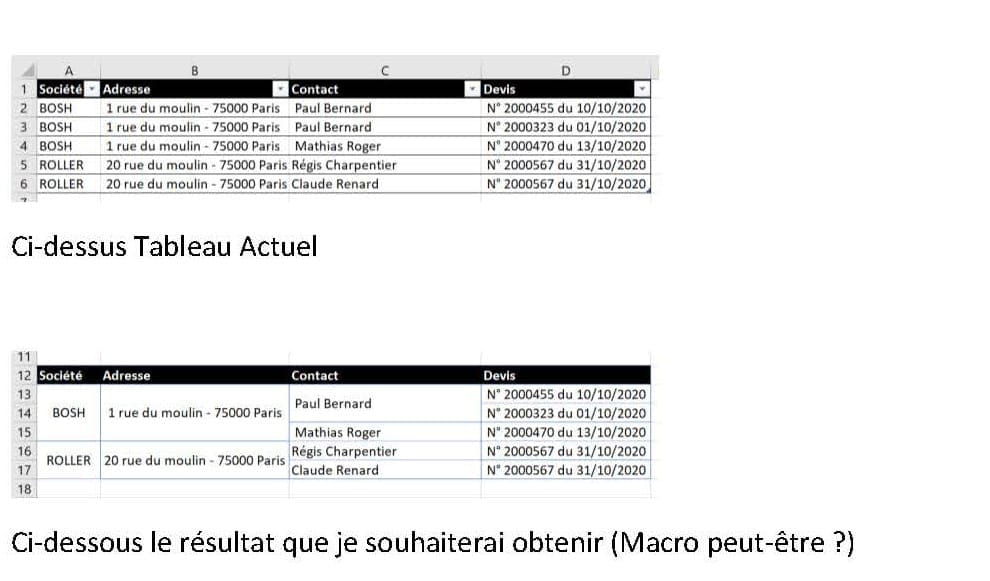
Here is the current table:
Company Name / Address / Contact / QUOTE
BOSH / 1 rue du moulin - 75000 Paris / Paul Bernard / No. 2000455 dated 10/10/2020
BOSH / 1 rue du moulin - 75000 Paris / Paul Bernard / No. 2000323 dated 01/10/2020
BOSH / 1 rue du moulin - 75000 Paris / Mathias Roger / No. 2000455 dated 10/10/2020
And here is the table I would like to obtain:
Paul Bernard / No. 2000455 dated 10/10/2020
BOSH / 1 rue du moulin - 75000 Paris / Paul Bernard / No. 2000323 dated 01/10/2020
Mathias Roger / No. 2000455 dated 10/10/2020
I would need this to be done automatically as the data is extensive and automatically updated... I cannot do manual merging.
Maybe a macro?
Thank you.
Best regards.
Configuration: Windows / Chrome 86.0.4240.75
As a beginner, I would like your help with the presentation of a document containing primarily textual data. I have a spreadsheet containing client accounts (name, address, contact, and quote number for which we have responded). This data has been extracted from an online data service that is continuously updated.
Here is the current table:
Company Name / Address / Contact / QUOTE
BOSH / 1 rue du moulin - 75000 Paris / Paul Bernard / No. 2000455 dated 10/10/2020
BOSH / 1 rue du moulin - 75000 Paris / Paul Bernard / No. 2000323 dated 01/10/2020
BOSH / 1 rue du moulin - 75000 Paris / Mathias Roger / No. 2000455 dated 10/10/2020
And here is the table I would like to obtain:
Paul Bernard / No. 2000455 dated 10/10/2020
BOSH / 1 rue du moulin - 75000 Paris / Paul Bernard / No. 2000323 dated 01/10/2020
Mathias Roger / No. 2000455 dated 10/10/2020
I would need this to be done automatically as the data is extensive and automatically updated... I cannot do manual merging.
Maybe a macro?
Thank you.
Best regards.
Configuration: Windows / Chrome 86.0.4240.75
3 answers
-
Hello,
Actually, you just want to consolidate the data by company, possibly by address if there are multiple, and then by contact.
This is typical of a pivot table even if you don't have to generate any calculations.
Here’s an example of a table converted into a pivot table to achieve what you want. It will take 4 clicks and that's it. And a pivot table updates with one click.


m@rina
--
From now on, if a user says "it doesn't work" without any more info..., I'm done!-
Yes, that's exactly it. Can you send me the procedure to perform this pivot table?
Thank you very much ????- Yes, so it's very simple:
First, make sure your table is an "Excel-style table" if it isn't already: Click in a cell, then Insert Table, you can choose a format.
Then, click in your table, Insert => PivotTable => OK
In the PivotTable Fields pane, check your fields: company, address, contact, quote
They should now all be in the Rows area.
Your table is done.
You just need to format it a bit. For that, with the cursor in the PivotTable, go to the Design tab (the name may vary depending on the version).
On the left, Grand Totals: click and choose Off for Rows and Columns
Report Layout: choose Tabular
You can resize the columns
and you can choose a style from the PivotTable Styles gallery
You can then apply filters, sorts, etc. if needed.
When you have a change in your database, go to the PivotTable, and press Alt+F5 or in the PivotTable Analyze tab, click Refresh.
And if you want, we can create a macro that updates whenever you display this sheet.
m@rina - It's great, it's working. Really thanks M@rina for your help! So, I'd also like your macro to have my table update automatically ;-)
- Hello,
So you right-click on the tab of your sheet that contains the Pivot Table, and you choose View Code.
And then you copy and paste this:
Private Sub Worksheet_Activate()
ActiveSheet.PivotTables(1).PivotCache.Refresh
End Sub
So, from now on, every time you display this sheet, the table will update itself if any changes have been made to the original table.
One thing: since your Excel file now contains a macro, you will need to save it as a different file type with an XLSM extension (M for macro).
m@rina
-
-
Hello,
Sorry, but I don't see any logic in the expected result...
Why does the second one have an address, but neither the first nor the third?
To automate, whether by merging or by macro, there needs to be a logic.
m@rina
--
From now on, if a user tells me "it's not working" without any further info, I'm giving up! -
Hello,
Thank you for your quick response :-)
My message wasn't very clear, I'm sorry. I’m attaching an image copy of the results that I would like to achieve.

Thank you