No more automatic sign-in when opening Microsoft Edge
judith
-
pistouri Posted messages 19010 Registration date Status Contributor Last intervention -
pistouri Posted messages 19010 Registration date Status Contributor Last intervention -
Hello,
Since the last Windows update, I have to log in (enter my username and password) every morning to my usual sites (Twitter, etc.) whereas before I was automatically logged in when I opened the browser, which was very convenient!
Can someone help me restore this automatic login?
Thanks in advance and have a great day!
Configuration: Windows / Edge 86.0.622.43
Since the last Windows update, I have to log in (enter my username and password) every morning to my usual sites (Twitter, etc.) whereas before I was automatically logged in when I opened the browser, which was very convenient!
Can someone help me restore this automatic login?
Thanks in advance and have a great day!
Configuration: Windows / Edge 86.0.622.43
7 answers
-
pistouri Posted messages 19010 Registration date Status Contributor Last intervention Ambassador 8 732
Hello,
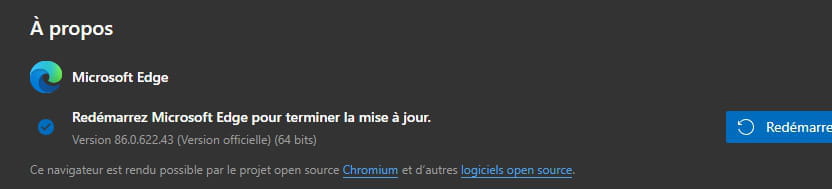
1- Switch to version Edge 86.0.622.48 (Official version).
Open Edge, clear everything in the address bar and copy/paste:
edge://settings/help
Then press the Enter key.
Click on Restart when the update is downloaded.


Close Edge again and restart it.
2- Browsing data
Open Edge, clear everything in the address bar and copy/paste:
edge://settings/privacy
Then press the Enter key.
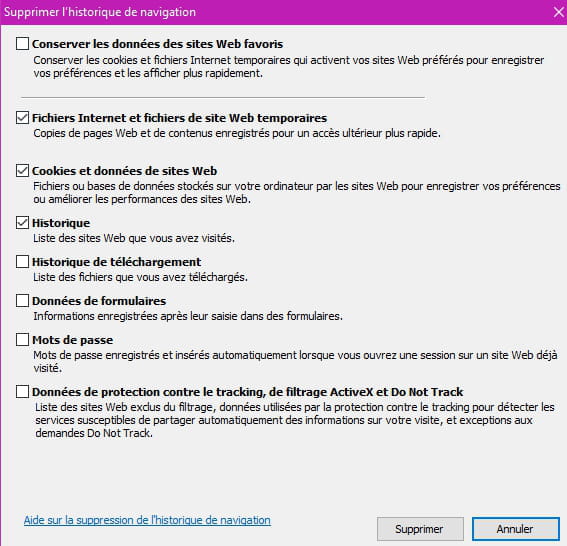
Section --► Clear browsing data
Click on -► Choose what to clear
Check only the first 4 boxes.


---------------------------------------------------------------------------------------------------------------------------------------------------
3- Avoid cleaning software like CCleaner
4- Create another profile in the Edge browser.
Enable synchronization if you wish.
5- Passwords
Open Edge, clear everything in the address bar and copy/paste:
edge://settings/passwords
Then press the Enter key.
Highlight in blue the 2 boxes;
-Offer to save passwords
-Auto sign-in
If this option is disabled, we will ask you for permission before each login on a website
A+
--
surgery -
pistouri Posted messages 19010 Registration date Status Contributor Last intervention Ambassador 8 732
Hello,
1- Create a new profile.
Open Edge (Chromium).
Click on the three dots at the top right.
Click on the line ► Settings
In the left menu, click on the line -►Profiles
In your personal profile, click on -►Add a profile
Then click on ► Add
An internet page opens, click on ►Sign in to sync your data
Click on ►Confirm
Click on the profile 1 then ► Sign in
Choose another account if you have multiple.
At any time, you can switch to your other account.
2- Repair or reset Edge
With Windows 10 version 2004 (May 2020)
Settings►Apps►Apps and features
Scroll down the list to -► Microsoft Edge
Click on Microsoft Edge then ►Advanced options
Click on ► Reset
the tutorial
3- Update Windows 10 to version 2009.
Start by checking your current version.
In the search box on the taskbar, type or press the keyboard keys Windows + R type -►winver
Note your version (the 4 digits)
To update Windows 10:
Settings ►Updates and security
If you have no downloads in progress, click on -►Check for updates
A+
--
scalpel -
pistouri Posted messages 19010 Registration date Status Contributor Last intervention Ambassador 8 732
Microsoft (the forum) is not able to repair its software (Edge) and that's a shame.
See with version 2009 of Windows 10.
You should know in advance that Edge will be installed by default in this version and that it will be mission impossible to uninstall it (although there will probably be a loophole somewhere).
Alongside Edge Chromium, I use Edge Dev, which is quite similar.
It is stable and updated regularly like Chromium.
Try it if you wish.
It's on this page
Select the boxes like in the image below.
Then --► Download
All your settings and favorites will be imported automatically.
A clone of Chromium in summary.
On the contrary, it can be uninstalled in version 2009:
Which is not the case for Edge Chromium version 2009:
A+
-
Thank you very much for your response! Unfortunately, after trying all the manipulations you suggested, I'm still at the same point...
Any other ideas? -
I tried the last two steps with a Microsoft customer service agent, to no avail! So I'm giving up, I switched back to Chrome (which I should never have left!) and everything is working great!
Thanks anyway for taking the time to respond to me!
Have a good evening! -
Thank you for all this information! In fact, it was Microsoft's technical support; they actually made me reinstall all of Windows! It took all afternoon… for nothing! Too bad because I really liked Edge Chromium, which I find faster than Google Chrome.
On your advice, I will try Edge Dev.
Thanks again and have a great day! -
pistouri Posted messages 19010 Registration date Status Contributor Last intervention Ambassador 8 732
Edge will install during an update, you don't have to worry.
Click on the search area, it's the magnifying glass on the taskbar
See if you see the option to install or launch Edge.
Microsoft didn't beat around the bush and it's a shame because that's what I wanted to avoid at all costs, I would have suggested creating a new user account if necessary.
I have to go, have a nice day.
--
pistouri