
Windows Sign-in Screen
Hello,
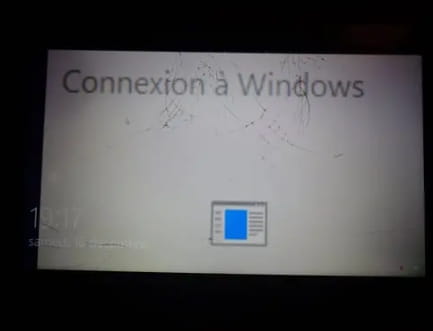
On my laptop, an image appears in front of the welcome screen, and on this image, it says "connecting to Windows."
When I press any key on the keyboard, the image disappears and the screen turns blue.
Can someone please help me?
It worked perfectly fine yesterday, and this evening when I turned on my laptop, this problem appeared.
Thanks to anyone who helps me????
Sophie
Configuration: Android / Chrome 83.0.4103.106
On my laptop, an image appears in front of the welcome screen, and on this image, it says "connecting to Windows."
When I press any key on the keyboard, the image disappears and the screen turns blue.
Can someone please help me?
It worked perfectly fine yesterday, and this evening when I turned on my laptop, this problem appeared.
Thanks to anyone who helps me????
Sophie
Configuration: Android / Chrome 83.0.4103.106
2 answers
-
ModeratorHi,
Does this require you to log in to a Microsoft account?
--
Please press a key to continue the disinfection... -
ContributorHi Malekal, Hi Maxette,
Surely this
1- Automatic login at startup
You may configure the automatic login at startup for Windows 10 with netplwiz.
Keyboard shortcut Windows + R
Type: netplwiz or control userpasswords2
Uncheck the box “Users must enter a user name and password to use this computer.”
Select the username of the account to automatically log in at startup.
Uncheck the box “Users must enter a user name and password to use this computer.”
Then OK.
Type your user account password twice.
2- Login options
Go to Settings ► Accounts ► Sign-in options
Uncheck the 3 boxes at the bottom of the page.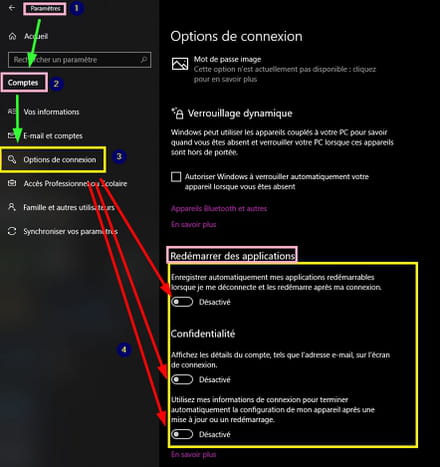
Another solution is to switch to a local account.
It's a matter of account or password, I didn't go deeper.
Check if the account is indeed an Administrator.
See you later
--
pistouri


