Unable to remove an overlay on the desktop
Solved
c2lorquin
-
pistouri Posted messages 19010 Registration date Status Contributor Last intervention -
pistouri Posted messages 19010 Registration date Status Contributor Last intervention -
Hello
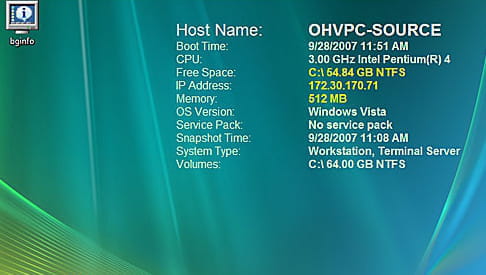
While installing software, I accidentally requested an extraction on the desktop..see the partial screenshot attached since I work on 2 screens I have the same thing on both
.https://www.cjoint.com/c/JHkqpPjK3xG
I checked in "Display settings" and "Custom"
I tried a restore with no effect
I can no longer remove this overlay, how can I do it? Thank you for helping me.
While installing software, I accidentally requested an extraction on the desktop..see the partial screenshot attached since I work on 2 screens I have the same thing on both
.https://www.cjoint.com/c/JHkqpPjK3xG
I checked in "Display settings" and "Custom"
I tried a restore with no effect
I can no longer remove this overlay, how can I do it? Thank you for helping me.
3 answers
-
pistouri Posted messages 19010 Registration date Status Contributor Last intervention Ambassador 8 732
I think your software is → BgInfo
Try this:
This log does not install. It creates a wallpaper named BGinfo. You just need to change the wallpaper. Right-click on the desktop, Properties, click on the Desktop tab and choose your old wallpaper or another one.
Source
BGInfo is a small utility from Mark Russinovich that displays various information related to your system on the desktop.
There is indeed a ''Backgrounds'' and ''deskop'' option in the settings.
Right-click on the text displayed permanently on the desktop, you should see this window.

Backgrounds = Wallpaper or Desk Background
Deskop = Desktop
To change the wallpaper with Windows 10.
Settings → Personalization → Background
A+
-
Hello
Thank you very much for your help, I had indeed searched for "Customized". But I found the BGInfo file in the theme. It was done in no time... Thanks again.- Content for you.
It wasn't easy since the software doesn't install anywhere.
It's indeed in the customization settings, in themes or background image, where you had to dig to change that.
And it was indeed BGInfo that my memory remembered the name of.
You can mark the subject as resolved.
Have a nice day.
-
-
pistouri Posted messages 19010 Registration date Status Contributor Last intervention Ambassador 8 732
Hello,
Give the name of the software if you remember it.
From your screenshot, I had installed this software a while ago (more than 5 years) and it's impossible to display it on the Desktop, even after uninstalling it.
I don't remember the name of this software.
It seems possible to right-click on the text to hide it or a keyboard shortcut combination.
In the meantime, launch the task manager with Ctrl+Alt+Delete
Check the processes tab, ongoing applications, and background processes.
Or see if you can find it with Revo
Also, open the Start button at the bottom left of the screen.
Then maybe under → Recently added
See you+
--
scalpel -
pistouri Posted messages 19010 Registration date Status Contributor Last intervention Ambassador 8 732
Oops, I forgot to suggest you Process Explorer, which is more comprehensive than the task manager.
Also with Autoruns
Tab → Everything
Tab → Logon (this is what starts when the PC boots up)
Tab → Scheduled Tasks (these are the scheduled tasks)
Post screenshots if you're not sure.
→ Take a screenshot
→ Post an image on CCM
Cya
--
pistouri