Fan connection
Solved
jeremtraceur33
Posted messages
12
Status
Member
-
JeuneL Posted messages 1873 Registration date Status Member Last intervention -
JeuneL Posted messages 1873 Registration date Status Member Last intervention -
Hello.
I just built my tower but I'm having trouble with the fan connectors.
Let me explain, I have a SATA connector for the fan and a simple fan connector, but as you can guess, neither of them connects to the sysfan.
I would like to know how to connect them since there is no adapter provided with the case (Bequiet base 600) Attached photo.
Thank you.

I just built my tower but I'm having trouble with the fan connectors.
Let me explain, I have a SATA connector for the fan and a simple fan connector, but as you can guess, neither of them connects to the sysfan.
I would like to know how to connect them since there is no adapter provided with the case (Bequiet base 600) Attached photo.
Thank you.

4 answers
-
Even the manual doesn't show much, but I understand now...

You have these cables...
And from there you have:
-The blue connector = USB 3.0 to be connected to the motherboard which powers 2 USB connectors on the front
-The SATA Power = Just to provide power to the fan controller
-The small connectors = To be connected to the motherboard for the hard drive LED, the power button, the reset button, etc...
-The HD Audio connector to connect to the motherboard
-The 3-pin connector to power one or more fans to connect to the fan
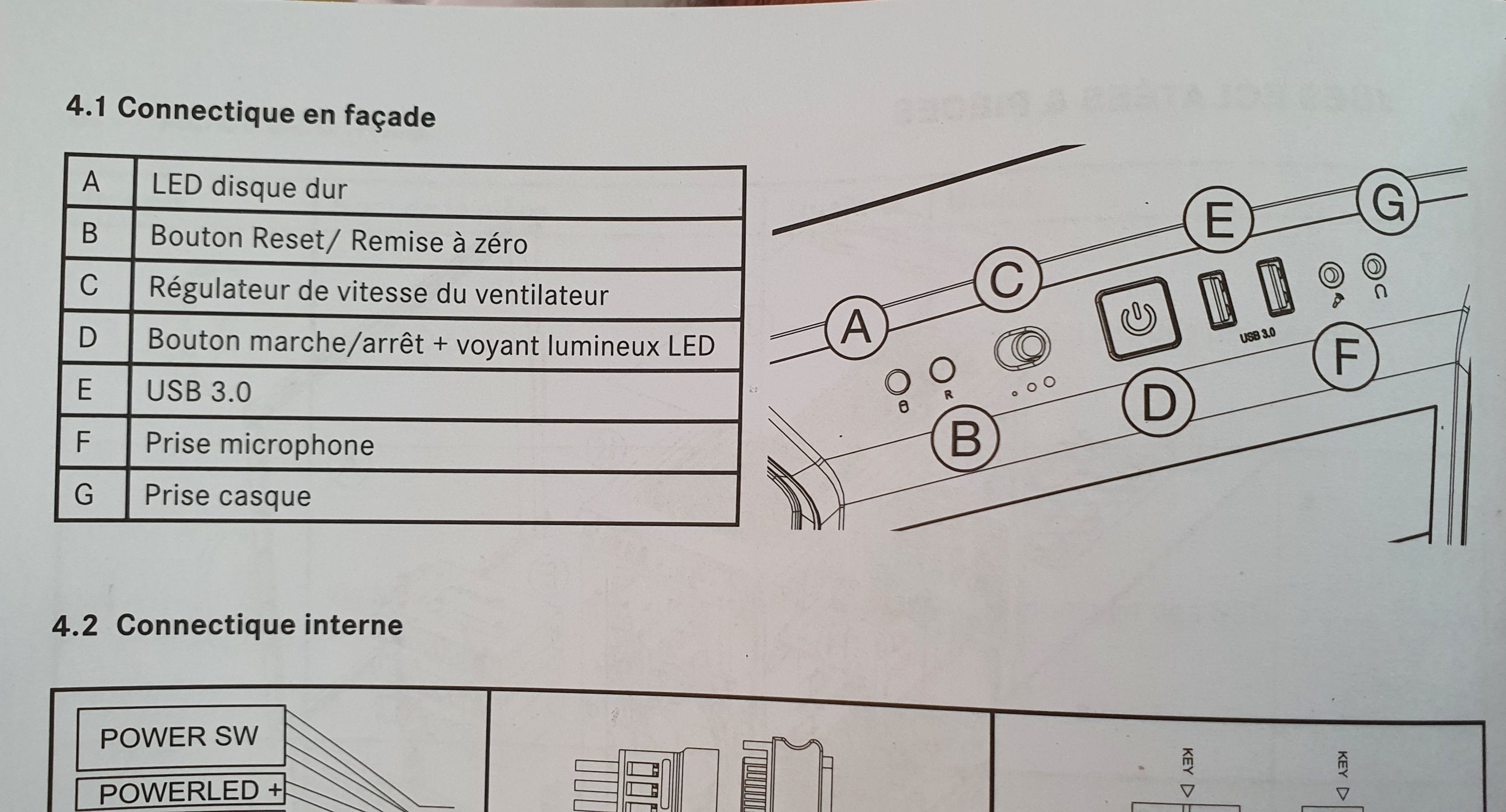
You have integrated a button that offers 3 positions for the fan speed which actually affects the voltage = 5, 9, or 12V
So you should be able to connect all of this without any problems
;o) -
Good evening,
Fans with either 4-pin or 3-pin connectors are connected to the motherboard...

The two cables coming from the power supply are not for that; they are there in case you want to connect an additional fan directly to the power supply
SATA power connectors are not used for fans.-
Thank you for your response. However, the SATA acts as a speed controller. I imagine this SATA corresponds to the speed variation button on the case next to the power button, but it is indicated to connect it directly to the power supply..

The real problem is that there are no adapters provided, whether in Molex to connect directly to the power supply or in 3-4 pin to plug into the motherboard.
If I understand correctly, the 3-pin connector in the photo corresponds to the 3 fans of the case bridged together and should be connected to sysfan (except that due to the need for an adapter, I can't find one) and where should I plug the SATA from the controller?
I did not expect a surprise of a male plug on a male connector without an adapter, as well as a controller cable devoid of a port to connect it.
-
-
I think the SATA connector is there to provide more power to the entire system.
However, I think you should have one or more fan connectors at the back of your system.
Can you send me a photo of this speed regulator or give me the brand and model?-
I just followed all the wires to the case outputs and the 3-pin cable doesn’t seem to serve as power but corresponds to a bridge for the fan (my case only has 2 fans out of 3, so it’s logical that there’s an extra cable in case I add one) so I couldn’t connect it to the motherboard as it simply didn’t fit.
As for the SATA cable, it corresponds to the speed regulator shown in photo Num C.

What puzzles me is that this cable must necessarily serve both as a speed regulator and as power for the case fans since my case doesn’t have any other cable to power these fans. The question that comes to mind is: where and with what adapter should this SATA be connected?
A hassle for simple fans.. long live the new models.
-
-
It would be easier if you give me the brand and model...