
Issue with Live Mail Essentials 2012
Solved
Hello
I am new to CCM and I have a problem with WLM 2012 since the last Windows update.
I have a message that pops up and I can't read my emails
"The message could not be displayed
Windows Live Mail encountered an unexpected problem while displaying this message. Please check if your computer's memory or disk space is not insufficient and try again."
I have tried everything, repaired and reinstalled, and I'm still getting the same message.
I installed Outlook and the new Mail app but I have to admit I don't like them.
A big thank you to everyone if you can help me
Philippe
I am new to CCM and I have a problem with WLM 2012 since the last Windows update.
I have a message that pops up and I can't read my emails
"The message could not be displayed
Windows Live Mail encountered an unexpected problem while displaying this message. Please check if your computer's memory or disk space is not insufficient and try again."
I have tried everything, repaired and reinstalled, and I'm still getting the same message.
I installed Outlook and the new Mail app but I have to admit I don't like them.
A big thank you to everyone if you can help me
Philippe
6 answers
-
Good evening,
Known (and resolved) bug of Windows 10 version 2004. Here is the solution:
https://www.gps-sne.com/t4972-fix-bug-windows-live-mail-0x800c013e-windows-10-
ContributorHello,
Thank you very much, it works. Indeed, there were only 3 registry keys to modify!
https://www.gps-sne.com/t4972-fix-bug-windows-live-mail-0x800c013e-windows-10
See you, Le Pivert -
-
@DupuyHello, can you tell me what to do? I don't understand what I need to do?
Since today, I have the infamous message
"The message could not be displayed
Windows Live Mail encountered an unexpected problem when displaying this message. Check if the memory or disk space on your computer is not insufficient and try again."
I am lost and without my inbox, it's impossible to work
Thank you -
Contributor@deboTo open the Registry, see this:
https://www.commentcamarche.net/faq/363-la-base-de-registre-de-windows#editer-la-base-de-registre
Then go to:
HKEY_CURRENT_USER\SOFTWARE\Microsoft\Windows Live Mail
Change the keys:
RecreateFolderIndex
RecreateStreamIndex
RecreateUIDLIndex
0 to 1
like this:
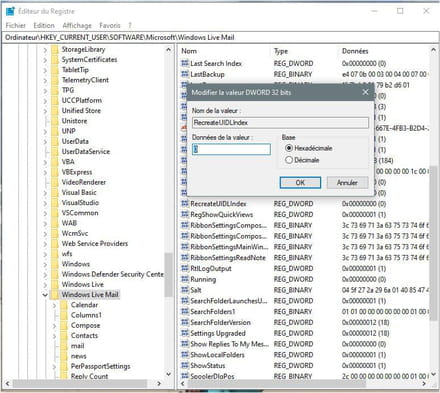
There you go
@+ The Woodpecker -
Thank you, you "saved my life"
Yes, a big thank you, it's still not obvious for a novice.
First point, I couldn't find (HKEY_CURRENT_USER\SOFTWARE\Microsoft\Windows Live Mail) in the hierarchy... luckily you specified the procedure!!! Then I had to create the keys,
RecreateFolderIndex
RecreateStreamIndex
RecreateUIDLIndex
And there I was using a lowercase 'l' instead of an 'i', I noticed the difference by using another font. And yes, obvious for the pros, not at all for me.
In the end, I am very happy to have my WLM back because I find it very well designed and easy to use.
Best regards.
MIKE
-



