Problem with Ccleaner suddenly ignoring Thunderbird files.
Gandalflebleu
Posted messages
28
Status
Member
-
pistouri Posted messages 19010 Registration date Status Contributor Last intervention -
pistouri Posted messages 19010 Registration date Status Contributor Last intervention -
Hello,*
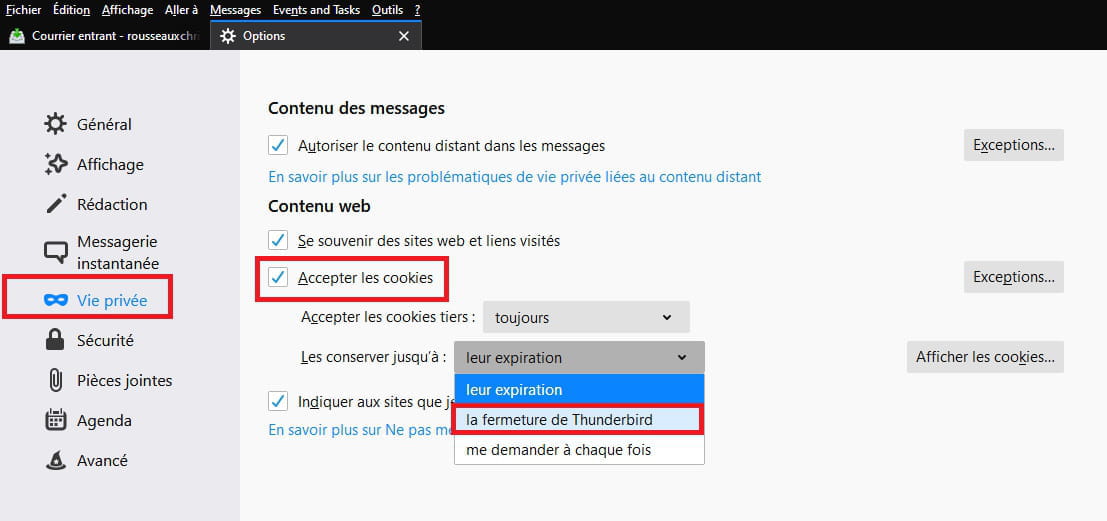
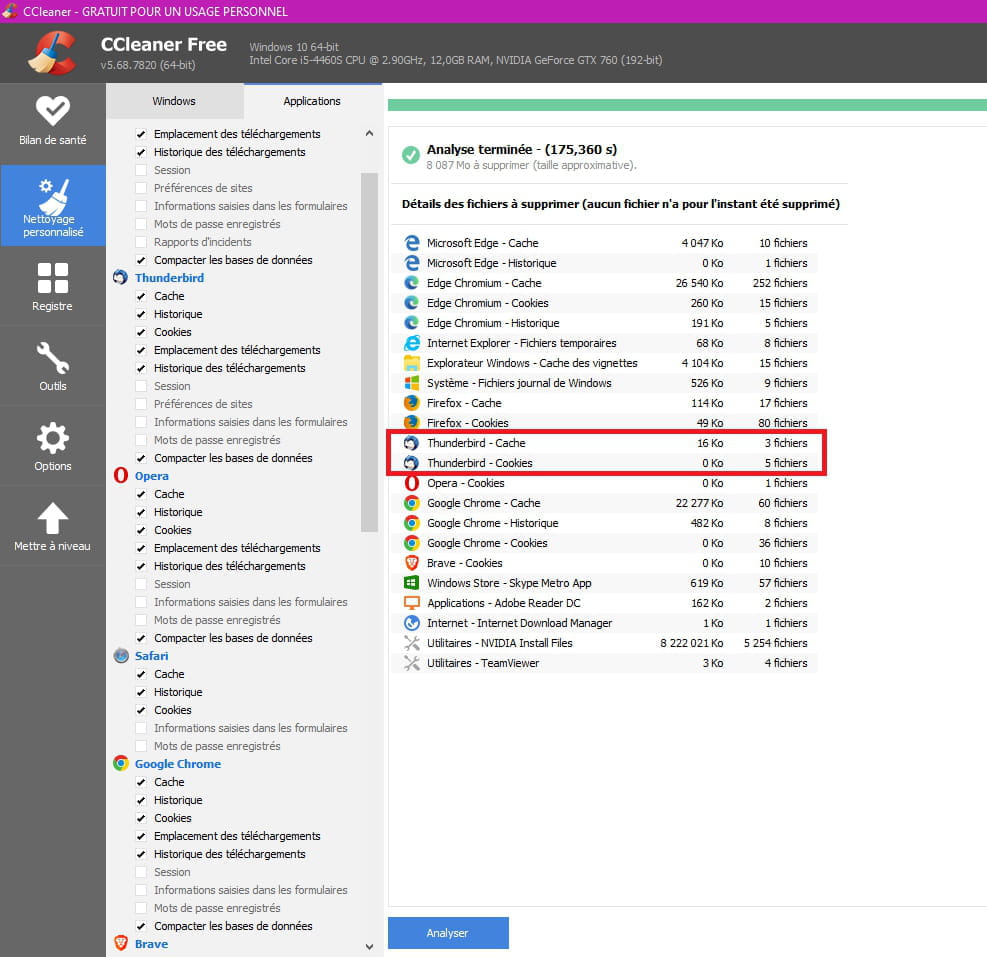
For no apparent reason, Ccleaner suddenly ignores Thunderbird files.
I see no way to change this decision in their settings.
I also cannot find how to contact their website to ask the question.
Thank you for replying to me by email and best regards.
For no apparent reason, Ccleaner suddenly ignores Thunderbird files.
I see no way to change this decision in their settings.
I also cannot find how to contact their website to ask the question.
Thank you for replying to me by email and best regards.
5 answers
-
Hello,
It's not very clear.
Which option to process Thunderbird files?
In any case, CCleaner cleanups can be done without.
CCleaner isn't really useful, even though it is recommended everywhere.
If you want to keep it, disable CCleaner's monitoring; it starts up with Windows and slows it down with these incessant cleanups, see: https://www.malekal.com/supprimer-ccleaner-demarrage-windows/
Also think about disabling data sending in CCleaner's options. They send information to Avast! servers.
--
Please press any key to continue the disinfection... -
pistouri Posted messages 19010 Registration date Status Contributor Last intervention Ambassador 8 731
Hello,
'' Ccleaner suddenly ignores Thunderbird files. ''
In Thunderbird options → Privacy
There’s a setting to delete cookies upon closing the email client → Closing Thunderbird
In Ccleaner options → Thunderbird
Custom cleaning → Applications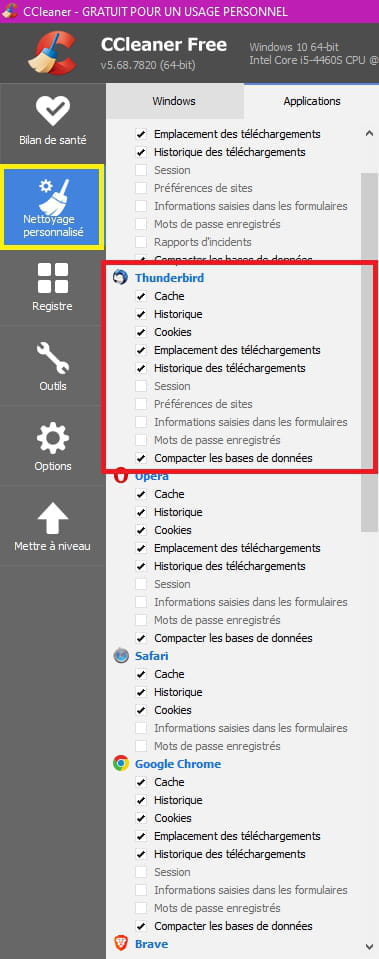
Once you start the cleaning, you check: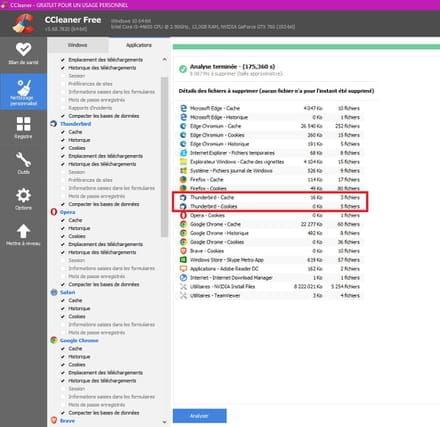
About:
Ccleaner is a cumbersome tool that takes a long time to analyze.
On the other hand, it installs Avast during installation or updates and worse, it installs AVG all without your consent, even when doing a custom installation.
Although it's relatively simple to uninstall, Ccleaner remains primarily
commercial.
Opt for the eraser → Privacy Eraser
A+
--
pistouri -
Hello,
Using this software is more than useful as it cleans up all residual files after each Web connection. There are several dozen, many of which are "trackers".
With every use, it deletes hundreds of MB. and tracking cookies.
Stay 2 days without cleaning and you will accumulate dozens of these cookies.
I am fully aware of Windows procedures and their uses.
For Thunderbird, with each connection, it accumulates a bunch of residual files that, without cleaning, slow down its opening.
Thank you for your attempt to respond.-
Cookies should be blocked upfront and set your browser to block third-party cookies.
See: https://www.malekal.com/cookies-tracking/
Otherwise, cleaning your browser every two days is counterproductive.
You don't benefit from the cache.
A CCleaner clean every 3 months is sufficient.
-
-
Hello,
I am reproducing here a previously given response:
Complete and definitive uninstallation, using Revo Uninstaller in advanced mode, of that lousy CCleaner which spends its time making requests to AVAST servers under the pretext of checking for an update and wasting my time trying to gain a few megabytes while I have terabytes of free space and contributing to Avast's interference (Tracking) in my device even though I don’t have AVAST installed.
In January 2020, several information sources reported that Avast Antivirus, through a subsidiary, was selling the browsing history of users of Avast products. Although the company claimed that all data was "anonymized," it was reported that the sold data could be linked to the real identities of individuals, exposing every click and search they made. In response, Avast announced that it would close the subsidiary due to the negative reaction regarding data privacy.
Goodbye CCleaner, and for years I've been wondering if it should go to the Crapthèque, even before Avast acquired Piriform.
Note for those who can’t read between the lines: Avast never said it would stop spying on its users; it simply said it was closing the subsidiary that was responsible for this private data trade. We understand that this trade continues in another form. This trade is one of the most lucrative activities on the Web, raking in billions of US$.
Even for the other Piriform applications that one might still want to use, like Speccy, you need to set the outgoing Internet connection prohibition for Piriform (and, by extension, all its applications) in your firewall application settings.
Pierre (aka Terdef)
Asap Admin - SWI Ambassador - MalwareBytes Expert-
Hello,
Should we sue CCleaner?
→ A hidden virus in CCleaner, the software that cleans your PC
→ Criticized, CCleaner takes a step back (on data collection).
→ CCleaner, the not-so-clean software
CCleaner is a bit like speed bumps on roads: if everyone followed the rules, it would be unnecessary.
On one hand, Microsoft is right when they say that this type of utility can do a lot of harm. No system cleanup can be done completely automatically: "human" decisions must be made regarding the "cleanup" suggestions made by the software, particularly concerning the registry. These utilities are therefore usually reserved for very experienced users. Others should refrain. In particular, all registry cleanup suggestions related to COM and DCOM should be scrutinized. If you don't know what a CLSID, AppID, typelib, and COM interface are, just leave it alone.
The rest
Malekal summarizes the situation well → Do you really need CCleaner?
It should be noted that Windows' disk cleanup already cleans quite a bit, but few know it.
For cookies, browsers nowadays offer automatic deletion upon closing in the options, and the same goes for Thunderbird (based on Firefox).
-
-
Contact CCleaner; I found this for you:
https://support.piriform.com/hc/en-us/requests/new