Files unable to open
Solved
Alexski
-
VieilleEtudiante -
VieilleEtudiante -
Hello,
Following a download that I think is questionable on µtorrent, I am facing the following issues:
- Unable to open documents with certain extensions: pdf, docx, xlsx: every time the same message: "Windows cannot find the path :'C:\Users\...\Desktop\Document.pdf'. Please check that you have entered the correct name, then try again". Unable to open Word, Excel, or Adobe Reader: the icons do not respond. The same goes for opening Word through a direct link, same message: "Windows cannot find the path :'C:\Users\...\Appdata\Roaming\Microsoft\...\Word 2016.lnk'. Please check that you have entered the correct name, then try again".
However, pdf files can be opened with Firefox or any other browser.
For Office documents, I tried converting them directly to pdf using pdfcreator; it doesn't work. However, online conversion via Ilovepdf works and allows me to read the documents in a browser. Compressing the document to then decompress it did not help, nor did renaming the document.
I tried uninstalling Adobe and then reinstalling it: still the same problem.
Another issue noticed, I can no longer rename certain folders on my C drive. In particular, I cannot rename the Program Files (x86), Program, Users, and Windows folders. However, there is no problem with the others.
I have done a scan with Antivirus, Malwarebytes, or SuperAntiSpyware: nothing.
In short, there is surely a simple solution, but it exceeds my skills.
Thank you for your help!
Alexski
Configuration: Windows / Firefox 77.0
Following a download that I think is questionable on µtorrent, I am facing the following issues:
- Unable to open documents with certain extensions: pdf, docx, xlsx: every time the same message: "Windows cannot find the path :'C:\Users\...\Desktop\Document.pdf'. Please check that you have entered the correct name, then try again". Unable to open Word, Excel, or Adobe Reader: the icons do not respond. The same goes for opening Word through a direct link, same message: "Windows cannot find the path :'C:\Users\...\Appdata\Roaming\Microsoft\...\Word 2016.lnk'. Please check that you have entered the correct name, then try again".
However, pdf files can be opened with Firefox or any other browser.
For Office documents, I tried converting them directly to pdf using pdfcreator; it doesn't work. However, online conversion via Ilovepdf works and allows me to read the documents in a browser. Compressing the document to then decompress it did not help, nor did renaming the document.
I tried uninstalling Adobe and then reinstalling it: still the same problem.
Another issue noticed, I can no longer rename certain folders on my C drive. In particular, I cannot rename the Program Files (x86), Program, Users, and Windows folders. However, there is no problem with the others.
I have done a scan with Antivirus, Malwarebytes, or SuperAntiSpyware: nothing.
In short, there is surely a simple solution, but it exceeds my skills.
Thank you for your help!
Alexski
Configuration: Windows / Firefox 77.0
14 answers
-
Hello,
It seems that it comes from Avast! CleanUp.
1) Be aware that these cleanup software generally don't serve any purpose.
Sooner or later, they cause problems.
See if uninstalling it resolves the issue?
-
Hi,
Avast CleanUp uninstalled, but the problem persists.
When trying to open a pdf, CleanUp indicated that Adobe was open, but nothing happened. Clicking on the document again, and this time the error message from the initial post appeared.
I uninstalled Adobe Reader, reinstalled it. At the end of the installation, it suggests launching the software: nothing.
Opening the pdf? Still the same error message...- Strange because for some, it seems to fix the problem.
Otherwise, you'll have to wait for Avast! to publish a corrective version...
I've heard that renaming the executables to adobe.exe allows the software to run?
And a system restore?
Try a Windows system restore that allows you to return to a previous restore point (if available) in order to get a functional Windows back.
=> how to restore Windows and System Restore
=> https://www.commentcamarche.net/informatique/windows/147-restaurer-windows-avec-les-points-de-restauration/
To do this:
On your keyboard, press the Windows + R key
type rstrui.exe and OK.
Follow the instructions.
-
Hello, I would like to thank you even though my uninstallation is not finished. I am almost sure it is that because the phenomenon corresponds to a very recent Avast update. It's not just young people who connect on ccm, but also seniors who experienced the internet in 1992 when it was called mosaic and was used by Americans. So once again, thank you! Your spirit of solidarity towards poor lost users like us is a source of eternal gratitude.
-
-
PROBLEM SOLVED! It was indeed an issue with the latest Avast Cleanup update. I was able to restore my computer using a restore point a few hours before the update. Everything is working again. I have now blocked Avast's automatic updates while waiting for them to resolve the issue!
Good luck to everyone ???? -
I have exactly the same problem, my partner does too, and at the same time! It smells like a system update that’s bugging!!!
-
Hello,
Test by uninstalling the latest update: Uninstall a recent Windows update.
I scanned with Antivirus, Malwarebytes, or SuperAntiSpyware: nothing.
Your antivirus and MBAM are sufficient.
Avoid combining them.
--
Please press any key to continue the disinfection... -
Hello
Same problem this morning when restarting the computer. No file opens.
It does look like an update issue, since the problem is not unique.
Maybe wait for a new update before doing too many operations. -
A third https://forums.commentcamarche.net/forum/affich-36703488-je-ne-peut-plus-lancer-mes-fichier
--
Please press a key to continue the disinfection...-
- Good evening,
There https://forums.commentcamarche.net/forum/affich-36703488-je-ne-peut-plus-lancer-mes-fichier#7 you suggest that it might be related to Avast Cleanup...
This morning I did indeed run a full scan with Avast, and it seems that this is just after I noticed this problem.
What solution would you suggest? We can of course uninstall Avast Cleanup (or at least not use it for the moment), but will that be enough to fix the damage?
Edit: the last update of Avast Cleanup Premium was yesterday (09/06) QED. - Avast! CleanUp Premium: https://forums.commentcamarche.net/forum/affich-36704869-frst-l-analyse-pour-mon-probleme-c-user#1
These cleaning programs are useless, they only create a mess.
-
-
-
Hello,
Has anyone found a solution?
I'm experiencing the same issue, and uninstalling the Windows updates didn't resolve it.-
Hello.
I too have encountered these same sudden problems!
Cannot open pdf, word, and excel files...
Acrobat = Uninstall + redownload + reinstall = same!
The solution I found = restore to a previous date. I restored to 01/06/2020 which I had as a point.
Everything returned to normal... EXCEPT that upon shutting down and reopening W10 > updates were applied!
Result = back to square one = the mentioned files wouldn't open again!
So I concluded > that it was the W10 Update updates that were causing the hassle!
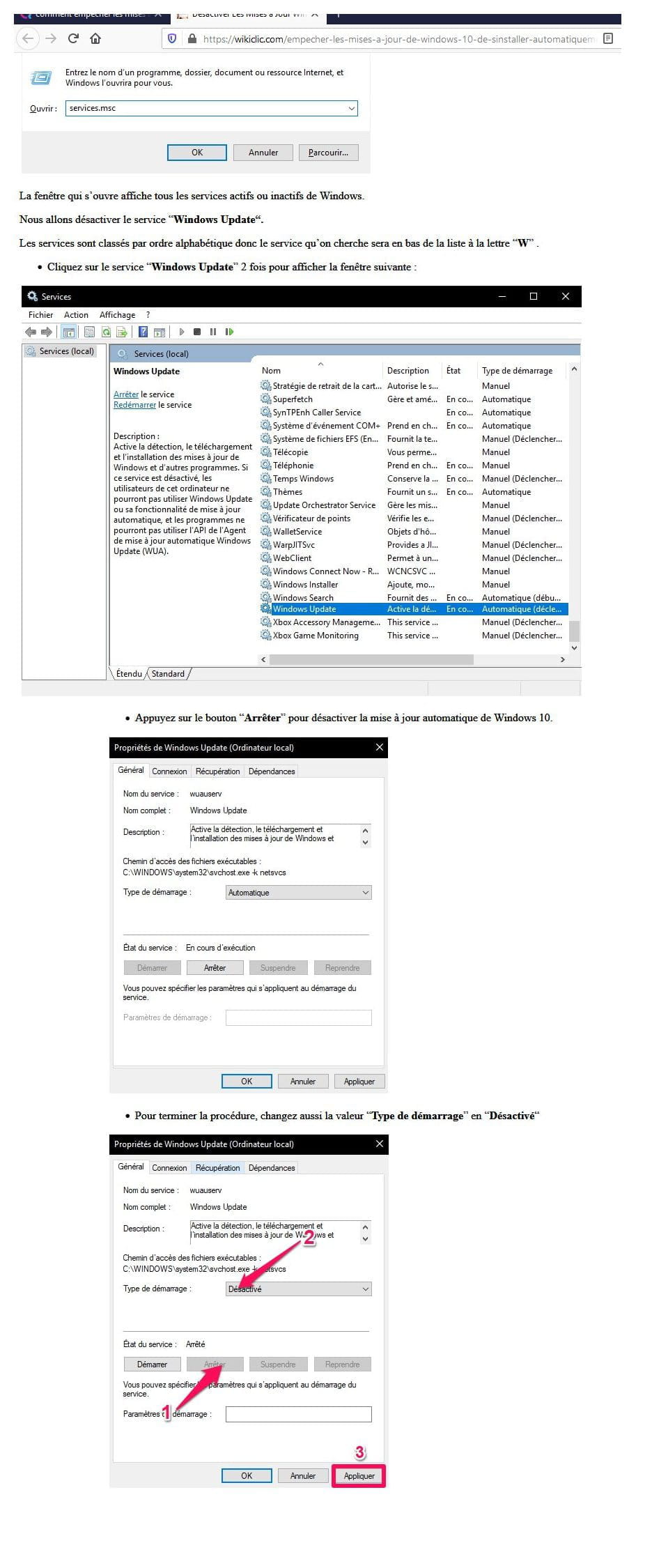
I found a solution to prevent W10 updates - attached file.
Since then = everything works again and no W10 update.
Of course, some will say it’s not a solution... but I am open to another solution!
For all practical purposes.
-
-
Same problem for me as well, I had posted on the forum https://forums.commentcamarche.net/forum/affich-36704203-probleme-pour-ouvrir-un-document-de-ma-dropbox-ou-one-drive
I will try to uninstall the latest updates...
To be continued! -
I identified a Windows security update from today, but I can't uninstall it... The button doesn't show up, even if I right-click... I feel like I'm too stupid... :(
Has anyone found a solution? -
At the risk of not seeming very original, I notice exactly the same problem: impossible to open .doc or .docx, .pdf, .xls files...
But what annoys me the most is that Windows can't find the Word, Excel, or Acrobat Reader software either!
In the end, I opened .pdf files with Nitro Reader, but .doc files are impossible for now. -
Hello
This morning, an update from Avast was installed. Everything went back to normal after the restart, which took quite a bit of time compared to usual.
Still, we really struggled all day yesterday trying to solve the issue!!!! -
Hello,
I've had the same issue since yesterday, but I don't have AVAST: I can't open any Office files (Word...) while I have no problem with others ... I did a scan with AVG, with Malware that detected nothing, I did the 2 major cumulative updates for Windows 10, I uninstalled/reinstalled Office but still the same problem ....
Here are the FSRT scan result files:
https://pjjoint.malekal.com/files.ph...1_f11o13r13o98
https://pjjoint.malekal.com/files.ph...d11i10k5u12v15 (additions)
https://pjjoint.malekal.com/files.ph..._g7j10w11g9x12 (shortcuts)
If someone can help me? Thanks in advance and have a nice day
Olivier -
I think it is a virus because, coincidentally, while I am trying to repair Windows with the official ISO tool, I encounter the same error as if the virus doesn't want me to restore Windows.