
Win 7 stuck on updating configuration 35% and lost admin password
Solved
KATLISLE
-
KATLISLE -
KATLISLE -
Hello,
On my Acer computer, yesterday I turned it off instead of letting it stay in sleep mode forever like I often do, and this morning upon restarting, the screen gets stuck on "configuring updates" at 35%. It goes to 100% but is stuck—so I turn it off and try again, but this time it’s stuck at 35%. I try to boot in safe mode with F8 to repair... But it reaches the administrator password request (I renamed it with my first name and the first letter of my last name), and now what to do??? I’ve tried everything: just hitting OK without anything, 0000, 1111, 1234 and variations, admin, birthday, words I use elsewhere... Fail.... Will a professional repair person be able to do anything? And if so, after that, if we want to restore and there are no restore points? What determines these points at x dates? Should I have done a manipulation; I've never backed up on CD, no recent backups on an external drive of my files, a huge oversight... Am I going to lose everything, like my photos, or will there be a way to recover them? Thank you in advance for your insights...
On my Acer computer, yesterday I turned it off instead of letting it stay in sleep mode forever like I often do, and this morning upon restarting, the screen gets stuck on "configuring updates" at 35%. It goes to 100% but is stuck—so I turn it off and try again, but this time it’s stuck at 35%. I try to boot in safe mode with F8 to repair... But it reaches the administrator password request (I renamed it with my first name and the first letter of my last name), and now what to do??? I’ve tried everything: just hitting OK without anything, 0000, 1111, 1234 and variations, admin, birthday, words I use elsewhere... Fail.... Will a professional repair person be able to do anything? And if so, after that, if we want to restore and there are no restore points? What determines these points at x dates? Should I have done a manipulation; I've never backed up on CD, no recent backups on an external drive of my files, a huge oversight... Am I going to lose everything, like my photos, or will there be a way to recover them? Thank you in advance for your insights...
25 answers
- 1
- 2
Next
-
Hi
I'm trying to open it with F8 in safe mode to repair... But it lands on the administrator password request
If you click on command prompt in safe mode, does it also ask for the password?
See you
--
The radiation level is higher at the unemployment office than at Chernobyl. -
-
re
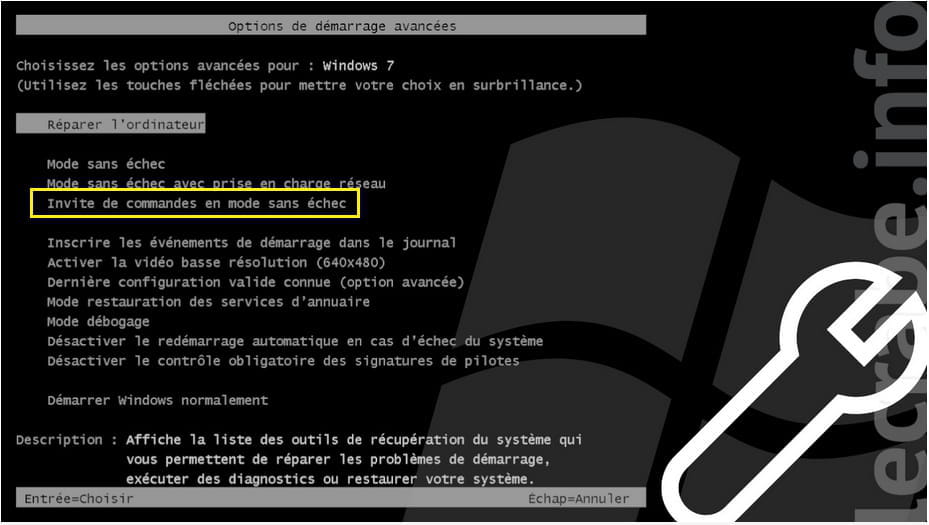
in the advanced options of W7, this is it:

@+
--
the radiation level is higher at the unemployment office than at Chernobyl-
Well, thank you for your help, I will try what you said... I finally tried other passwords, I was able to start the restore to the date 23/04, it took a long time, went out to run an errand, came back to an error message failure... I closed it, returned to update configuration until 100% but it got stuck! I'll leave it a few hours to see and then I'll try your suggestion.
-
-
re
if the PC is stuck on the update configuration, do this:
start the PC in advanced options (F8) at startup
on the page that opens, click on "command prompt in safe mode"
on the page that opens, copy/paste this command:
net stop wuauserv
del /q /s C:\Windows\SoftwareDistribution\*
net start wuauserv
close the command prompt window, and restart the PC
let me know what happens
@+
-
When I open the command prompt, no blank page opens where I can rewrite your suggestion (because there's no copy-paste possible? I'm writing from my mobile phone??)... A page opens with the gray title "loading Windows files" and then a long list of files appears with a lot of names preceded by "loading"... And it systematically switches back to the blocked page.
-
re
you did not choose "command prompt in safe mode" on the page
@+
--
the radiation level is higher at the job center than at Chernobyl -
Ah, when I ask to REPAIR
there is a way to open the command window FOR REAL
It says:
X:\windows\system 32"> and at the end, a blinking underscore
How do I enter your command in the prescribed form?
Which keys to go to the next line?? (if I press enter it just repeats the welcome message and the arrows don't move the blinking cursor?)
I can't copy and paste and from where??? I can only write myself??? How do I move in this sheet? Thank you -
re
let's keep it simple:
start the PC in "safe mode", always press F8 at startup and in the page that opens, you choose SAFE MODE
when the PC has started in SM, follow this path to access the folder that needs to be emptied/deleted
C:\Windows\SoftwareDistribution\Download
when you're in the Download folder, select everything with CTRL+A
and delete everything with CTRL+D
let me know how it goes
@+
--
the radiation level is higher at the employment office than at Chernobyl-
I don't understand... Follow this path, where? We can't write anywhere after F8 + MSE.... The list of files scrolls by so fast, I can't even see software distribution, and I'm at the bottom of the page without having seen it..??? And it immediately switches to the config page stuck at 35%... Impossible to click on this file I haven't seen or to write anywhere...
If only I knew how to write in the command prompt...?.... but I can't copy-paste since I have no access to the computer, I'm reading your advice on my phone... I think otherwise we now have to wait until Tuesday when the repair shop opens... And I hope they will know how to restore it another way!
-
-
My computer no longer starts; I turn it off, and it opens to a stuck page saying "your computer could not start." The system reboot utility is searching for problems... Indefinitely... It keeps spinning, it's stuck, it asked once if I wanted to restore, I checked yes, and it immediately went back to the blocked page...?
Has it gotten worse? -
re
if you followed the instructions properly, you only emptied the downloaded updates folder
what happens if you start the pc in MSE?
@+
--
the radiation level is higher at the employment center than at Chernobyl -
re
Don't understand... Follow this path, where to? You can't type anywhere after F8 + MSE.... The file list is scrolling by so fast, I can't even see software distribution since I'm at the bottom of the page without having seen it..??? And it immediately jumps to the config page stuck at 35%... Can't click on that file I haven't seen nor type anywhere ...
it's not normal for the pc to switch to the config page stuck at 35%...
WARNING:
I'm going to explain how to paste the command in the command prompt
boot the pc with the F8 key and choose command prompt in safe mode
let me know if the pc stays on this page
@+
--
the radiation level is higher at the employment office than at Chernobyl -
The only command prompt that opens 1 page is the one I described earlier... I have to press F8 REPAIR and not MSE, which opens 1 choice including command prompt, click, 1 page with the message mentioned above... At 7:45 PM....
X: etc....
This line does not erase, but I imagine that's where I should copy your command -
re
when you start in MSE do not click on "repair", but with the directional arrows select "command prompt in MSE" and click on it
let me know if it works, and if the page stays in place

@+
--
the radiation level is higher at the employment center than in Chernobyl -
Hello... No, it doesn't work at all, I've already said it, in MSE command prompt no page holds.... So it's the same again. The page only stays if I click on repair and then from the list of proposals (at least 5, not just restore....) I choose command prompt see message from 7:45 PM.
-
hello
X:\windows\system 32"> and at the end a blinking dash
through this function, I don’t think the command works
don’t you have another computer to download a Live CD?
@+
--
the radiation level is higher at the unemployment office than in Chernobyl -
No, I saw that it was suggested to restore, I don't even know what those CDs are, zero other computers... I have to go to a repair shop for this kind of manipulation... Thank you for all these attempts, have a good Sunday despite the lockdown.
-
re
I don't know if you know, but W7 is no longer supported by Microsoft since January 20th of this year
If your PC is compatible with W10, I suggest you install W10
You have activation keys for a modest price --> click here
Check this page for your PC's compatibility with W10 --> click here
@+
--
The radiation level is higher at the employment office than at Chernobyl-
Yes, I know, isn't that what the bug is for? I wanted to switch to Windows 10, but first I wanted to 1) back up my files 2) back up the system. However, that hasn't been done!
Are you telling me that with this breakdown, I go straight to Windows 10? .. But am I not going to lose all my photo files and others (I have some that are very precious)? Wouldn't it be better to restore first?
-
-
re
the system restore doesn't work on your PC, you've already tried and it ended in a failure
aside from booting the PC from a Live CD to recover your data, I don't see how to proceed
for W10, your W7 needs to be "operational," because the license/activation key will be used to activate W10
if you have any questions...
@+
--
the radiation level is higher at the employment office than at Chernobyl -
Well, that confirms that we need to restore first of all with this CD thing... Thanks again, bye.
-
Hello,
There is a solution but it’s very long. Do you have a second PC on hand at first? What model is your Acer computer? Is it recent or not? If you have a second PC, then all is not lost. And above all, do not restore the hard drive that is stuck under the Windows 7 operating system. That means losing everything. Do not format the drive; it’s very important.


- 1
- 2
Next