
Unable to contact your DHCP server. / Ethernet has no configuration.
koh-samui
Posted messages
192
Registration date
Status
Member
Last intervention
-
koh-samui Posted messages 192 Registration date Status Member Last intervention -
koh-samui Posted messages 192 Registration date Status Member Last intervention -
Hello,
I used a software (Avast) to update all my drivers,
and as a result, I no longer have a network connection via Ethernet (Wi-Fi still works).
I reinstalled the old and various drivers, but it still doesn't work...
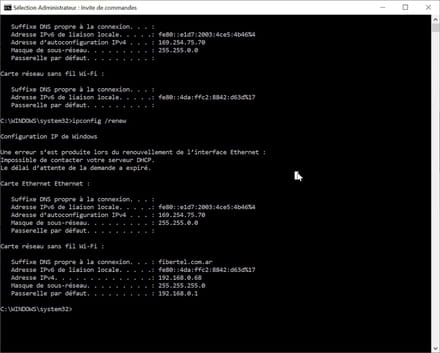
When I run ipconfig /renew
I get this:
An error occurred while renewing the Ethernet interface:
Unable to contact your DHCP server.
The request timed out.
Do you have any ideas on how to proceed?
Thank you so much in advance

I used a software (Avast) to update all my drivers,
and as a result, I no longer have a network connection via Ethernet (Wi-Fi still works).
I reinstalled the old and various drivers, but it still doesn't work...
When I run ipconfig /renew
I get this:
An error occurred while renewing the Ethernet interface:
Unable to contact your DHCP server.
The request timed out.
Do you have any ideas on how to proceed?
Thank you so much in advance


3 answers
-
-
I just found the solution!
My MAC address was all zeros
so I just put in another random address and it works! -
Ok thanks for the info,
for the moment it’s all good, I’m keeping my fingers crossed,)
But the problem arose when I changed the driver so if it’s indeed related to that, I hope the issue won’t come back!
