Optical 5.1 Sound Issues
Solved
Mike67_1051
Posted messages
4
Registration date
Status
Member
Last intervention
-
STARGATE43 Posted messages 13754 Registration date Status Contributor Last intervention -
STARGATE43 Posted messages 13754 Registration date Status Contributor Last intervention -
Hello,
I have a home theater RX6012R connected via optical cable to my TV (Samsung).
The sound comes out "perfectly" from the digital CD output, but the sound is extremely low or even nonexistent for 5.1 movies.
My settings seem fine; I don’t understand where the problem could be...
If someone has a solution, I’m all ears.
Thank you.
I have a home theater RX6012R connected via optical cable to my TV (Samsung).
The sound comes out "perfectly" from the digital CD output, but the sound is extremely low or even nonexistent for 5.1 movies.
My settings seem fine; I don’t understand where the problem could be...
If someone has a solution, I’m all ears.
Thank you.
4 answers
-
Hi Mike,
Could you give us the details of the connections you've made? Based on that, I might be able to guide you towards other connections that could solve this inconvenience?
Besides your TV, your amplifier, and your Xbox One, are there any other devices? If so, which ones? Please provide the exact brands and models, thanks ;-)
I assume you have made the following connections:
1) XBOX ONE ← HDMI CABLE → HDMI IN TV.
2) OPTICAL OUT TV ← OPTICAL CABLE → OPTICAL IN AMPLIFIER.
Could you try the current connections without changing anything? You have an Xbox One, it plays Blu Rays and DVDs, the sound of these discs is in 5.1 for the most part, when you watch a DVD or a BD, does the sound automatically come out in 5.1 from your amplifier or not?
To summarize the situation as I understand it:
The sound from the channels plays well on all speakers (6 speakers) including the center
→ logical, the stereo sound from the TV channels is decoded by your amplifier and passes through all channels, this is the action of Dolby ProLogic or Dolby ProLogic II, so it's virtualized stereo in 5.1, it's "fake" 5.1.
When you go through the Xbox One, the sound from the channels is only played on 5 speakers, the 2 front, the 2 rear, and the subwoofer, so you have 4.1.
→ Check how the output sound from the Xbox One is configured, and see if you can set the sound to Dolby Surround, that's what I did on my Xbox 360.
I'm giving you an image of my setup, it might give you some ideas for experiments on yours: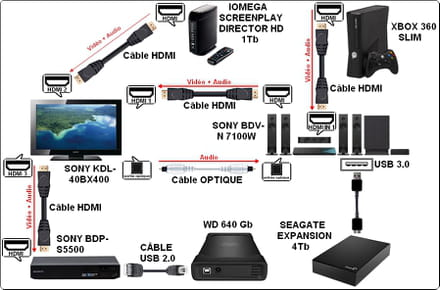
With this type of connection, the sound from all connected devices is relayed by my TV, which sends the sound to my home theater, and I have 5.1.
You can click on this image to view it in full size and better visualize the details ;-)
TV channels are in Dolby Digital 2/0.0 at the source and this Dolby Digital 2/0.0 is automatically virtualized by my home theater into "fake" 5.1, for the rest, everything that outputs real 5.1 from other devices also outputs real 5.1 from the home theater.
Best regards and have a good afternoon ;-)
--
--> NO PROBLEMS, ONLY SOLUTIONS <--
What is fidelity? It's just a lack of opportunities ;-) -
Hello and welcome to this forum,
On some amplifiers, you need to assign the optical input, check your manual
And on the TV, also check the audio menu and select "external speakers" or something like that
I call a spade a spade *
*in French in the text -
Hi Mike,
I’m going to try to give you a little helping hand and of course say hi to Andy in passing ;-)
In case you don’t have the manual in French for your JVC RX-6012R, here’s a link to download it completely for free and without mandatory registration: https://uptobox.com/qqzqu8yjc1hk.
You should also see what type of 5.1 sound is giving you trouble, is it AC3 (Dolby Digital) or DTS? Are these from DVDs or Blu-Rays?
I read that DTS Digital Surround sounds could give issues if the digital source selection is set to "AUTO", but all this is well explained in the manual I’ve provided for download.
Looking back at your statement, I noticed that your amplifier is connected via optical to your TV and not to any player, and thinking a little further than the tip of my nose, there is no 5.1 sound coming from TV channels, it's analog stereo if the channel isn't HD, and it’s Dolby Digital 2.0 (stereo) that is broadcast if it’s an HD (digital) channel, so that’s concerning the sound from TV channels.
This inconvenience is therefore due to the settings of your amplifier; to make up for the lack of central sound, you need to set your amplifier to Dolby ProLogic or Dolby ProLogic II, this type of decoding spreads stereo sounds over the 5 channels and thus voices end up on all 5 channels.
Now, if it’s movies played via a USB stick or external hard drive, you need to check if the TV is properly relaying the 5.1 sound to your amplifier, which it should but with Samsung, you never know ;-)
But to know this, you would need to give us the exact model of your Samsung TV to know all its characteristics.
Best regards and good evening/night ;-)
--
--> NO PROBLEMS, ONLY SOLUTIONS <--
What is fidelity? It's just a lack of opportunities ;-) -
Hello, the TV model is UE46F6100AW.
Following the documentation you sent me (thank you very much by the way) and especially the section on digital input settings, it still doesn’t work.
The optical cord goes directly from the TV to the amplifier.
For all digital channels like TF1, everything works correctly.
However, when using an Xbox One for the rest (Netflix, Disney+), I have no outgoing voice for all the movies in 5.1. If I change the movie setting to 2.0, it works fine through the central speaker.
Should I connect the amplifier cord to the console without going through the TV? And leave the jack cord (red/white) to the TV for digital?
Thank you for your responses.