BSOD Aléatoire
Bonjour à tous!
Je viens vers vous car je ne trouve vraiment aucune solution à mon problème après beaucoup de recherche.
J'ai des BSOD complètement aléatoire (1 fois par jour ou 1 fois tous les 5 jours etc....) et ceci depuis un mois, je soupçonne cette fameuse mise à jour Windows 1909
Voilà ce que j'ai fais:
Tous mes drivers sont à jour
- Mon Bios est à jour
- Memtest ne me détecte aucune erreurs (je l'ai fais tourner deux fois)
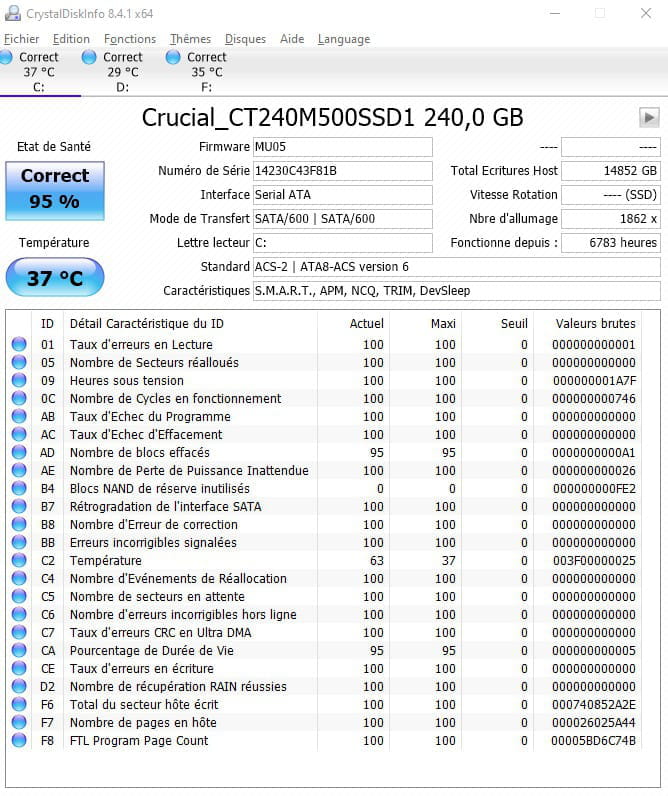
- CrystalDiskInfo ne me détecte aucune erreurs
C: --> Correct 95%
D: et E: sont correct
-chkdsk pareil
J'ai déjà réinstallé deux fois windows ????
Ma config:
Système d'exploitation
Microsoft Windows 10 Professionnel 64 bit (build 10.0.18363)
Carte mère
MSI Z170A GAMING M5 (MS-7977) 1.0 (BIOS 1.I0)
Processeur
Intel Core i7-6700K 4,01 GHz U3E1 (Intel64 Family 6 Model 94 Stepping 3)
Mémoire
Capacité totale : 16 Go
Barrette n° 1 : F4-2400C15-8GVR Bank 1 (8 Go)
Barrette n° 2 : F4-2400C15-8GVR Bank 3 (8 Go)
Stockage
Capacité totale : 2,95 To
Lecteur n° 1 : WDC WD10EZEX-00BN5A0 SCSI (931,51 Go)
Lecteur n° 2 : Crucial_CT240M500SSD1 SCSI (223,57 Go)
Lecteur n° 3 : ST2000DM006-2DM164 SCSI (1,82 To)
Carte graphique
Nvidia GeForce RTX 2060
Carte réseau
Rivet Networks Killer E2400 Gigabit Ethernet Controller
Voici les message de WhoCrashed et le détails des choses déjà faites:
On Mon 02/03/2020 11:46:44 your computer crashed or a problem was reported
crash dump file: C:\Windows\Minidump\030220-17390-01.dmp
This was probably caused by the following module: fltmgr.sys (FLTMGR+0x580A)
Bugcheck code: 0x50 (0xFFFF822B6E22A85F, 0x10, 0xFFFF822B6E22A85F, 0x2)
Error: PAGE_FAULT_IN_NONPAGED_AREA
file path: C:\Windows\system32\drivers\fltmgr.sys
product: Système d’exploitation Microsoft® Windows®
company: Microsoft Corporation
description: Gestionnaire de filtres de système de fichiers Microsoft
Bug check description: This indicates that invalid system memory has been referenced.
This appears to be a typical software driver bug and is not likely to be caused by a hardware problem.
The crash took place in a file system driver. Since there is no other responsible driver detected, this could be pointing to a malfunctioning drive or corrupted disk. It's suggested that you run CHKDSK.
On Sat 29/02/2020 21:44:39 your computer crashed or a problem was reported
crash dump file: C:\Windows\Minidump\022920-15125-01.dmp
This was probably caused by the following module: ntoskrnl.exe (nt+0x1C1510)
Bugcheck code: 0x50 (0xFFFFFC002FCFAA24, 0x10, 0xFFFFFC002FCFAA24, 0x2)
Error: PAGE_FAULT_IN_NONPAGED_AREA
file path: C:\Windows\system32\ntoskrnl.exe
product: Microsoft® Windows® Operating System
company: Microsoft Corporation
description: NT Kernel & System
Bug check description: This indicates that invalid system memory has been referenced.
This appears to be a typical software driver bug and is not likely to be caused by a hardware problem.
The crash took place in the Windows kernel. Possibly this problem is caused by another driver that cannot be identified at this time.
On Sat 29/02/2020 21:07:46 your computer crashed or a problem was reported
crash dump file: C:\Windows\Minidump\022920-8250-01.dmp
This was probably caused by the following module: ntoskrnl.exe (nt+0x1C1510)
Bugcheck code: 0xD1 (0xFFFFFC012A4485E0, 0x2, 0x8, 0xFFFFFC012A4485E0)
Error: DRIVER_IRQL_NOT_LESS_OR_EQUAL
file path: C:\Windows\system32\ntoskrnl.exe
product: Microsoft® Windows® Operating System
company: Microsoft Corporation
description: NT Kernel & System
Bug check description: This indicates that a kernel-mode driver attempted to access pageable memory at a process IRQL that was too high.
This bug check belongs to the crash dump test that you have performed with WhoCrashed or other software. It means that a crash dump file was properly written out.
The crash took place in the Windows kernel. Possibly this problem is caused by another driver that cannot be identified at this time.
On Fri 28/02/2020 19:24:40 your computer crashed or a problem was reported
crash dump file: C:\Windows\Minidump\022820-8296-01.dmp
This was probably caused by the following module: ntoskrnl.exe (nt+0x1C1510)
Bugcheck code: 0xD1 (0xFFFFFC0110602457, 0x2, 0x8, 0xFFFFFC0110602457)
Error: DRIVER_IRQL_NOT_LESS_OR_EQUAL
file path: C:\Windows\system32\ntoskrnl.exe
product: Microsoft® Windows® Operating System
company: Microsoft Corporation
description: NT Kernel & System
Bug check description: This indicates that a kernel-mode driver attempted to access pageable memory at a process IRQL that was too high.
This bug check belongs to the crash dump test that you have performed with WhoCrashed or other software. It means that a crash dump file was properly written out.
The crash took place in the Windows kernel. Possibly this problem is caused by another driver that cannot be identified at this time.
On Tue 25/02/2020 00:05:54 your computer crashed or a problem was reported
crash dump file: C:\Windows\Minidump\022520-8859-01.dmp
This was probably caused by the following module: ntoskrnl.exe (nt+0x1C1510)
Bugcheck code: 0x50 (0xFFFFFC014CE30946, 0x10, 0xFFFFFC014CE30946, 0x2)
Error: PAGE_FAULT_IN_NONPAGED_AREA
file path: C:\Windows\system32\ntoskrnl.exe
product: Microsoft® Windows® Operating System
company: Microsoft Corporation
description: NT Kernel & System
Bug check description: This indicates that invalid system memory has been referenced.
This appears to be a typical software driver bug and is not likely to be caused by a hardware problem.
The crash took place in the Windows kernel. Possibly this problem is caused by another driver that cannot be identified at this time.
Voici la conclusion:
5 crash dumps have been found and analyzed. No offending third party drivers have been found. Connsider using WhoCrashed Professional which offers more detailed analysis using symbol resolution. Also configuring your system to produce a full memory dump may help you.
Read the topic general suggestions for troubleshooting system crashes for more information.
Note that it's not always possible to state with certainty whether a reported driver is responsible for crashing your system or that the root cause is in another module. Nonetheless it's suggested you look for updates for the products that these drivers belong to and regularly visit Windows update or enable automatic updates for Windows. In case a piece of malfunctioning hardware is causing trouble, a search with Google on the bug check errors together with the model name and brand of your computer may help you investigate this further.
Qu'en pensez vous?
Merci d'avance pour votre aide
Je viens vers vous car je ne trouve vraiment aucune solution à mon problème après beaucoup de recherche.
J'ai des BSOD complètement aléatoire (1 fois par jour ou 1 fois tous les 5 jours etc....) et ceci depuis un mois, je soupçonne cette fameuse mise à jour Windows 1909
Voilà ce que j'ai fais:
Tous mes drivers sont à jour
- Mon Bios est à jour
- Memtest ne me détecte aucune erreurs (je l'ai fais tourner deux fois)
- CrystalDiskInfo ne me détecte aucune erreurs
C: --> Correct 95%
D: et E: sont correct
-chkdsk pareil
J'ai déjà réinstallé deux fois windows ????
Ma config:
Système d'exploitation
Microsoft Windows 10 Professionnel 64 bit (build 10.0.18363)
Carte mère
MSI Z170A GAMING M5 (MS-7977) 1.0 (BIOS 1.I0)
Processeur
Intel Core i7-6700K 4,01 GHz U3E1 (Intel64 Family 6 Model 94 Stepping 3)
Mémoire
Capacité totale : 16 Go
Barrette n° 1 : F4-2400C15-8GVR Bank 1 (8 Go)
Barrette n° 2 : F4-2400C15-8GVR Bank 3 (8 Go)
Stockage
Capacité totale : 2,95 To
Lecteur n° 1 : WDC WD10EZEX-00BN5A0 SCSI (931,51 Go)
Lecteur n° 2 : Crucial_CT240M500SSD1 SCSI (223,57 Go)
Lecteur n° 3 : ST2000DM006-2DM164 SCSI (1,82 To)
Carte graphique
Nvidia GeForce RTX 2060
Carte réseau
Rivet Networks Killer E2400 Gigabit Ethernet Controller
Voici les message de WhoCrashed et le détails des choses déjà faites:
On Mon 02/03/2020 11:46:44 your computer crashed or a problem was reported
crash dump file: C:\Windows\Minidump\030220-17390-01.dmp
This was probably caused by the following module: fltmgr.sys (FLTMGR+0x580A)
Bugcheck code: 0x50 (0xFFFF822B6E22A85F, 0x10, 0xFFFF822B6E22A85F, 0x2)
Error: PAGE_FAULT_IN_NONPAGED_AREA
file path: C:\Windows\system32\drivers\fltmgr.sys
product: Système d’exploitation Microsoft® Windows®
company: Microsoft Corporation
description: Gestionnaire de filtres de système de fichiers Microsoft
Bug check description: This indicates that invalid system memory has been referenced.
This appears to be a typical software driver bug and is not likely to be caused by a hardware problem.
The crash took place in a file system driver. Since there is no other responsible driver detected, this could be pointing to a malfunctioning drive or corrupted disk. It's suggested that you run CHKDSK.
On Sat 29/02/2020 21:44:39 your computer crashed or a problem was reported
crash dump file: C:\Windows\Minidump\022920-15125-01.dmp
This was probably caused by the following module: ntoskrnl.exe (nt+0x1C1510)
Bugcheck code: 0x50 (0xFFFFFC002FCFAA24, 0x10, 0xFFFFFC002FCFAA24, 0x2)
Error: PAGE_FAULT_IN_NONPAGED_AREA
file path: C:\Windows\system32\ntoskrnl.exe
product: Microsoft® Windows® Operating System
company: Microsoft Corporation
description: NT Kernel & System
Bug check description: This indicates that invalid system memory has been referenced.
This appears to be a typical software driver bug and is not likely to be caused by a hardware problem.
The crash took place in the Windows kernel. Possibly this problem is caused by another driver that cannot be identified at this time.
On Sat 29/02/2020 21:07:46 your computer crashed or a problem was reported
crash dump file: C:\Windows\Minidump\022920-8250-01.dmp
This was probably caused by the following module: ntoskrnl.exe (nt+0x1C1510)
Bugcheck code: 0xD1 (0xFFFFFC012A4485E0, 0x2, 0x8, 0xFFFFFC012A4485E0)
Error: DRIVER_IRQL_NOT_LESS_OR_EQUAL
file path: C:\Windows\system32\ntoskrnl.exe
product: Microsoft® Windows® Operating System
company: Microsoft Corporation
description: NT Kernel & System
Bug check description: This indicates that a kernel-mode driver attempted to access pageable memory at a process IRQL that was too high.
This bug check belongs to the crash dump test that you have performed with WhoCrashed or other software. It means that a crash dump file was properly written out.
The crash took place in the Windows kernel. Possibly this problem is caused by another driver that cannot be identified at this time.
On Fri 28/02/2020 19:24:40 your computer crashed or a problem was reported
crash dump file: C:\Windows\Minidump\022820-8296-01.dmp
This was probably caused by the following module: ntoskrnl.exe (nt+0x1C1510)
Bugcheck code: 0xD1 (0xFFFFFC0110602457, 0x2, 0x8, 0xFFFFFC0110602457)
Error: DRIVER_IRQL_NOT_LESS_OR_EQUAL
file path: C:\Windows\system32\ntoskrnl.exe
product: Microsoft® Windows® Operating System
company: Microsoft Corporation
description: NT Kernel & System
Bug check description: This indicates that a kernel-mode driver attempted to access pageable memory at a process IRQL that was too high.
This bug check belongs to the crash dump test that you have performed with WhoCrashed or other software. It means that a crash dump file was properly written out.
The crash took place in the Windows kernel. Possibly this problem is caused by another driver that cannot be identified at this time.
On Tue 25/02/2020 00:05:54 your computer crashed or a problem was reported
crash dump file: C:\Windows\Minidump\022520-8859-01.dmp
This was probably caused by the following module: ntoskrnl.exe (nt+0x1C1510)
Bugcheck code: 0x50 (0xFFFFFC014CE30946, 0x10, 0xFFFFFC014CE30946, 0x2)
Error: PAGE_FAULT_IN_NONPAGED_AREA
file path: C:\Windows\system32\ntoskrnl.exe
product: Microsoft® Windows® Operating System
company: Microsoft Corporation
description: NT Kernel & System
Bug check description: This indicates that invalid system memory has been referenced.
This appears to be a typical software driver bug and is not likely to be caused by a hardware problem.
The crash took place in the Windows kernel. Possibly this problem is caused by another driver that cannot be identified at this time.
Voici la conclusion:
5 crash dumps have been found and analyzed. No offending third party drivers have been found. Connsider using WhoCrashed Professional which offers more detailed analysis using symbol resolution. Also configuring your system to produce a full memory dump may help you.
Read the topic general suggestions for troubleshooting system crashes for more information.
Note that it's not always possible to state with certainty whether a reported driver is responsible for crashing your system or that the root cause is in another module. Nonetheless it's suggested you look for updates for the products that these drivers belong to and regularly visit Windows update or enable automatic updates for Windows. In case a piece of malfunctioning hardware is causing trouble, a search with Google on the bug check errors together with the model name and brand of your computer may help you investigate this further.
Qu'en pensez vous?
Merci d'avance pour votre aide
13 réponses
-
ModérateurSalut,
Vérifie si des mises à jour sont disponibles avec Snappy Driver Installer : https://www.malekal.com/tutoriel-snappy-driver-installer-mettre-a-jour-pilotes/
et :
Pour vérifier ton ordinateur, pour d'éventuels infections et avoir un état général du système :
Suis le tutoriel FRST en cliquant sur ce lien bleu. ( prends le temps de lire attentivement - tout y est bien expliqué ).
Télécharge et lance le scan FRST,
Attendre la fin du scan, un message indique que l'analyse est terminée.
Trois rapports FRST seront générés :- FRST.txt
- Shortcut.
- Additionnal.txt
Envoie ces 3 rapports sur le site https://pjjoint.malekal.com/ et en retour donne les 3 liens pjjoint qui mènent aux rapports ici dans une nouvelle réponse afin que l'on puisse les consulter.
(Les liens bleus mènent à des tutoriels explicatifs pas à pas, clic dessus pour avoir les instructions plus précises à suivre).
-
Merci pour votre réponse, je vais tester tous ça :)
-
J'ai installé les drivers que me propose Snappy Driver Installer, j'avais 14 drivers non à jour.
J'avais vérifié sur tous les drivers .com
Et voici les liens pijoint:
Addition.txt: https://pjjoint.malekal.com/files.php?id=20200305_n11r15i10z15m7
FRST: https://pjjoint.malekal.com/files.php?id=FRST_20200305_m12j15r15m11e14
Shortcut: https://pjjoint.malekal.com/files.php?id=20200305_t7i6o7q7e15 -
ModérateurTu as eu des écrans bleus depuis ?
Tu as des programmes qui ont été installés à l'achat de l'ordinateur ou installés par la suite et qui sont pas forcément utiles.
Ils encombrent Windows et peuvent le ralentir.
Tu peux donc les désinstaller.
Vas dans le Panneau de configuration
puis programmes et fonctionnalités.
Désinstalle :
Avast (Laisse Windows Defender plus léger)
CCleaner
PS : CCleaner n'est pas vraiment utile, même si on le recommande de partout.
Si tu tiens à le garder, désactive la surveillance de CCleaner, ça se met au démarrage de Windows et le ralentit avec ces nettoyages incessants, voir : https://www.malekal.com/supprimer-ccleaner-demarrage-windows/
Pense aussi à désactiver la télémétrie. Elles remontent des informations aux serveurs Avast!
-
Cela fait depuis début Janvier que j'ai des écrans bleue.
Je désinstalle CCleaner et avast -
ModérateurTente aussi de réparer Windows 10 : comment réparer Windows 10.
-
J'ai déjà réinstallé Windows 10, 2 fois en utilisant cette méthode pour faire ma clef de boot.
J'ai eu un nouveau BSOD (le dernier remonte au 2 mars):
On Sat 07/03/2020 18:54:12 your computer crashed or a problem was reported
crash dump file: C:\Windows\Minidump\030720-15796-01.dmp
This was probably caused by the following module: ntoskrnl.exe (nt+0x1C1510)
Bugcheck code: 0x50 (0xFFFFFC00586C51E9, 0x10, 0xFFFFFC00586C51E9, 0x2)
Error: PAGE_FAULT_IN_NONPAGED_AREA
file path: C:\Windows\system32\ntoskrnl.exe
product: Microsoft® Windows® Operating System
company: Microsoft Corporation
description: NT Kernel & System
Bug check description: This indicates that invalid system memory has been referenced.
This appears to be a typical software driver bug and is not likely to be caused by a hardware problem.
The crash took place in the Windows kernel. Possibly this problem is caused by another driver that cannot be identified at this time.
On Sat 07/03/2020 18:54:12 your computer crashed or a problem was reported
crash dump file: C:\Windows\MEMORY.DMP
This was probably caused by the following module: ntkrnlmp.exe (nt!memset+0xF056)
Bugcheck code: 0x50 (0xFFFFFC00586C51E9, 0x10, 0xFFFFFC00586C51E9, 0x2)
Error: PAGE_FAULT_IN_NONPAGED_AREA
Bug check description: This indicates that invalid system memory has been referenced.
This appears to be a typical software driver bug and is not likely to be caused by a hardware problem.
The crash took place in the Windows kernel. Possibly this problem is caused by another driver that cannot be identified at this time. -
J'ai quand même testé la réparation mais BSOD:
0xC1900101 - 0x20007
L'installation a échoué dans la phase SAFE_OS avec une erreur lors de l'opérateur INSTALL_DRIVERS
Je me souviens que lors de la mise à jour de windows obligatoire pour installer le logiciel du Game pass PC de microsoft j'avais un BSOD à chaque fois.
J'ai dû réinstallé windows en passant par le téléchargement d'un iso à jour -
Cela va être compliqué en ce moment d'emmener mon pc dans un magasin, alors je viens de faire une analyse de mon BSOD avec Windbg, ci cela peut aider un peu:
https://textuploader.com/1jakc-
ModérateurWhocrashed a déjà donné les infos qui vont bien.
Au niveau matériel :
Installe "Real Temp" ou "Coretemp" pour Monitorer la température de l'ordinateur.
Voir à combien monte la température de l'ordinateur lors de son utilisation. Celle-ci ne doit pas dépasser les 60 degrés Celsius. Si possible joindre au message une capture d'écran du logiciel.
~~
Vérifie déjà le disque dur : Comment vérifier la santé du disque dur
Avec CrystalDiskInfo
- Télécharger CrystalDiskInfo
Il faut que le statut soit en bleu, sinon c'est pas bon signe.
Plus d'explications : CrystalDiskInfo: Vérifier l’état de santé du disque dur.
~~
Au niveau logiciel :
- faire la mise à jour de pilotes avec snappy
- réparer Windows 10 sans perte de données
- si pas mieux : réinitialiser Windows 10.
et vois ce que cela donne.
Si ça replante, c'est matériel, faut trouver ce qui fait planter.
-
-
Y'a t-il un moyen de trouver par moi même le composant qui peut poser problème?
-


Et j'ai fait un memtest toute la nuit et 0 Error
Désolé je dois te saouler avec ça :(
Peut être la CG?-
ModérateurOui peut-être la carte graphique.
Mais là c'est compliqué pour tester à part avec une autre.
Réinitialise Windows 10.
Ne fais pas de mise à jour de pilotes, à part installer ceux de la CG.
Vois ce que cela donne.
-
-
ModérateurSalut,
Ne serait-ce pas un problème mémoire ?
Error: PAGE_FAULT_IN_NONPAGED_AREA
Il me semble.
Peut être la RAM ?
Tu peux tester ta RAM avec memtest86
L'enlever, la remettre, vérifier si elle surchauffe si il y a des heatsink dessus que tu peux toucher, en t'assurant d'être exempt d'électricité statique, en te déchargeant sur le boitier avant.
Le VRAM peut être trop bas aussi, si elle est relativement froide, ça s'augmente peut être, en faisant attention de ne pas la survolter.
Ou une mise à jour BIOS pourrait peut être régler ça sans rien avoir à faire d'autre.
Tu peux vérifier la version du BIOS avec Speccy -
J'ai encore et pour la dernière fois réinstaller windows.
Je n'ai mis à jour que ce le pilote de la CG et j'ai eu un BSOD après un reboot:
On Fri 20/03/2020 21:05:03 your computer crashed or a problem was reported
crash dump file: C:\Windows\Minidump\032020-7296-01.dmp
This was probably caused by the following module: ntoskrnl.exe (nt+0x1C2380)
Bugcheck code: 0x50 (0xFFFFFC073603B904, 0x10, 0xFFFFFC073603B904, 0x2)
Error: PAGE_FAULT_IN_NONPAGED_AREA
file path: C:\Windows\system32\ntoskrnl.exe
product: Microsoft® Windows® Operating System
company: Microsoft Corporation
description: NT Kernel & System
Bug check description: This indicates that invalid system memory has been referenced.
This appears to be a typical software driver bug and is not likely to be caused by a hardware problem.
The crash took place in the Windows kernel. Possibly this problem is caused by another driver that cannot be identified at this time.
On Fri 20/03/2020 21:05:03 your computer crashed or a problem was reported
crash dump file: C:\Windows\MEMORY.DMP
This was probably caused by the following module: win32kfull.sys (win32kfull!NtUserWin32kSysCallFilterStub+0x521)
Bugcheck code: 0x50 (0xFFFFFC073603B904, 0x10, 0xFFFFFC073603B904, 0x2)
Error: PAGE_FAULT_IN_NONPAGED_AREA
file path: C:\Windows\system32\win32kfull.sys
product: Microsoft® Windows® Operating System
company: Microsoft Corporation
description: Full/Desktop Win32k Kernel Driver
Bug check description: This indicates that invalid system memory has been referenced.
This appears to be a typical software driver bug and is not likely to be caused by a hardware problem.
The crash took place in a Microsoft module. Your system configuration may be incorrect. Possibly this problem is caused by another driver on your system that cannot be identified at this time.
Fabul, j'ai fait tourner toute la nuit un memtest et 0 error et j'ai déjà mis à jour le BIOS avec celui dispo sur le site du constructeur