Qualcomm Atheros QCA9377 Wireless Network Adapter Driver Issue
Saly972
Posted messages
22
Status
Membre
-
billmaxime Posted messages 50508 Registration date Status Contributeur Last intervention -
Hello,
I have a problem with my Qualcomm network card, the driver is up to date but the device cannot start (Code 10). I have to reset the network for it to work, but the problem comes back every time. I have an ASUS X570ZD x-64 system.
Liens connexes:
- Pilote ATK0100
- The cursor of my computer mouse has disappeared. How can I find it?
- Qualcomm Atheros AR956X WiFi card not working
- how to check if caps lock is on or off in windows 10
- Network connection issue with Realtek RTL8723BE Wireless LAN 802.11n PCI-E NIC
- Network card not detected, unable to connect
31 réponses
- 1
- 2
Suivant
re
search for drivers with Driverscloud --> click here
choose the version that corresponds to your PC (64 bits)
when you have done the driver search, post the URL of the page via copy/paste
PS: stay connected on the page when you send the link
@+
search for drivers with Driverscloud --> click here
choose the version that corresponds to your PC (64 bits)
when you have done the driver search, post the URL of the page via copy/paste
PS: stay connected on the page when you send the link
@+
In the command prompt in admin mode:
Enter the following commands, pressing Enter for each one:
ipconfig /flushdns
netsh winsock reset
netsh winhttp reset proxy
netsh winhttp reset tracing
netsh winsock reset catalog
netsh int ipv4 reset catalog
netsh int ipv6 reset catalog
netsh int ip reset c:\reset.txt
exit
Enter the following commands, pressing Enter for each one:
ipconfig /flushdns
netsh winsock reset
netsh winhttp reset proxy
netsh winhttp reset tracing
netsh winsock reset catalog
netsh int ipv4 reset catalog
netsh int ipv6 reset catalog
netsh int ip reset c:\reset.txt
exit
Hello
1) Indeed, the WiFi device is not present
in your device manager, click on "view" --> "show hidden devices" and post a screenshot of the page
PS: If you see the device, do this:
download 7zip to your desktop click here
right-click on 7zip, and choose "run as administrator" to install it
Download this driver --> click here
and save it in your documents.
Right-click on --> WLAN_DCH_QualcommAtheros_Win10_64_VER1200919.zip
Select --> 7Zip
Choose --> extract to "WLAN_DCH_QualcommAtheros_Win10_64_VER1200919\"
Go to the device manager.
Right-click on the device --> qualcomm atheros qca9377 wireless network adapter
Update driver
Browse my computer ......
Choose from a list of drivers...
Have disk
Browse
Go to your documents
Go to the unzipped driver folder --> WLAN_DCH_QualcommAtheros_Win10_64_VER1200919
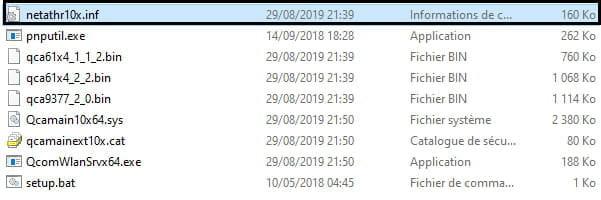
Select the file --> netathr10x.inf and OK
Restart
in image:
2) If you still don't see the device, do this:
open the unzipped driver folder, and run --> QcomWlanSrvx64.exe as administrator (right click)
in image:
restart the PC
@+
1) Indeed, the WiFi device is not present
in your device manager, click on "view" --> "show hidden devices" and post a screenshot of the page
PS: If you see the device, do this:
download 7zip to your desktop click here
right-click on 7zip, and choose "run as administrator" to install it
Download this driver --> click here
and save it in your documents.
Right-click on --> WLAN_DCH_QualcommAtheros_Win10_64_VER1200919.zip
Select --> 7Zip
Choose --> extract to "WLAN_DCH_QualcommAtheros_Win10_64_VER1200919\"
Go to the device manager.
Right-click on the device --> qualcomm atheros qca9377 wireless network adapter
Update driver
Browse my computer ......
Choose from a list of drivers...
Have disk
Browse
Go to your documents
Go to the unzipped driver folder --> WLAN_DCH_QualcommAtheros_Win10_64_VER1200919
Select the file --> netathr10x.inf and OK
Restart
in image:
2) If you still don't see the device, do this:
open the unzipped driver folder, and run --> QcomWlanSrvx64.exe as administrator (right click)
in image:
restart the PC
@+
hi
post 1 screenshot of your device manager --> click here
@+
--
the radiation level is higher at the unemployment office than at Chernobyl
post 1 screenshot of your device manager --> click here
@+
--
the radiation level is higher at the unemployment office than at Chernobyl
re
I used both solutions
Okay, but I would like to understand:
With the first solution, when clicking on "View" and "Show hidden devices", was the device visible?
As long as you have the device in your Device Manager, give me its identifier click here
PS: the first line is enough, post it via copy/paste in your reply
@+
--
The radiation level is higher at Pôle Emploi than in Chernobyl.
I used both solutions
Okay, but I would like to understand:
With the first solution, when clicking on "View" and "Show hidden devices", was the device visible?
As long as you have the device in your Device Manager, give me its identifier click here
PS: the first line is enough, post it via copy/paste in your reply
@+
--
The radiation level is higher at Pôle Emploi than in Chernobyl.
re
I'm trying to help another person in the same situation as you click here
your PC is a laptop, and theirs is a desktop (tower), but that's the only difference...
I'll ask them for the identifier of their device, but I think it will be the same as yours
that's bad...
it worked but every time I put the PC to sleep the problem comes back :/
is it when you want to take the PC out of sleep mode that the problem returns?
if you don't put the PC to sleep, do you have any issues with the Wifi connection?
@+
--
the radiation level is higher at the employment office than at Chernobyl
I'm trying to help another person in the same situation as you click here
your PC is a laptop, and theirs is a desktop (tower), but that's the only difference...
I'll ask them for the identifier of their device, but I think it will be the same as yours
that's bad...
it worked but every time I put the PC to sleep the problem comes back :/
is it when you want to take the PC out of sleep mode that the problem returns?
if you don't put the PC to sleep, do you have any issues with the Wifi connection?
@+
--
the radiation level is higher at the employment office than at Chernobyl
I will try not to put it on standby to see if that's the case
Okay, and you'll tell me what it gives
See you
--
the radiation level is higher at the employment center than at Chernobyl
re
your Wi-Fi card does not appear in the driver search...
as you had error code 45 earlier, check this page to see what it means --> click here
PS: you can download the Ethernet connection driver and install it -->
Realtek Semiconductor Co., Ltd. RTL8111/8168/8411 PCI Express Gigabit Ethernet Controller
Driver from 11/18/2019
also check in the device manager if the Wi-Fi card is still present (possibly in hidden devices)
if you have any questions...
@+
--
the radiation level is higher at the unemployment office than at Chernobyl
your Wi-Fi card does not appear in the driver search...
as you had error code 45 earlier, check this page to see what it means --> click here
PS: you can download the Ethernet connection driver and install it -->
Realtek Semiconductor Co., Ltd. RTL8111/8168/8411 PCI Express Gigabit Ethernet Controller
Driver from 11/18/2019
also check in the device manager if the Wi-Fi card is still present (possibly in hidden devices)
if you have any questions...
@+
--
the radiation level is higher at the unemployment office than at Chernobyl
re
it's not in the hidden devices either
the infamous code 45...
if you still have the driver for this message on your desktop, execute manipulation No. 2 --> click here
let us know what it says
@+
--
the radiation level is higher at the job center than at Chernobyl
it's not in the hidden devices either
the infamous code 45...
if you still have the driver for this message on your desktop, execute manipulation No. 2 --> click here
let us know what it says
@+
--
the radiation level is higher at the job center than at Chernobyl
re
I did the operation again, but the driver is not showing up for now. I'll wait until tomorrow...
Did you restart the PC after the operation?
If it doesn't show up now, it won't show up tomorrow either...
There's something that intrigues me, your PC is running W10 "original," and you're having this issue with the Wifi device
Is your PC still under warranty?
@+
--
The radiation level is higher at the employment office than at Chernobyl.
I did the operation again, but the driver is not showing up for now. I'll wait until tomorrow...
Did you restart the PC after the operation?
If it doesn't show up now, it won't show up tomorrow either...
There's something that intrigues me, your PC is running W10 "original," and you're having this issue with the Wifi device
Is your PC still under warranty?
@+
--
The radiation level is higher at the employment office than at Chernobyl.
re
I restarted after the manipulation
ok, and the Wifi card isn't showing up...
My PC is still under warranty
personally, I would send it back for repair because this kind of issue with a new PC is not normal
how long have you had the PC?
do you think it might be infected?
cya
--
the radiation level is higher at the employment office than at Chernobyl
I restarted after the manipulation
ok, and the Wifi card isn't showing up...
My PC is still under warranty
personally, I would send it back for repair because this kind of issue with a new PC is not normal
how long have you had the PC?
do you think it might be infected?
cya
--
the radiation level is higher at the employment office than at Chernobyl
re
I've had it for almost 2 months
I'm saying again that it's not normal to have an issue like yours with a new pc
I don't know if it's infected
if you haven't done anything special (downloads, etc...), I don't think the pc is infected
furthermore, I don't think an infection would prevent the installation and functioning of the driver/device
@+
--
the radiation level is higher at the unemployment office than at Chernobyl
I've had it for almost 2 months
I'm saying again that it's not normal to have an issue like yours with a new pc
I don't know if it's infected
if you haven't done anything special (downloads, etc...), I don't think the pc is infected
furthermore, I don't think an infection would prevent the installation and functioning of the driver/device
@+
--
the radiation level is higher at the unemployment office than at Chernobyl
- 1
- 2
Suivant

she is not in the hidden devices either