Colorize paragraph marks in Word
Shepard_Daillec
Posted messages
13
Status
Member
-
T3chN0g3n Posted messages 79 Registration date Status Member Last intervention -
T3chN0g3n Posted messages 79 Registration date Status Member Last intervention -
Hello,
I am currently working on fairly long text files with Word (Office 365), and to control the layout, I use paragraph marks and formatting symbols.
In InDesign, I usually use the same marks, but they appear in color by default, which makes reading much less cluttered because you can easily distinguish the different symbols from the text. I would like to know if there is a method to display them in color on Word, in the same way.
Thank you for your guidelines!
Configuration: Windows / Firefox 72.0
I am currently working on fairly long text files with Word (Office 365), and to control the layout, I use paragraph marks and formatting symbols.
In InDesign, I usually use the same marks, but they appear in color by default, which makes reading much less cluttered because you can easily distinguish the different symbols from the text. I would like to know if there is a method to display them in color on Word, in the same way.
Thank you for your guidelines!
Configuration: Windows / Firefox 72.0
3 answers
-
Hello,
If I understand your question correctly, I can create paragraph formatting by highlighting from left to right, and bullet points by simply clicking on them with the text cursor:
Best regards. -
Thank you very much for your response.
That's exactly the effect I'm looking for, but I'm not quite grasping the method: for example, when I click with the text cursor on a bullet point, Word just selects the entire set of bullet points. Could you please clarify your method?
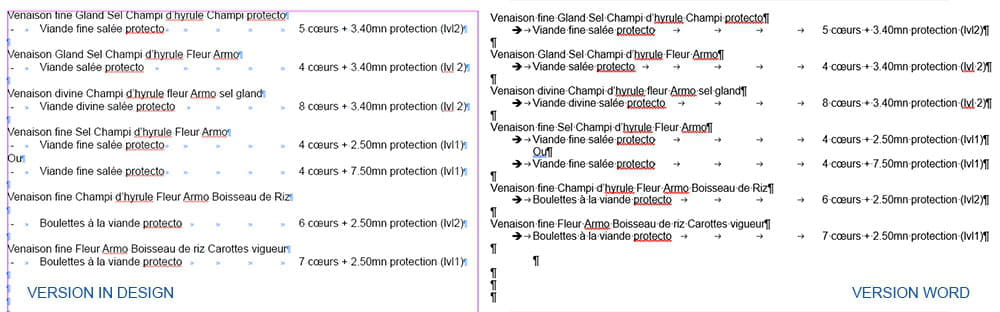
To better illustrate my point, here is a screenshot with a simple text file: on the left, the In Design version with colored marks, and on the right, the Word version with the marks in black. The idea would be for the marks to display by default in color in Word, as they do in In Design.

-
Unfortunately, the solution doesn't work: when changing the color of the bullets, only the bullets are modified. I need it to apply to all hidden characters in the document.
After some research, it appears that this feature is set by default on the Mac version of Word, but not on the PC version (I'm still trying to figure out the logic...). The information dates back to early 2018, so I'm going to keep searching, you never know, but thank you for your feedback!-
Indeed, for the moment it seems only available on Word for Mac but not on Windows. A suggestion was made in 2016, but 3 years later it’s still the same... https://word.uservoice.com/forums/304924-word-for-windows-desktop-application/suggestions/11303205-changing-color-of-formatting-marks
Best regards.
-